

Overview
m-Power applications natively accommodate right-justified character fields. In the past, matching two right-justified fields of different lengths (e.g., an 8-character field and a 12-character field) required building logical fields of equal length to ensure the data compared correctly.
Now, you no longer need to create logical fields to convert your data. You can easily handle right-justified fields by simply adding the *RIGHTJUST keyword to the field’s description.
This feature is fully supported across m-Power and works seamlessly with:
- Table Joins (When joining on a right-justified field, m-Power automatically trims the fields behind the scenes to ensure an exact match).
- Runtime Prompt Filters (Reports)
- Selection Filters (Data Lists)
- Writing Values (Maintainers)
How to Apply
Method 1: Data Dictionary Level
Whenever possible, we recommend specifying right justification at the Data Dictionary level. By adding *RIGHTJUST to the field description in Admin > Manage Tables, m-Power will automatically apply this logic to any new application built over that table, saving you from having to remember to configure it on a per-application basis.
Method 2: Application Level
If you only need to apply this logic to a specific application, you can do so directly in the app’s Data Model:
- Open your application’s Data Model.
- Click on Field Settings.
- Select the field in question.
- Add
*RIGHTJUSTanywhere in the Field Description.
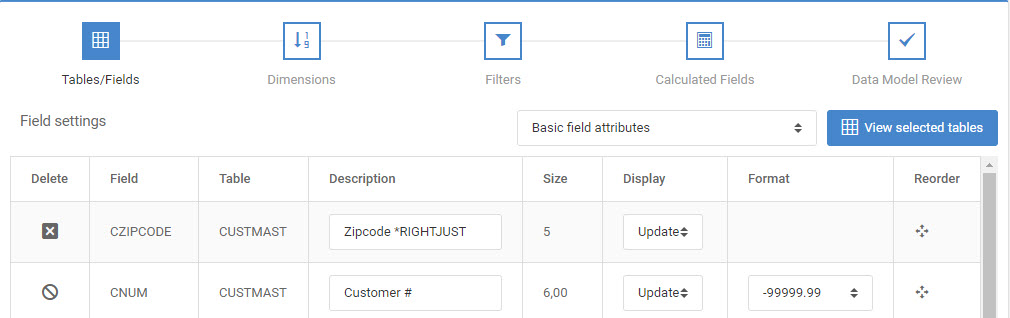
Once applied, simply Rebuild your application (no HTML overwrite is required).
Right-Justified Fields in Joined Tables
When joining tables together, you may occasionally run into a scenario where the right-justified field lives in the secondary table, rather than your primary table.
Because m-Power streamlines how joined fields are handled, the secondary table’s field is treated as the same field from the primary table, meaning the secondary field aren’t directly editable in the Field Setting screen.
To handle this scenario, m-Power includes a dedicated keyword: *JOINRIGHTJUST.
Simply add *JOINRIGHTJUST to the field description of the primary table (the left side of the join). m-Power will automatically detect this and apply the necessary trimming logic to the join behind the scenes, ensuring your tables link perfectly.