
Give Your Team Self-Service Analytics, Governed by IT
End the report request backlog. Business users build their own reports, pivot tables, and visualizations over only the data you choose to expose, in your environment. IT controls what each role can see, so users can get the data they need on their own.

Take Reporting Off IT's Plate Without Giving Up Control
Self-service raises the same worry: If business users can build their own reports, what stops them from seeing data they shouldn't? m-Power DX answers it. IT publishes governed datasets, each one row-secured to the right roles, and users explore only within those boundaries. They get to build reports, pivot tables, and visualizations on their own. You decide what they can touch. Set the datasets up with m-Power, or have our consultants do it for you.
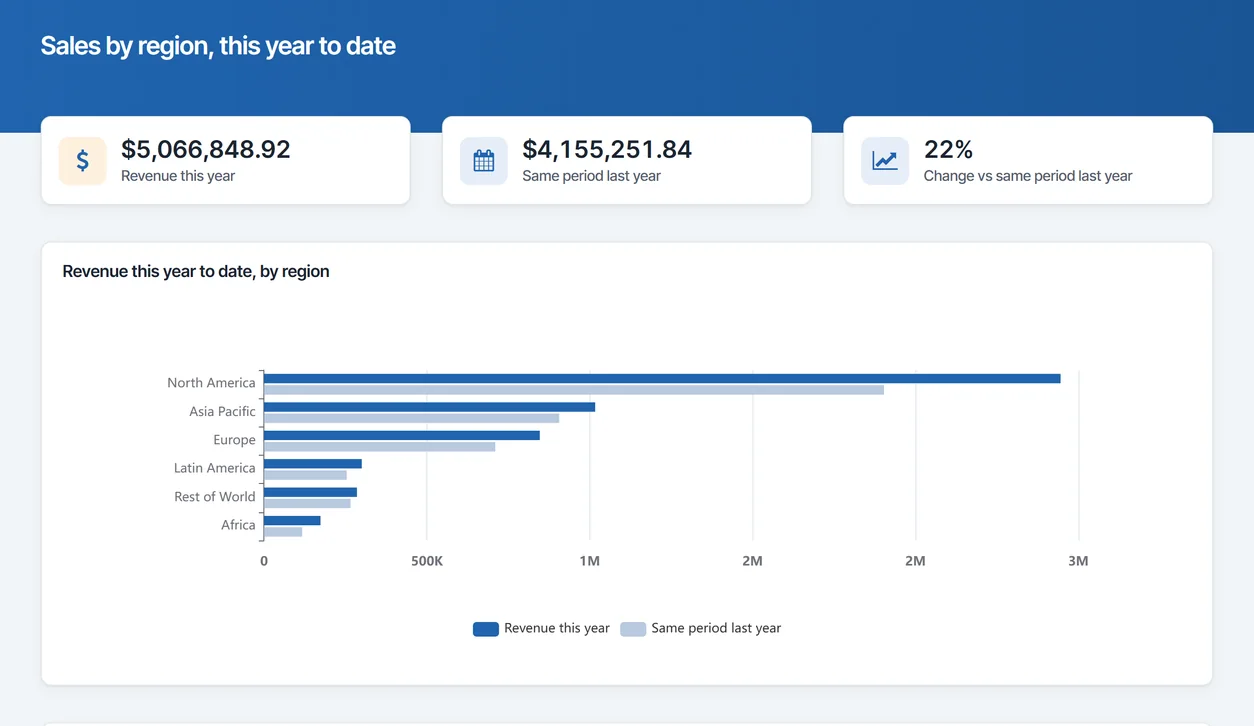
Users answer their own questions
With a point-and-click interface, business users build reports, lookups, and pivot tables themselves, without opening a ticket.
- Build reports, lookups, and pivot tables on their own
- Filter, sort, and group without a ticket
- Export to Excel or PDF in a click
IT controls what they can touch
Users only ever see the datasets you publish, filtered to their role. The rest of the database stays out of reach.
Runs over your data, in your environment
m-Power DX explores your live databases where they already sit, on-prem or in your cloud, without copying data out to a vendor's cloud.
Takes the report backlog off IT
When users serve themselves, the queue of one-off report requests shrinks and IT gets its time back.
Learn it in minutes
There's no query language to learn. New users pick up the interface and build their first report the same day.
- Point-and-click, no SQL to write
- New users productive in minutes
- No report-writing training to schedule
Roll it out to everyone
Perpetual license, no per-user fees. Give self-service to any team that needs it.
What Can Your Users Build?
Everything below runs over the governed datasets IT publishes, so users explore on their own without stepping outside their permissions:
Reports and Data Lookups, Self-Served
Business users answer their own "what happened" questions. They pick a dataset, filter it, group it, and pull the report they need, then export it, all without waiting on IT.
- Ad hoc reports over governed data
- Quick record lookups and searches
- Export to Excel or PDF on demand
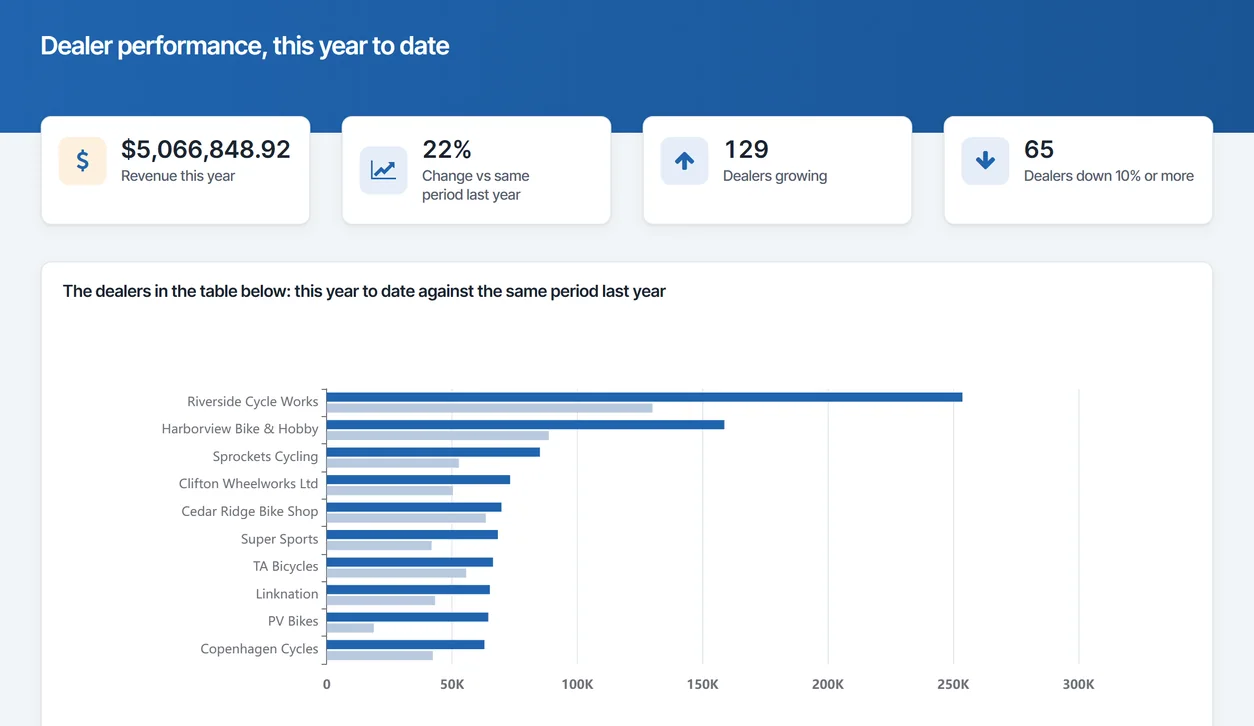
Pivot Tables and Visualizations
For the "why" questions, users pivot the same governed data to view it from any angle and turn it into a chart, without exporting to a spreadsheet or asking for a new report.
- Pivot and cross-tab on their own
- Turn a report into a chart in a click
- Drill from a total down to the detail
Saved Queries and Personal Views
Once a user builds a view that works, they save it and come back to it. The next month, it's one click instead of starting over, and it's still governed by the same rules.
- Save and reuse a query or layout
- Keep personal views per user
- Share a view with the team when it helps
Governed Datasets, Published by IT
Behind every self-service view is a dataset IT set up: The tables and columns exposed, the rows secured by role, the joins already done. Users explore within those boundaries.
- Expose only the tables and columns you choose
- Secure rows by role, region, or user
- Publish clean, joined datasets users can trust
Use Cases
A few of the ways teams put m-Power DX to work. IT publishes the datasets; users take it from there:
Ad hoc reports
Let users build the one-off report they need instead of adding it to IT's queue.
Data lookups
Quick searches to find an order, a customer, or a record in seconds.
Pivot tables
Cross-tab governed data to see it from whatever angle answers the question.
Visualizations
Turn a report into a chart to spot the trend without a separate BI tool.
Saved queries
Save a view once and reuse it, so recurring questions take one click.
Governed datasets
IT publishes clean, row-secured datasets that users can safely explore.
Scheduled exports
Set a saved report to run and deliver on a schedule you choose.
Role-based access
Every user sees only the data their role allows, right down to the row.
Set up a demo and we'll build a governed self-service view over your data, live.
Get a DemoSelf-Service That Stays Inside Your Security Model
Run self-service on the same security model as the rest of your applications, so IT keeps the same control over data access.
Row-level permissions
Control which users see which rows and columns in a dataset.
Role-based access
Lock down dataset and data access per user role.
Use your authentication
Integrate with Active Directory, OAuth2, or SAML.
Audit trails
Full logging of user actions and logins.
Frequently asked questions
Don't see your question? Ask us. You'll talk to a real person who actually cares whether this works for you.
Send us a noteWhat is m-Power DX (Data Explorer)?
Can business users really build reports without IT?
Does self-service mean losing control of our data?
How do we control what each person can see?
Will this reduce the reporting load on IT?
How hard is it for business users to learn?
Where does it run, and over which databases?
Do we pay per user?
How is this different from a dashboard or BI tool?
Can our team set this up, or do you set it up?
Last updated: July 2026
See self-service built over your data
We'll walk through the build process live, using your data and your use case, and answer any questions your team has.