
Build Custom Business Intelligence Over Your Own Data
Deliver the dashboards, reports, and analytics your business keeps asking for, built directly over your live data in your environment. You control what each role can see, with no per-user BI seats to buy as you roll it out.

Roll BI Out to Everyone Without Per-User Fees
Off-the-shelf BI raises the same questions: Who has to buy a seat? Where does the data live? Can it write back, or only read? Does it fit your process, or does your process have to change to fit the tool? m-Power answers each one. It builds custom BI apps over your own database, on the same security model as the rest of your applications. Build them internally with m-Power, or have our consultants build for you.
Show each role only its own data
Row- and column-level security decides who sees which numbers, so one dashboard can safely serve every department.
- Filter rows by region, plant, or rep
- Hide cost and margin columns per role
- Run on your existing sign-on (AD, SAML, OAuth2)
Build over your live data, where it lives
Run m-Power next to your databases, on-prem or in your cloud. There's no data migration and no separate BI stack to feed.
Data warehousing is built in
Pull from multiple systems into a clean warehouse, then report over it. No separate ETL tool to license.
Update the database from your reports
Most BI tools only read. m-Power apps can update the database too, so users can act on what they find without leaving the report.
Deliver a working app in hours
A model-driven build process turns a data source into a working report or dashboard the same day.
Roll it out to everyone
Perpetual license, no per-user fees. Give each team the reports and dashboards they need.
What Can You Build?
Build over your existing database tables, on-premise or in the cloud. Whether your team builds with m-Power or our consultants build for you, here's what you can deliver:
Reporting and BI Apps Over Your Live Data
Start with a spreadsheet or a database table and build a full BI application: reports, drill-downs, and dashboards, all reading straight from your own data. Watch the full build in the video.
- Report over live data, no nightly extract required
- Drill from a summary down to the record
- Export to Excel or PDF in a click
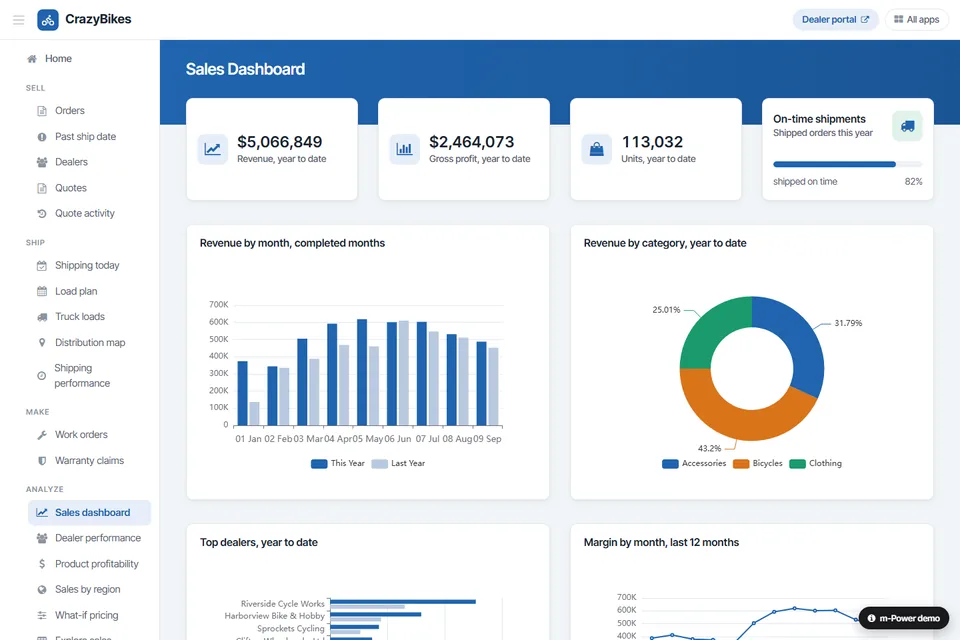
Dashboards and Pivot Tables Your Users Control
Give decision-makers a real-time view of the KPIs that matter, then let them slice it themselves. Users build their own dashboards and pivot tables without waiting on a report request.
- Executive and operational KPI dashboards
- Web pivot tables users pivot themselves
- User-defined dashboards each person controls
One Clean View of Data From Multiple Systems
When your data is spread across an ERP, a CRM, and a stack of spreadsheets, m-Power pulls it together into a warehouse and reports over it automatically. No more combining exports by hand.
- Combine multiple sources into one warehouse
- Refresh on a schedule you set
- Report across systems from a single source
Analytics That Can Write Back to Your Data
Because m-Power combines low-code development with BI, its apps read and write. Users can flag a record, update a forecast, or trigger a workflow straight from the report they're looking at.
- Flag records that need a closer look
- Update figures without leaving the app
- Trigger workflows from a data change
Use Cases
A few of the ways IT teams put m-Power to work for business intelligence. Build these yourself, or have our consultants build them for you:
Operational BI dashboards
Give each team a live view of the metrics that drive their day, refreshed straight from your data.
Executive KPI tracking
Roll company-wide KPIs into an executive dashboard that ties back to the underlying detail.
Self-service analytics
Let users answer their own questions with reports they can filter, sort, and pivot on their own.
Drill-down reporting
Move from a summary number to the transactions behind it without switching tools.
Web pivot tables
Interactive pivot tables that let users view the same data from whatever angle they need.
Year-over-year analysis
Compare current performance against a prior period to spot the trend early.
What-if and forecasting
Model how a change would ripple through the business before you commit to it.
Embedded BI in your apps
Drop reports and dashboards into your existing software or a customer portal.
Set up a demo and we'll build a BI app over your data, live.
Get a DemoRenzi Foodservice Got One Clear View of Its Business
Renzi ran on multiple systems that didn't talk to each other, which made tracking true profit, reporting, and budgeting slow and manual. They used m-Power to connect those systems, extend their ERP, and deliver a clear view of the business.
- Extended the life of their ERP, delaying a $250,000 upgrade
- Added mobile ERP data access without the module fee
- Turned a month-long budgeting process into an automated one
Business Intelligence Demos
Try these live BI apps that were built with m-Power.
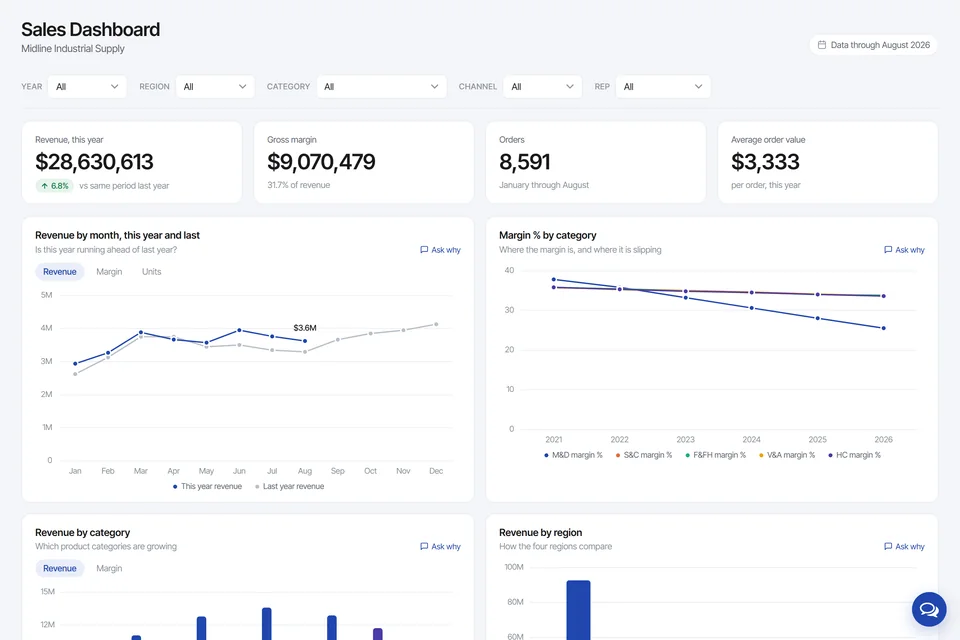
Sales Dashboard With an AI Analyst
Sales for a fictional distributor, filtered by region, category, channel and rep. Every chart has an "Ask why" link to an assistant reading the same tables.
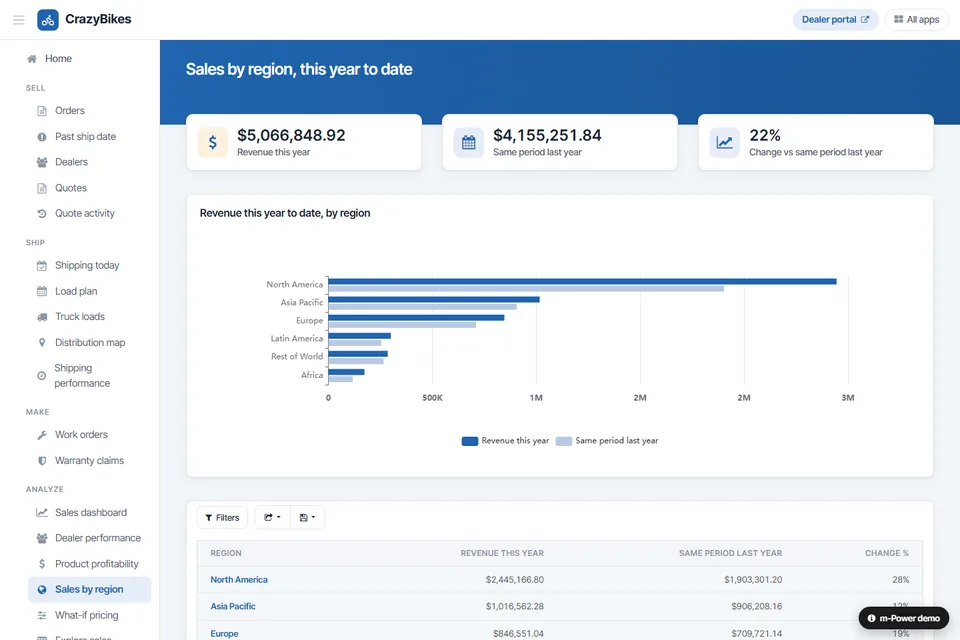
Year-Over-Year Analysis
Compare current data against a prior period to see how the business is trending over time.
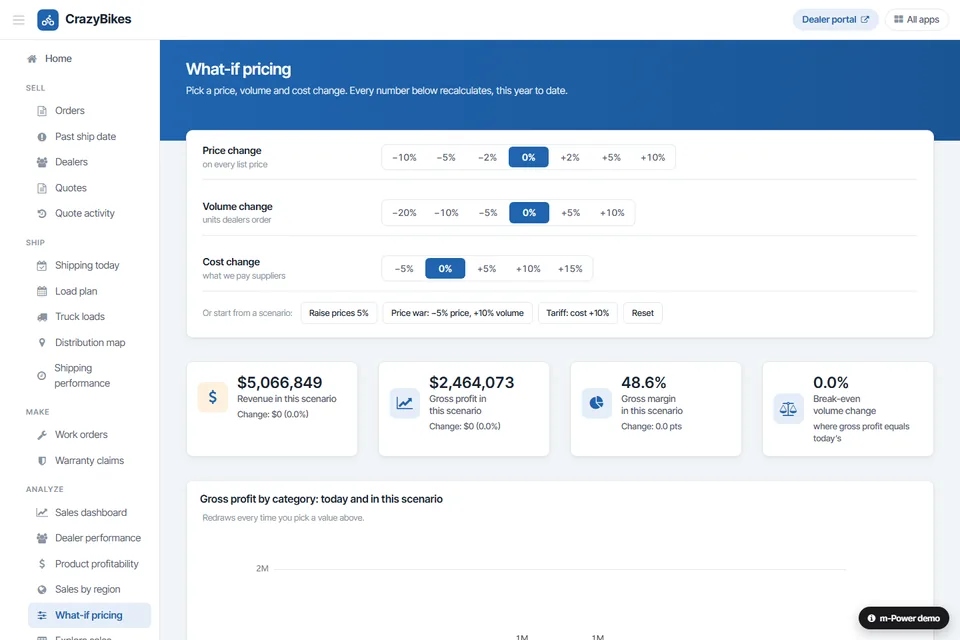
What-If Analysis
Using past data, this app shows how different changes would affect various parts of the business.
Enterprise-Grade Security on Every Report
Run BI on the same security model as the rest of your applications, with more granular control than most BI tools give you.
Row-level permissions
Control which users see which rows and columns in an application.
Role-based access
Lock down application and data access per user role.
Use your authentication
Integrate with Active Directory, OAuth2, or SAML.
Audit trails
Full logging of user actions and logins.
Frequently asked questions
Don't see your question? Ask us. You'll talk to a real person who actually cares whether this works for you.
Send us a noteHow is m-Power different from a standalone BI tool?
Where does our data live?
Do we pay per user for BI seats?
Can it write back to the database, or only read?
Does it include data warehousing?
Can we control what each user sees?
Can we embed BI in our existing software?
Which databases does it work with?
Can our team build this, or do you build it?
How fast can we have a working BI app?
Last updated: July 2026
See BI built over your data
We'll walk through the build process live, using your data and your use case, and answer any questions your team has.