
Automate Your Manual Business Processes
Turn the approvals, hand-offs, and notifications that still run on email into automated workflows, over your own data. Route work to the right people, trigger emails and updates on any event, and add every user without a per-seat fee.

Why Automate Processes With m-Power?
The slow part of most processes is the follow-through: An approval sitting in someone's inbox, or an email nobody remembered to send. m-Power automates those steps, over your own data, on the same security model as your other applications. Build the workflow internally with m-Power, or have our consultants build it for you.
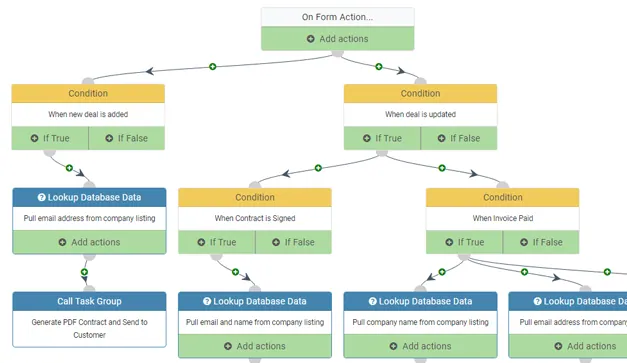
Route work to the right people
Send each request to whoever needs to act on it, in the order your process follows, with approvals, sign-offs, and escalations built in.
Trigger emails and alerts on any event
Send email or SMS on a schedule or the moment something happens, so nobody has to remember to follow up.
Add workflow to apps you already have
You don't have to start over. Layer approvals and automation onto your existing m-Power applications.
Keep a full trail of every step
Every submission, approval, and escalation is time-stamped and logged, so you always know where a request stands.
Runs over your data, in your environment
Workflows read and write your own database, on-prem or in your cloud, next to the apps they automate.
Roll it out to everyone
Perpetual license, no per-user fees. Route work to every employee, approver, and department.
What Can You Automate?
Build over your existing database tables, on-premise or in the cloud. Whether your team builds with m-Power or our consultants build for you, here's what you can put on autopilot:
Automate a Manual Process in Minutes
Watch a complete manual process become an automated workflow with m-Power's Workflow Designer, from the first form to the final approval and notification.
- Build the steps with no code
- Add approvals and business rules
- Trigger emails at any point
Approval Routing and Sign-Offs
Route requisitions, credits, time off, and change requests to the right approvers in the right order, with escalations when something sits too long.
- Multi-step, role-based approvals
- Escalations and reminders
- A full audit trail on every request
Event-Triggered Emails and Alerts
Let the system do the reminding. Send email or SMS the moment a record changes, a threshold is crossed, or a step is due, so the right person always knows.
- Alerts on any data change or event
- Scheduled reminders and digests
- Email and SMS to the right people
Document Intake and Multi-Step Processes
Turn a form or an incoming document into a process that runs itself: Capture the data, move it through each step, and update the systems it touches along the way.
- Form-to-workflow in one build
- Document and request intake
- Updates pushed to your other systems
Use Cases
A few of the processes teams automate with m-Power. Build these yourself, or have our consultants build them for you:
Approval routing
Send requests through the right approvers in the right order, every time.
Document intake
Capture incoming forms and documents and kick off the process automatically.
Notifications and alerts
Email or text the right people the moment something needs attention.
Multi-step processes
Chain the steps of a process so each one starts when the last one finishes.
Escalations
Move a stalled request up the chain so nothing sits unresolved.
SLA tracking
Watch deadlines and flag anything at risk of missing its target.
Form-to-workflow
Turn a web form straight into a routed, tracked process.
ERP-triggered workflows
Start a workflow off a change in your ERP or another system.
Set up a demo and we'll automate a process over your data, live.
Get a DemoPearl Buck Center Cut a 10-Day Process Down to One
Pearl Buck Center's restrictive cloud software was slowing the whole organization and locking down their data. They replaced it with a custom m-Power solution that automated the manual steps and gave them control back.
- Cut a 10-day monthly budgeting process to one day
- Eliminated data re-entry between systems
- Built a solution that fits their exact needs
Every Workflow Runs on Your Security Model
Automate on the same security model as the rest of your applications, so you control who can submit, approve, and see each step.
Row-level permissions
Control which users see which requests and rows.
Role-based access
Decide who can submit, approve, and act at each step.
Use your authentication
Integrate with Active Directory, OAuth2, or SAML.
Audit trails
Full logging of every submission, approval, and action.
Frequently asked questions
Don't see your question? Ask us. You'll talk to a real person who actually cares whether this works for you.
Send us a noteWhat is m-Power workflow automation?
What kinds of processes can it automate?
Can we add workflow to apps we already have?
Can it send emails and alerts automatically?
Can it handle approvals and escalations?
Do we pay per user?
Where does our data live?
Can a workflow start from our ERP or other systems?
How fast can we build one?
Can our team build it, or do you build it?
Last updated: July 2026
See a process automated over your data
We'll walk through the build process live, using your data and your use case, and answer any questions your team has.