
Build a Custom CRM You Own, With No Per-Seat Fees
Your sales process shouldn't have to change to fit a CRM, and your CRM bill shouldn't climb with every rep you add. Manage contacts, deals, and pipeline in a CRM built around how your team sells, over your own data, in your environment. Add every rep, customer, and partner without a per-seat bill.

Why Build a Custom CRM With m-Power?
Off-the-shelf CRM handles the basics fine. The problems start when your process needs a field that isn't there, or a workflow the tool can't build, and the per-seat bill keeps climbing as you add users. m-Power gives you another answer: Build the CRM around your process, over your own database, on the same security model as your other applications. Build it internally with m-Power, or have our consultants build it for you.
Built around your sales process
Build the stages, fields, and screens around how your team actually sells, instead of changing your process to fit the tool. When your process changes, change the CRM to match.
Each rep sees the right accounts
Row-level security decides who sees which accounts and deals, so territories and teams stay clean.
Automate the busywork
Build workflow automation into the CRM: Assign leads, schedule follow-ups, and send emails without anyone remembering to.
Connect it to your ERP and tools
An open architecture links the CRM to your ERP, quoting, and other systems, so data doesn't get keyed twice.
Add everyone, no per-seat bill
Perpetual license, no per-user fees. Put the CRM in front of every rep, service agent, and partner.
Own the CRM and the data
It runs over your own database, in your environment. You own the application and keep your customer data in-house.
What Can You Build?
Build over your existing database tables, on-premise or in the cloud. Whether your team builds with m-Power or our consultants build for you, here's what a custom CRM can include:
Watch a Full CRM Built From Scratch
Watch the whole thing come together: A custom CRM with contacts, deals, workflow automation, customer onboarding, and ERP integration, starting from nothing but data.
- Contacts, companies, and deals
- Workflow automation and onboarding
- Third-party and ERP integration
Contacts, Companies, and Deals Your Way
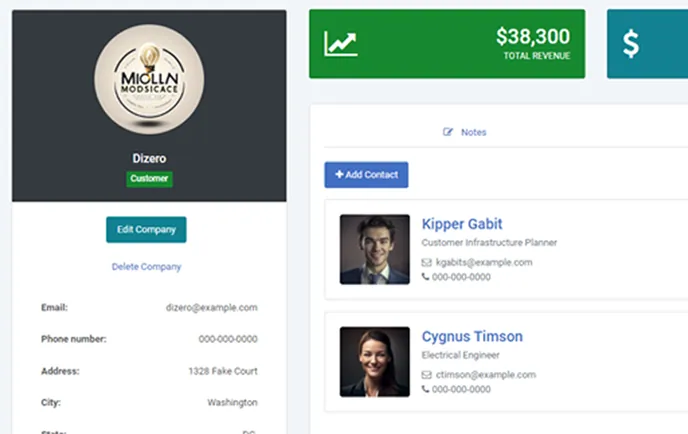
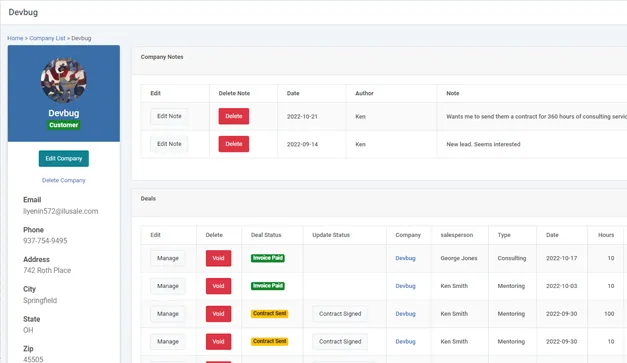
Track the accounts, contacts, and deals your business runs on, with the fields and stages that match how your team sells.
- Contact and account management
- Pipeline and deal tracking
- Notes and activity logging
Workflow Automation Built In
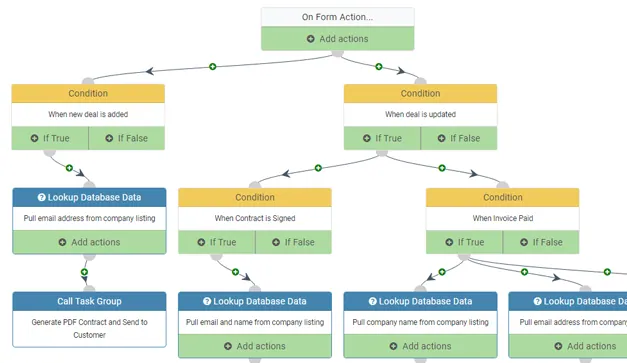
Build the follow-up steps into the CRM. Route new leads, kick off onboarding steps, and send emails automatically, so nothing falls through the cracks.
- Assign and route leads automatically
- Trigger onboarding and follow-up steps
- Send emails and alerts on any event
Connected to Your ERP and Tools
Keep the CRM in sync with the rest of your systems. Sync accounts with your ERP, push quotes into orders, and pull in third-party data through APIs.
- Two-way sync with your ERP
- Quote-to-order handoff
- Third-party integrations via API
Use Cases
A few of the ways teams put a custom m-Power CRM to work. Build these yourself, or have our consultants build them for you:
Contact and account management
One record for every contact and company, with the fields your business needs.
Pipeline and deal tracking
Move deals through stages that match how your team actually closes.
Quoting and proposals
Generate quotes from CRM data and hand them off to your order system.
Service tickets
Log, route, and resolve customer issues alongside the account history.
Activity logging
Keep calls, emails, and notes tied to the right contact and deal.
Customer portals
Give customers self-service access to their own account and orders.
CRM and ERP integration
Sync accounts and orders so the same data doesn't get keyed twice.
Mobile CRM
The same CRM on a phone or tablet for reps who sell on the road.
Set up a demo and we'll build a CRM proof of concept over your data.
Get a DemoSunstar Replaced Its CRM and Saved $200,000 in Year One
Sunstar ran a highly customized CRM inside Lotus Notes, but it had become cost-prohibitive, and their move to Office 365 left them without a built-in CRM. They used m-Power to build a custom replacement that fits their business.
- Saved $200,000 in year one, $100,000 every year after
- Built a CRM that fits their business exactly
- Delivered in less time than deploying an off-the-shelf system
Try the CRM Demo
This is the CRM built in the video above. It's fully functional: Manage contacts, companies, and deals, and leave notes.
Custom CRM Demo
Manage contacts, create and manage deals, and leave notes on contacts or companies. Workflow automation is switched off in this public demo, but we'll build a working proof of concept over your data.
Enterprise-Grade Security on Your Customer Data
Run the CRM on the same security model as the rest of your applications, with control right down to the row.
Row-level permissions
Control which reps see which accounts, deals, and rows.
Role-based access
Lock down application and data access per user role.
Use your authentication
Integrate with Active Directory, OAuth2, or SAML.
Audit trails
Full logging of user actions and logins.
Frequently asked questions
Don't see your question? Ask us. You'll talk to a real person who actually cares whether this works for you.
Send us a noteHow is a custom m-Power CRM different from off-the-shelf?
Do we pay per user or per seat?
Can it match our exact sales process?
Can it automate workflows?
Can it integrate with our ERP and other tools?
Where does our customer data live?
Can reps use it on mobile?
Can we give customers a portal?
How long does it take to build?
Can our team build it, or do you build it?
Last updated: July 2026
See a custom CRM built over your data
We'll walk through the build process live, using your data and your use case, and answer any questions your team has.