

On November 18th, 2026, mrc was made aware of a very specific vulnerability that exists on certain versions of Java 17.
Impacted users have two choices to remediate this vulnerability.
Option 1: Add JVM Option
On Windows, open a Command prompt and navigate to \tomcat\bin. Enter tomcat10w //ES//YOURSERVICENAMEHERE
In the Java Options block, add this to the end of the input:
-XX:-UseBASE64Intrinsics
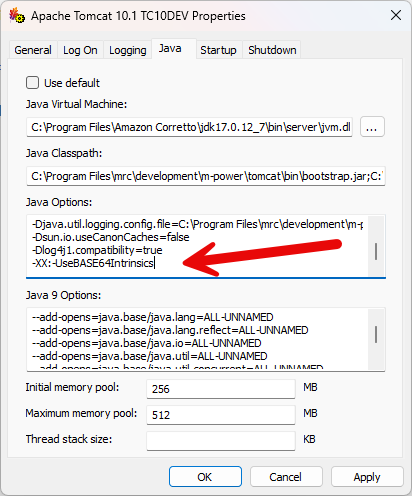
Save and restart Tomcat
Option 2A: Update your JDK (automatically)
Download and install this file on your m-Power server. Unzip this file.
Run the file.
This process will install the correct major version of Java on your system and then update Tomcat to use this newly updated minor version.
Option 2B: Update your JDK (manually)
If you’d rather handle this process manually, visit this page and download the latest version of the JDK.
Install the JDK on your server.
On Windows, open a Command prompt and navigate to \tomcat\bin. Enter tomcat10w //ES//YOURSERVICENAME. In the Java Options tab, update the Java Virtual Machine to point at the newest version.
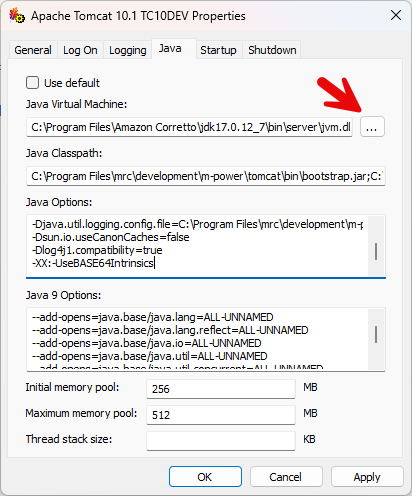
Save and restart Tomcat