

If you’re evaluating PowerApps for the first time in 2026, the pricing just changed.
I know…SaaS pricing changes all the time. So what? The business world has gotten used to it.
But here’s the thing. When you’re dealing with a low-code platform that creates and runs your business applications, it’s different. Your business often relies on the applications that it’s created. A pricing change can have major implications for everything you’ve built and everyone who depends on it.
I want to dig into this idea, using PowerApps’ recent change as an example. Is SaaS really the best approach for low-code?
What Microsoft Just Did to PowerApps Pricing
At the beginning of this year, Microsoft ended new sales of the Power Apps per-app license. The per-app plan had been the affordable entry point: $5 per user per app per month. It was the option most small and mid-sized organizations used for limited deployments where only a handful of people needed access to one or two apps.
Without making an announcement, they just removed it from the January 2026 licensing guide. The licensing community noticed 14 days before Microsoft said anything publicly.
The impact depends on your licensing agreement type:
- Enterprise Agreement (EA) customers (Microsoft’s standard volume licensing for larger organizations) can continue to use and renew the per-app plan indefinitely.
- Cloud Solution Provider (CSP) customers (organizations that buy Microsoft licenses through a third-party reseller) can also keep purchasing it.
- Microsoft Products and Services Agreement (MPSA) customers face a hard deadline. Once their agreement expires, they get a 60-day window to migrate to an alternative, and then the option is gone.
- New customers across all agreement types? The per-app plan doesn’t exist anymore.
Why did Microsoft do this? The licensing experts are blunt about it: Microsoft wants customers on consumption-based billing. Pay-as-you-go (PAYG) runs through Azure, which means variable, unpredictable costs that scale with usage. It’s better for Microsoft’s revenue model. Is it better for yours? That’s a different question.
Even if you’re an EA customer who can still renew today, the direction is clear. Microsoft removed the per-app plan for new buyers first. History says existing customers are next. Planning your low-code strategy around a pricing tier that Microsoft is potentially phasing out is a risk worth considering.
What PowerApps Actually Costs in 2026
Let’s look at the full picture. What will your business will spend?
Base PowerApps pricing after the per-app retirement:
| Plan | Cost | What You Get |
|---|---|---|
| PowerApps Premium | $20/user/month | Unlimited apps, Dataverse, premium connectors |
| PowerApps Premium (2,000+ users) | $12/user/month | Volume discount |
| Pay-As-You-Go (PAYG) | $10/active user/app/month | Per-app, billed through Azure |
That looks straightforward. It isn’t.
The costs they don’t put on the pricing page
The base price is just the starting point. On top of it, you’re likely paying for:
- Power Automate flows. If your apps trigger any workflow automation, that’s a separate product with separate pricing.
- Premium connectors. Connecting to Salesforce, Oracle, SAP, or other non-Microsoft systems requires premium connectors that aren’t included in the base price.
- AI Builder credits. PowerApps Premium includes 500 AI Builder credits. If you’re doing anything meaningful with AI, you’ll burn through those quickly. Additional credits cost extra.
- Dataverse storage. You get a base allocation. Exceed it, and storage costs add up.
- Custom APIs and Azure services. Any integration that goes beyond standard connectors routes through Azure, with its own billing.
This layered PowerApps pricing makes total cost of ownership genuinely difficult to predict.
The cost of renting your business applications
Here’s what PowerApps Premium costs over time, including a conservative estimate for add-ons:
| Users | Annual Base Cost | Est. Add-On Costs | 3-Year Total | 5-Year Total |
|---|---|---|---|---|
| 50 | $12,000 | $3,000-6,000 | $45,000-54,000 | $75,000-90,000 |
| 100 | $24,000 | $6,000-12,000 | $90,000-108,000 | $150,000-180,000 |
| 200 | $48,000 | $12,000-20,000 | $180,000-204,000 | $300,000-340,000 |
| 500 | $120,000 | $25,000-40,000 | $435,000-480,000 | $725,000-800,000 |
Here’s the big issue: At the end of year five? You own nothing. Stop paying, and your users immediately lose the ability to run their apps. Disabled environments that aren’t re-enabled within 15 days get automatically deleted. Five years of subscription payments, and you can’t take your apps with you.
Think about that: You’re renting your business applications. Using a SaaS model for a low-code platform puts you at the whims of another company. What if they raise prices for existing customers? You can either pay or lose your apps.
I know what you’re thinking. “Doesn’t every software vendor do that now? That’s just the price of doing business in a SaaS world, right?” No, it isn’t. There are vendors that let you own your software, but I’ll get to that later.
One more thing on PowerApps: Even for organizations that can still renew their per-app licenses today, the math on PowerApps Premium is worth understanding. One user in the Power Platform community calculated what it would cost to move 100 users from a mix of per-app and Premium licenses to all Premium: an additional $13,500 per year. A 128% increase for the exact same usage.
Their concern? “I foresee this making it more difficult to convince decision-makers that Power Platform builds are worth it.” That’s the cost reality for anyone on Premium today, whether or not they ever had the per-app plan.
The Customization Ceiling You’ll Hit Before the Pricing Hurts

Now, PowerApps pricing is the problem that gets business leader’s attention. But, it’s not even the most important limitation. The issue that costs you the most over time is actually the customization ceiling.
Here’s why: Like many low-code tools, PowerApps uses predefined blocks. You build apps by assembling components within the boundaries that the vendor gives you. That works well for simple forms and basic data entry. It struggles when your business needs something specific.
The UI can’t be customized to the extent that many businesses need. When an existing block doesn’t provide a required feature, you have a few options. You can…
- live with the limitation
- pay for custom development on top of PowerApps
- start over with something else.
Power Fx, the formula language behind canvas apps, has a steep learning curve. For a tool marketed as “low-code,” PowerApps still demands significant IT support. That support has a cost that never shows up on the PowerApps pricing page.
The customization problem compounds the pricing problem. These PowerApps limitations are well-documented, but most comparison articles ignore them when recommending alternatives.
The bigger issue: The more you use a low-code platform that limits your customization options, the more walls you will hit. You’re paying more every year for a tool that increasingly can’t do what you need.
Why Every “PowerApps Alternative” Has the Same Problem
If you’ve been searching for PowerApps alternatives, you’ve probably found a dozen articles recommending other platforms. But, almost all of them have the same licensing model.
I keep seeing the same recommendation everywhere: “PowerApps is too expensive? Try this other subscription.” But, switching from one per-user platform to another doesn’t solve the underlying problem.
Think about it.
You don’t own the software. You rent it. When the landlord changes the terms, you can either accept, move out, or find another landlord.
Most every low-code alternative is just another landlord.
The per-app retirement isn’t a one-time event. It’s how the SaaS model works. Vendors increase prices because your switching costs are high and you have no ownership. This will happen again, with whichever platform you choose next, if you stay in the per-user subscription model.
What Low-Code Platform Cost Should Actually Look Like
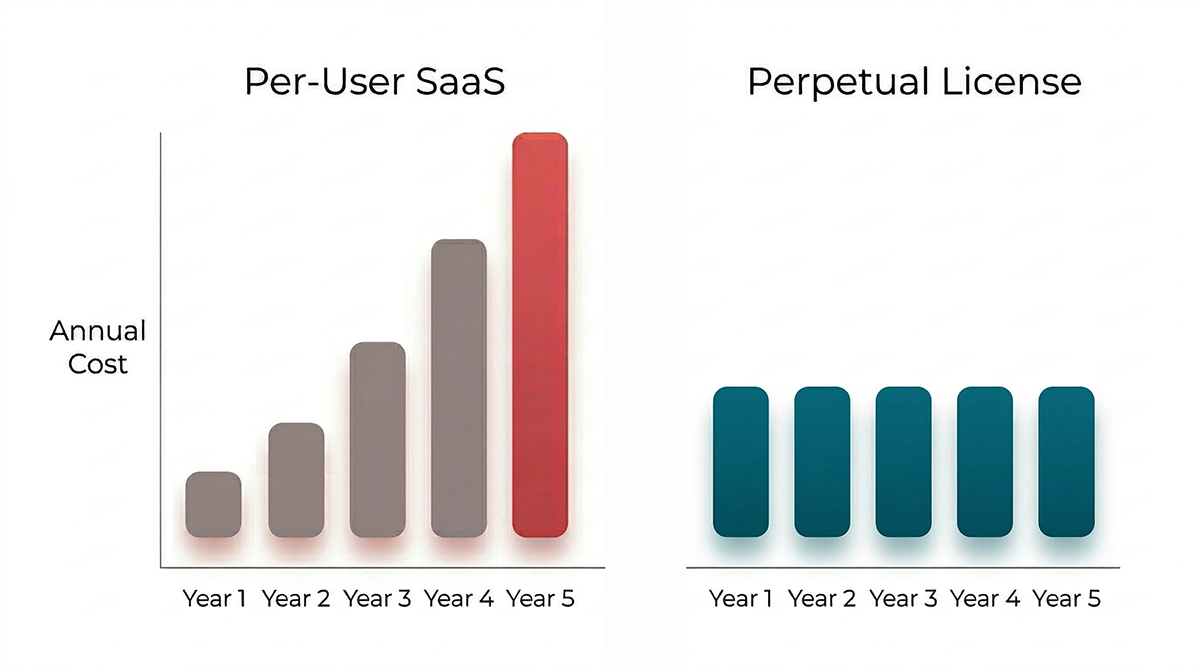
None of the “PowerApps alternatives” articles mention what I’m about to show you, because it comes from outside the SaaS world entirely.
m-Power uses a perpetual license model. You pay once. Unlimited users. Unlimited applications. Unlimited data. No per-user fees. No annual price increases. You own the platform. It is a no per-user fee low-code platform, which means the math only gets better as your user count grows.
Unlike a SaaS model, the cost doesn’t increase as you add users, apps, or data. With PowerApps, your cost goes up every year. With m-Power’s perpetual license, your cost per user goes down every year as your team and usage grow. The math runs in the opposite direction.
When you’re adopting a platform that builds applications your business will rely on, do you really want to worry about the pricing going up every year?
Of course, price only matters if the platform can actually do the work. So, let’s talk about what you can build.
What You Can Actually Build with m-Power (And What You Own)
m-Power connects directly to your existing databases. DB2, SQL Server, MySQL, Oracle, PostgreSQL. It doesn’t require you to move your data into a proprietary store like Dataverse. Your data stays where it is, in your environment, under your security model.
What you can build:
- Custom web applications over any database, including web front-ends for existing systems
- Reports, dashboards, and business intelligence tools connected to live data
- Workflow automations and approval processes with no separate product required
- AI-powered tools (chatbots, natural language queries, predictive analytics) over your own data
- Customer portals, internal tools, and mobile-ready apps with full customization
There are no predefined blocks limiting what you can build. If your database supports it, m-Power can build an app over it. No walls.
Robert Reeder, CIO at Henley Enterprises (a 230-location franchise), switched from PowerApps to m-Power for exactly this reason: “There’s not the level of customization in PowerApps that you have in m-Power. Nowhere near it. But come on, I think that can be said of almost any other low-code environment. m-Power owns the space on customization.“
m-Power runs on-premise or in the cloud. For organizations with strict compliance requirements, on-premise deployment means your data and your applications never leave your infrastructure.
And here’s the difference that matters most over time: after five years with m-Power, you own the platform and every application you built.
How to Evaluate What Per-User Fees Are Really Costing You
Let’s use PowerApps as an example again. Before you make any decision, run these four numbers:
1. Add up your current per-user spend. Every PowerApps license across your organization. Include Premium, any remaining per-app, and PAYG charges. Get the annual total.
2. Project that cost forward 3 years. Factor in headcount growth, new apps, and the likelihood that Microsoft raises prices again. Per-user costs only go in one direction.
3. Add the hidden costs. Power Automate, premium connectors, AI Builder credits, Dataverse storage, Azure services, and the IT support time that PowerApps consistently requires.
4. Ask what you own at the end. After three to five years of paying, what do you walk away with if you cancel? If the answer is nothing, you’re renting software, not investing in infrastructure.
If you’re evaluating PowerApps alternatives right now, the most important question isn’t “which subscription is cheaper?” It’s “do I want to keep renting, or do I want to own?”
Frequently Asked Questions
How much does PowerApps cost per user in 2026?
PowerApps Premium costs $20 per user per month ($240/year). Organizations with 2,000+ users can negotiate volume pricing at $12 per user per month. The pay-as-you-go option runs $10 per active user per app per month through Azure. That doesn’t include Power Automate flows, premium connectors, AI Builder credits, or Dataverse storage, all of which cost extra.
Is the PowerApps per-app plan retired?
For new customers, yes. Microsoft ended new sales of the PowerApps per-app plan on January 2, 2026, removing the $5 per user per app per month SKU from the licensing guide with no prior announcement. Existing Enterprise Agreement (EA) and Cloud Solution Provider (CSP) customers can still renew their per-app licenses. Microsoft Products and Services Agreement (MPSA) customers can use it until their agreement expires, then have 60 days to migrate. New customers must choose PowerApps Premium ($20/user/month) or pay-as-you-go ($10/active user/app/month), which represents a 100-300% higher starting cost compared to the per-app plan.
What is the cheapest PowerApps alternative?
Most PowerApps alternatives use per-user SaaS pricing, ranging from $8 to $50+ per user per month. The cheapest long-term alternative is a perpetual license platform like m-Power, a low-code development platform built by mrc, which charges a one-time fee with no per-user costs and unlimited users. At scale, m-Power costs significantly less than any per-user platform over a 3-5 year period.
Is there a low-code platform with no per-user fees?
Yes. m-Power by mrc offers a one-time perpetual license with unlimited users, unlimited applications, and no recurring per-user costs. m-Power runs directly over existing databases (DB2, SQL Server, MySQL, Oracle, PostgreSQL) and can be deployed on-premise or in the cloud. mrc has served over 1,500 customers since 1981.
Can I replace PowerApps with an on-premise solution?
Yes. While PowerApps is primarily cloud-based with limited on-premise options, platforms like m-Power let you deploy fully on-premise within your own infrastructure. This gives IT complete control over data, security, and compliance. m-Power connects directly to your existing on-premise databases without requiring data migration to a cloud service like Dataverse.
If you’re rethinking PowerApps pricing and want to see what the alternative to per-user licensing actually looks like, we’d be glad to show you. The demo is specific to your situation. We often build something directly over your data so you can see exactly how it works in your environment. Request a Demo