Join us in exploring the world of modern development, evolving technologies, and the art of future-proof software
Author name: Sal Stangarone
Sal Stangarone, President of mrc.
Sal Stangarone has been with mrc since 1990 and has built a wealth of experience over the years. He speaks with IT leaders on a daily basis about the problems they're facing, whether that's more requests than the team can get to, an ERP that won't do the one thing the business is asking for, aging applications nobody wants to touch, or a CEO who wants an AI strategy by the end of the quarter.
He's talked with thousands of IT leaders since then, and he's seen which fixes hold up and which ones quietly fall apart. Sal shares what he's learned on the Cup of Joe Blog, where he writes about AI governance, extending ERP systems, modernizing legacy applications, and what to check before you sign a low-code contract.
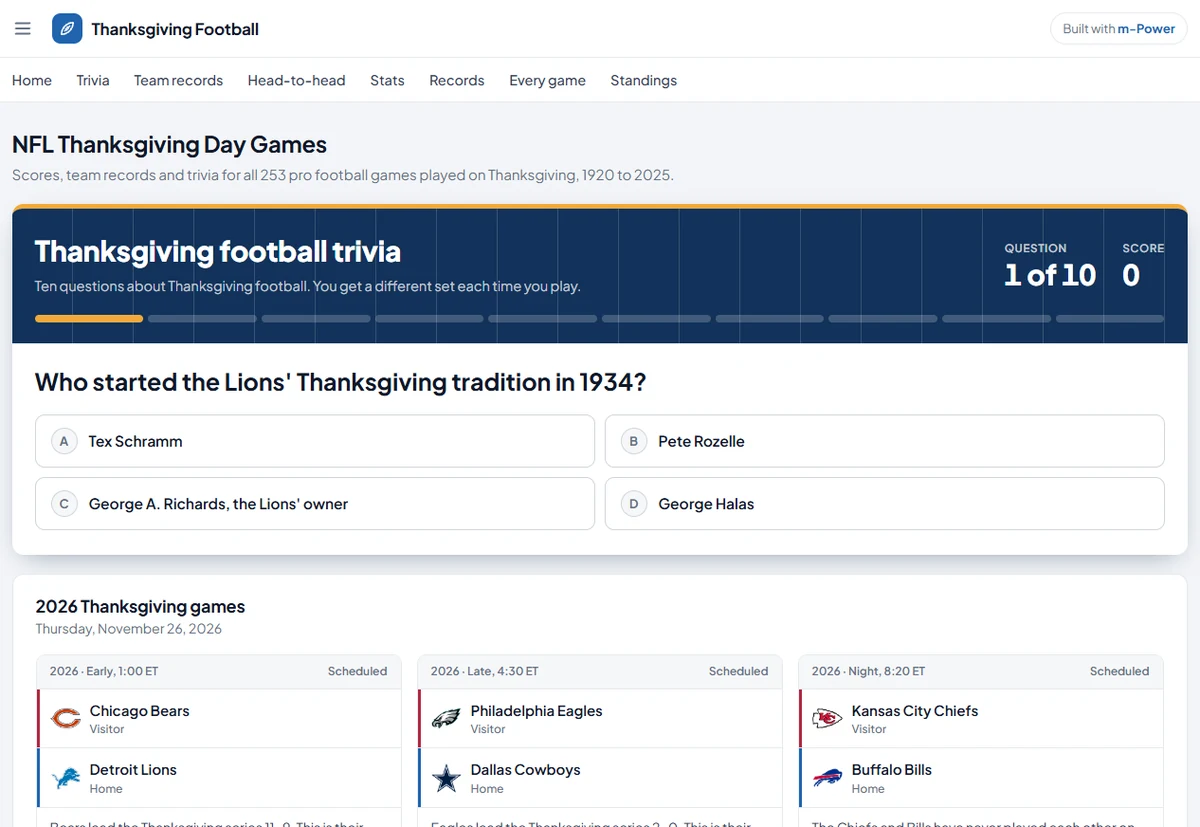
A few years back, we realized there weren’t any great applications for Thanksgiving football stats, so…we built one! It was a fun little project that combined our app development expertise with our love of football. This year we gave it a major upgrade: More stats, a new look, a page for every game since 1920, and a ten-question trivia quiz. You’ll find things like:
A page for every current team with its Thanksgiving record, streaks, best win and worst loss.
Head-to-head records for any two teams.
All-time standings, a record book, and the MVP of every game since 1989.
A page for every game since 1920, with a recap, the key players and the sources for that recap.
Sooner or later, a department will ask IT for an AI chatbot. HR might want one for policy questions. Sales might want one that knows its accounts. And leadership just wants to see AI being used in the business.
At first glance, this might seem fairly straightforward. You can set up a simple AI assistant tool and connect it to a folder of documents in a few hours.
That might work for basic chatbots that don’t need access to company data. But, what happens when your chatbot needs to work over your existing database? What happens when it needs to interact with sensitive data?
Then, you have a lot of questions to consider. Should the chatbot see employee salaries? Can it change records? How do you control which users have access to different pieces of data? How can you safely give it access to what it needs without touching your database?
There’s a lot to consider. Making a mistake could expose sensitive data, let employees see things they shouldn’t, and create privacy and legal problems.
We recently built an HR AI assistant demo and had to work through these questions. In this article, I’ll walk through the process step by step, basing it off of the HR assistant we just built.
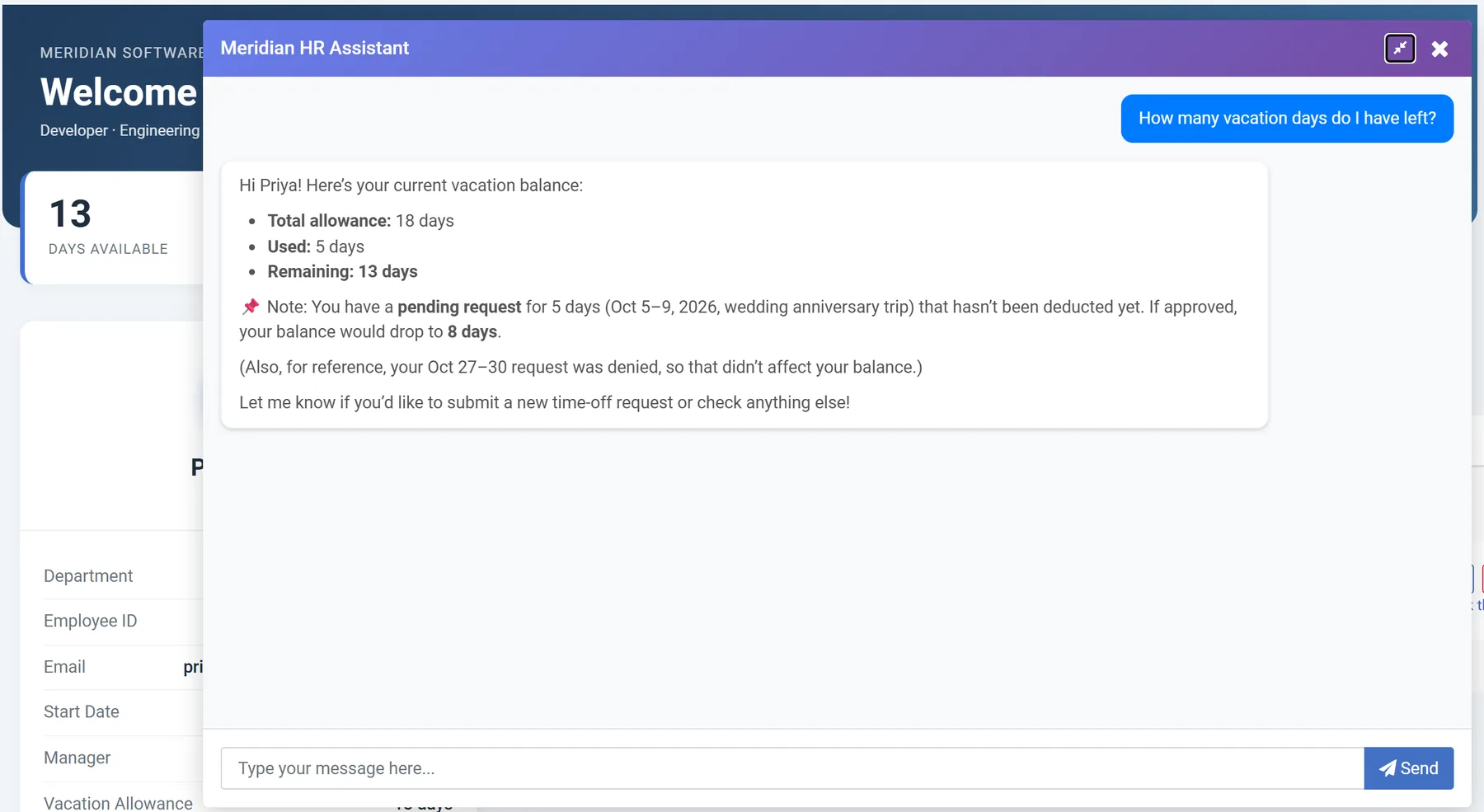
Screenshot of the HR portal with it’s AI Assistant
Why is a chatbot over company data harder than it looks?
The big challenge with building an HR assistant is that large language models (LLMs) don’t understand your data. An LLM has no idea who’s asking or what that person is allowed to see.
Somebody has to decide these things before the assistant goes live:
What it can see, for each user. In an HR AI Assistant, an employee should see their own vacation balance and nobody else’s.
How it understands user roles. Employees can only see their information, but what should managers see?
What it can change. Should it write to the database, or should you put a human in the loop?
Where the data goes. Whatever the assistant reads goes to the model you connect. Some companies are fine sending HR records to a public AI service. Many aren’t.
Who keeps it current. If nobody manages the policy documents, the chatbot keeps giving old answers.
I know what you might be thinking: “Plenty of chatbot tools already handle this. Why not buy one?”
Many organizations do. However, most chatbot tools make you upload files or sync a copy of your data to their service, where you set up who sees what in their admin screen. For IT, that creates issues. You’d be keeping a second copy of your data and a second set of permissions in sync with the first. Plus, in many cases, you can’t upload employee data to a third party cloud.
What’s a better way to build an internal AI chatbot?
The best way (and the way we did it): Build it over the database you already run, and give it applications to call instead of tables to query. That way it inherits the security your systems already enforce.
For this AI assistant, we built applications that already track who’s signed in and limit them to the rows they’re allowed to see. When the assistant calls one of those applications as the signed-in employee, it gets what that employee would see on screen. You don’t write a separate set of rules for the AI.
The OWASP Gen AI Security Project recommends the same approach. Its guidance on prompt injection says to handle privileged functions in code rather than handing them to the model. If a line in the prompt is the only thing keeping the assistant out of someone’s records, a cleverly worded question can sometimes get around it.
How to build a chatbot over your own data
We built an HR assistant for a fictional 13-person company called Meridian Software. It answers policy questions, shows employees their vacation balances, takes time-off requests, and walks new hires through onboarding.
Our HR AI agent post shows the build on video and covers how each assistant is set up. You can also try the live HR portal as any of four employees. Here are the steps:
Step 1: Describe your data before the AI reads it
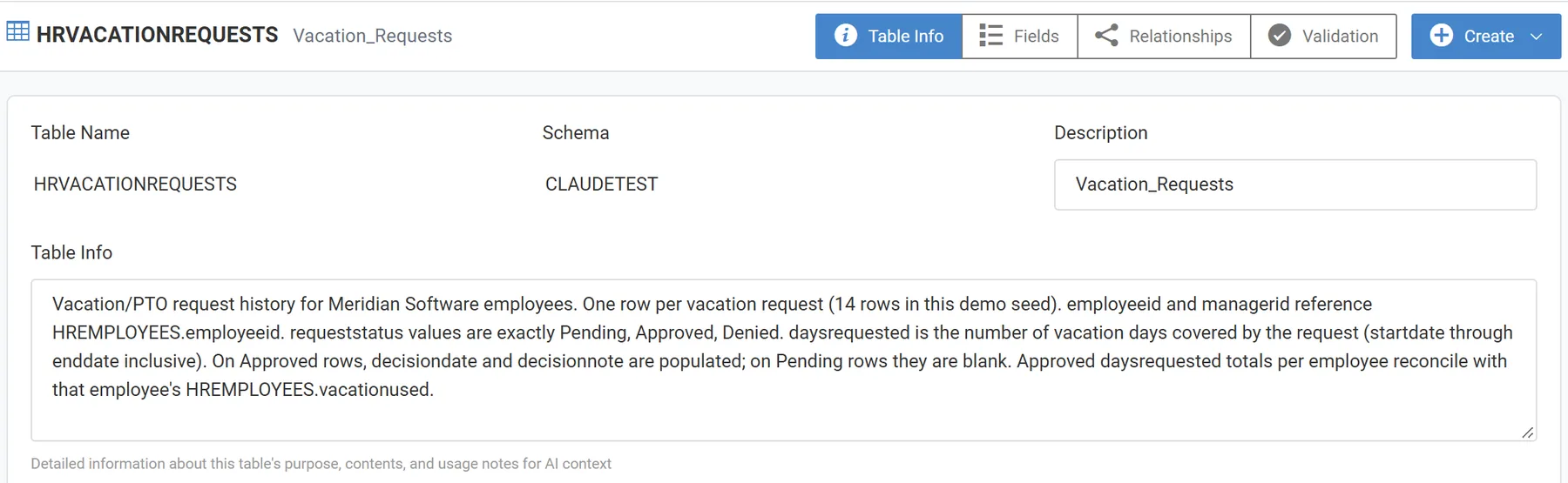
Start with the tables the assistant needs, and write down what they mean. Our project used four tables: One for employees, vacation requests, company policies, and onboarding tasks. Each got a short description, and each field got a plain label like “Employee number” or “First day off.”
Defining your tables helps the LLM understand your data
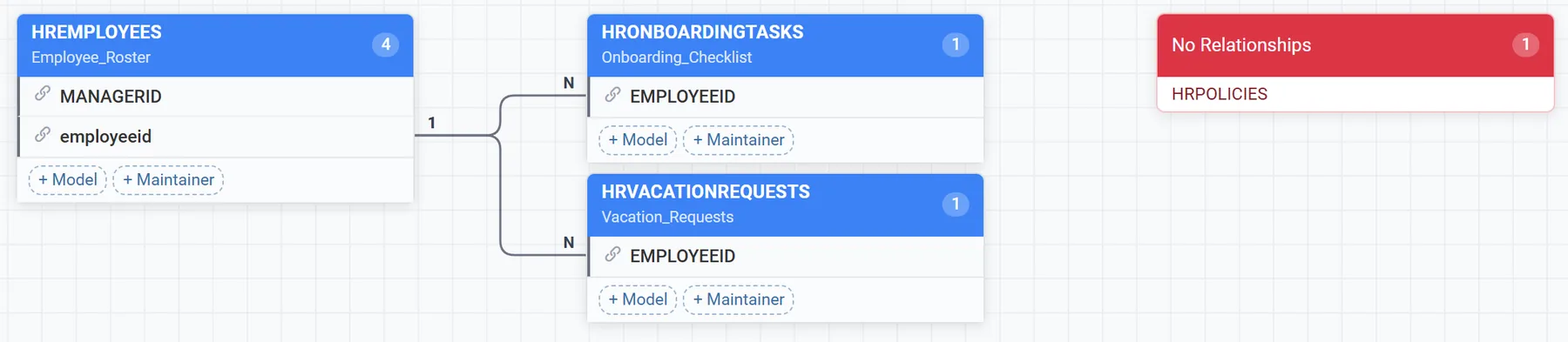
Some descriptions carry rules the model has to follow. The employee table says the remaining balance is the allowance minus the days used. The requests table lists the only valid statuses: Pending, Approved, and Denied. We also recorded how the tables relate, such as which employee is each person’s manager, and what the key field is for each table.
Table relationships define how everything fits together
The important part in this step: Figuring out and identifying what each field means. In many databases, only one or two people know what some fields are for, and the model can’t ask them. You need to take the time to set your meta data up in a clear way.
Step 2: Set up users and row-level security
Next, decide which users can see what. Each of our four demo users has an employee number and a role. Priya Patel is an employee, David Okafor is her manager, Sarah Mitchell runs HR, and Alex Turner is a new hire.
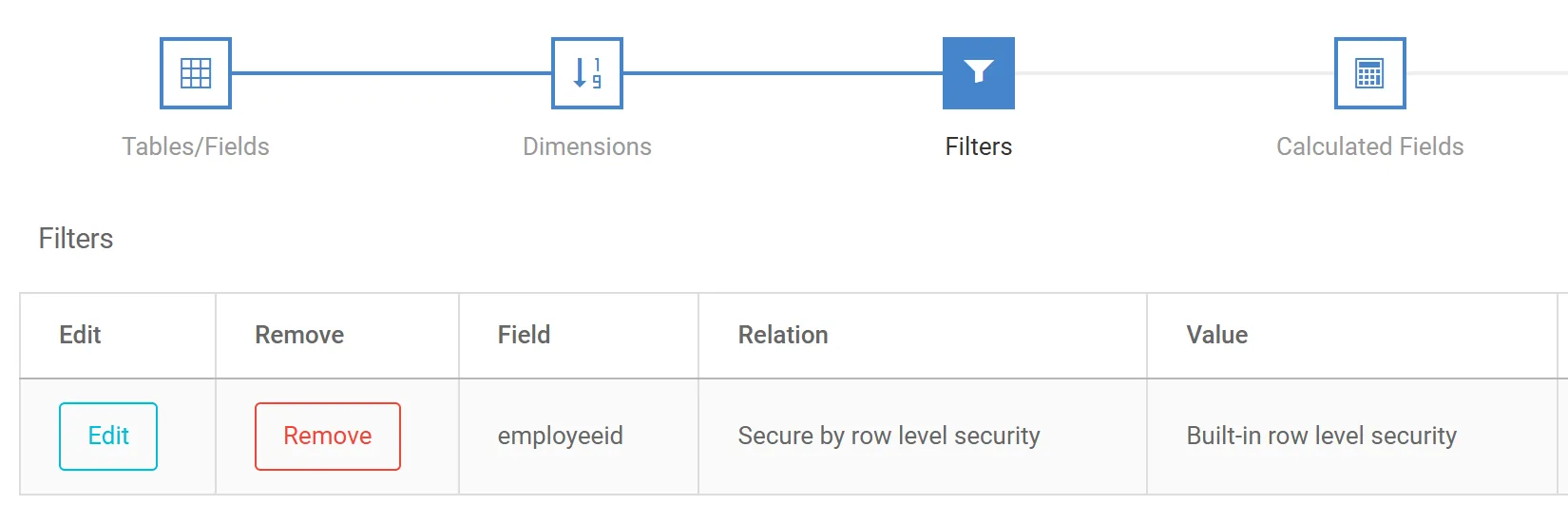
Row-level security filters each application by the signed-in user’s employee number. Priya sees one employee record (her own). David’s number does double duty. In an app filtered by manager, it should also show requests from his team, because his employee number is the manager number on each one.
Setting row-level security so each employee only sees their data
We made sure this worked before building anything else. Why? If row-level security didn’t work, nothing else mattered.
The important part in this step: Settling edge cases with the business. Should a manager see the team’s balances? Should HR see every request? Get those answers figured out before you build.
Step 3: Build the applications the assistant will call
We don’t want to give the assistant direct access to our database tables. Instead, give it access to data through applications that are built over our database tables. Those applications include rules, filters, and security to limit what the LLM can see and do. For instance, I could hide fields, only show certain records, or make the application read-only. This ensures that the LLM can only access what you want it to access.
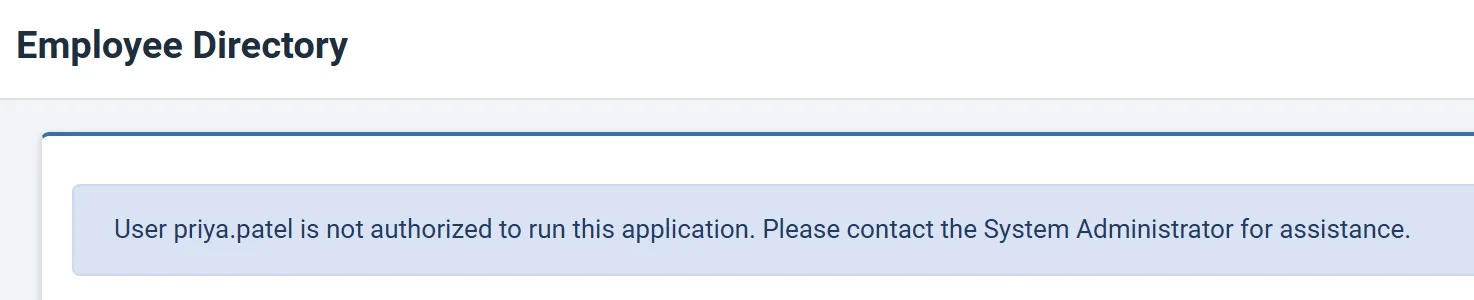
Example: In our project, the HR assistant has access to a few different applications that are all secured with row-level and application security. So, for example, if Priya tried to open the employee directory, she gets a “not authorized” message.
Priya opening the HR-only Employee Directory and getting a not-authorized message
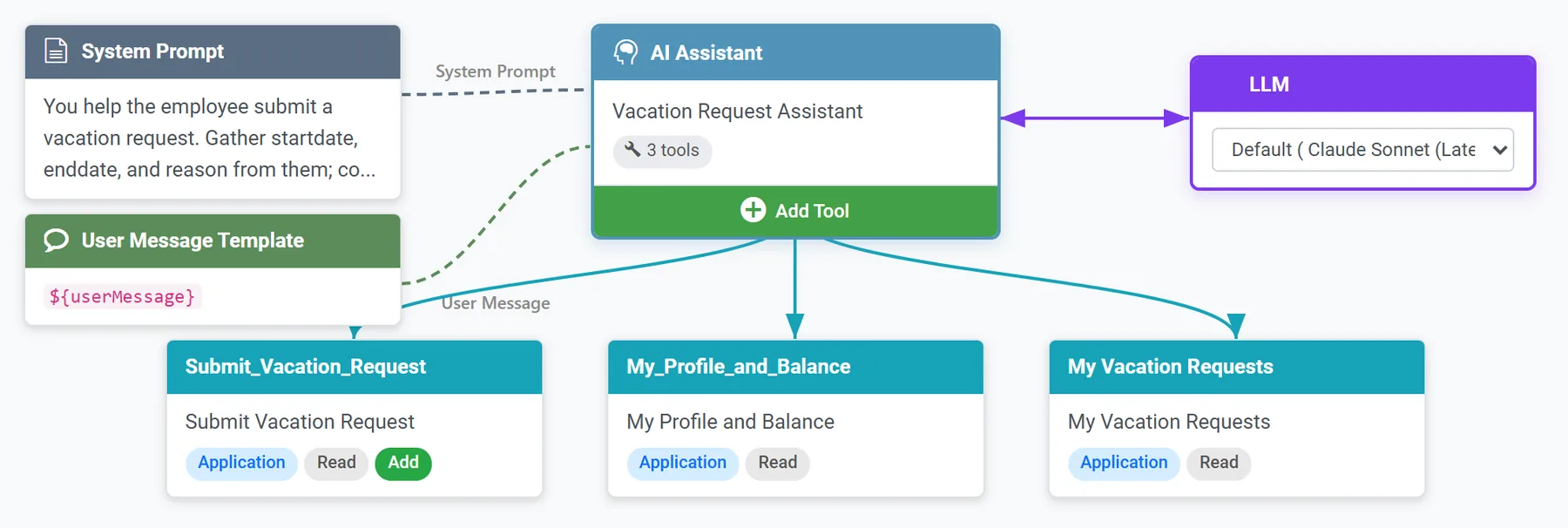
The other important note is that the assistant can only see the apps you give it, and each app returns only what the signed-in user can see. It can’t read our database tables directly, so if we don’t give it access to specific data through an application (as seen in the image below), it can’t see that data.
The Vacation Request Assistant in AI Studio with its three tools, each one an application
The same is true for writing to the database. We created a database CRUD application for writing vacation requests to the database and added that as a tool function to our AI assistant. However, the assistant cannot submit data on its own. It can only fill in the fields and then ask the user to submit. This is called “human in the loop” and is one way to ensure that an LLM cannot directly write to your database.
The important part in this step: Deciding, app by app, what the assistant can read and what it can change is crucial to any AI assistant that works over business data.
Step 4: Give the knowledge base an owner
Some answers aren’t in database tables. For instance, your vacation carryover policy might be a document, so the assistant needs a knowledge base to search.
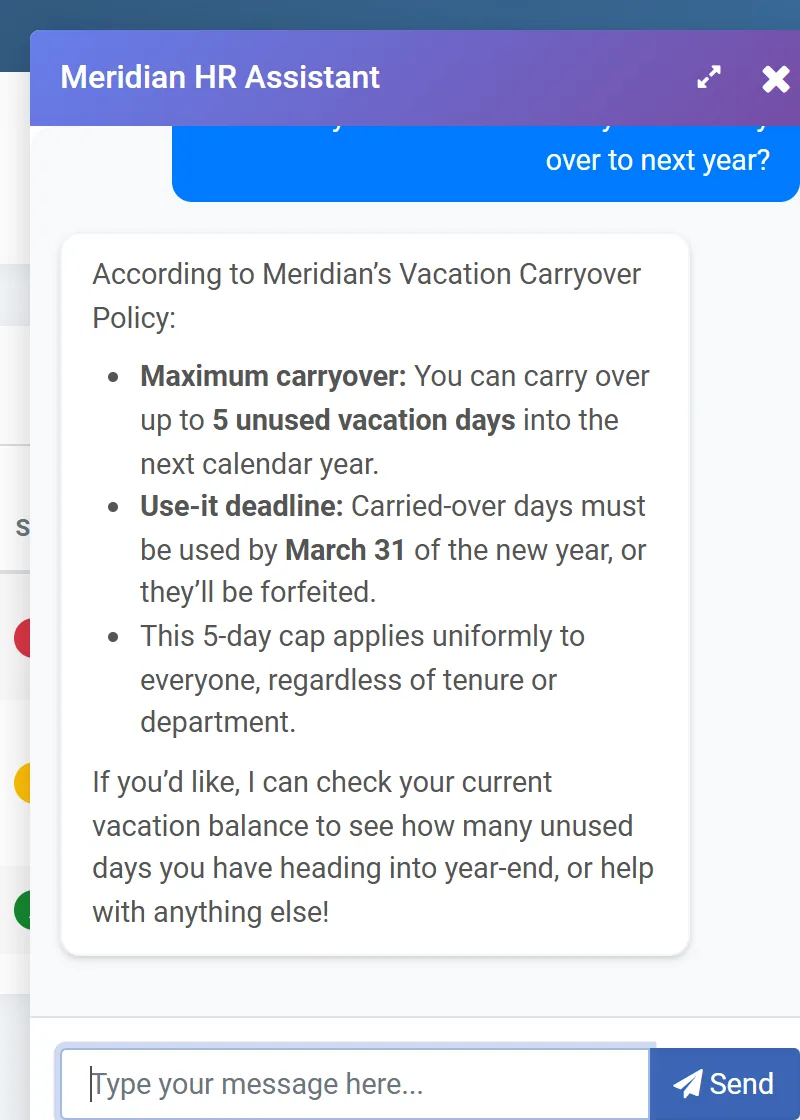
In our demo, we created a knowledge base with all of our HR policies and information. The policy assistant is told to answer only from those documents, and point the employee to HR when a policy doesn’t cover the question. For example, if you ask our HR AI assistant about carryover days, it answers correctly from the knowledge base.
The HR Assistant answering a question about vacation carryover from the policy documents
The important part in this step: Finding the current version of each document, and getting the department that owns it to agree to keep it up to date.
Step 5: Build small assistants and a supervisor
Up until now, we’ve been doing a lot of the prep work. Now, you build the agent that most people imagine when they hear “chatbot.”
When building an AI chatbot, don’t try to create one big assistant that does everything. Instead, create multiple assistants that each handle one job. Think of them as employees with very specific knowledge. For instance, one of our assistants only handles vacation requests. A different one only handles onboarding.
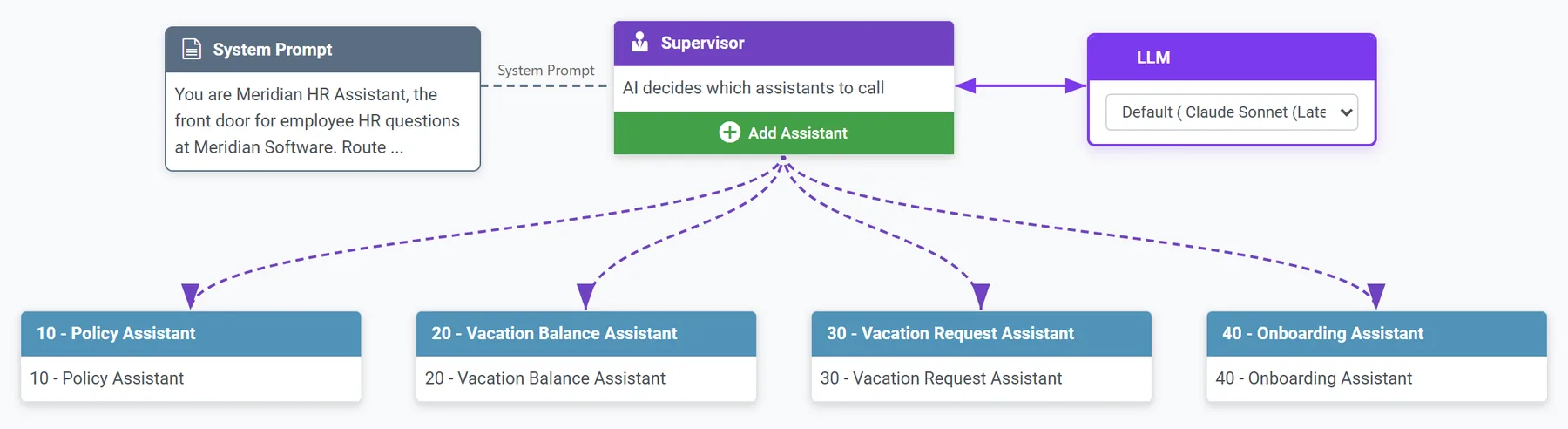
Then, you build a supervisor agent, which acts like a supervisor for each of your assistants. It reads the question from the user, and then figures out which assistant is best suited for that question.
Our agent has four assistants, one for each job, and a supervisor that reads each question and hands it to the right one. Each assistant gets a short prompt and a short list of tools (the applications from step 3).
The supervisor in AI Studio, with the four assistants it can hand a question to
One thing to note: The system prompt tells the assistant what it is and what it should be doing. Be as specific as possible here, to keep make sure the assistant understands what it can and cannot do.
For instance, if you say something like, “You are an assistant that answers vacation balance questions”, the assistant will handle basic questions well but might stumble on the more complicated ones. For example, this prompt doesn’t say how a balance is calculated or whether pending requests count. It doesn’t say what to do when Priya asks about David’s balance. Because they aren’t defined in the prompt, the LLM must make those decisions on its own, and some of them probably won’t match what HR would say.
Here’s an example of a good system prompt that tells the assistant what it needs to know:
“You help employees with their own vacation information only. Remaining balance = vacation allowance minus vacation used, from the profile tool. You can list their request history and statuses. You have no access to other employees’ data; if asked about anyone else, explain that this information is restricted to each employee. Pending requests are not yet deducted from the balance; mention them separately when present.”
It covers who the assistant is, what it can do, what it can’t do, and how to go about the things it should do. You could even get more specific than that if you want. The point is this: Anything that isn’t defined for the assistant is something that it will have to figure out on its own. It might do a good job most of the time, but not always. Don’t leave anything to chance.
The important part in this step: Test the prompts and rewrite them after you watch the assistant answer real questions. One of our most important prompt changes came out of testing.
Step 6: Test it signed in as real employees
Sign in as each user and ask what they’d normally ask, plus a few things they shouldn’t.
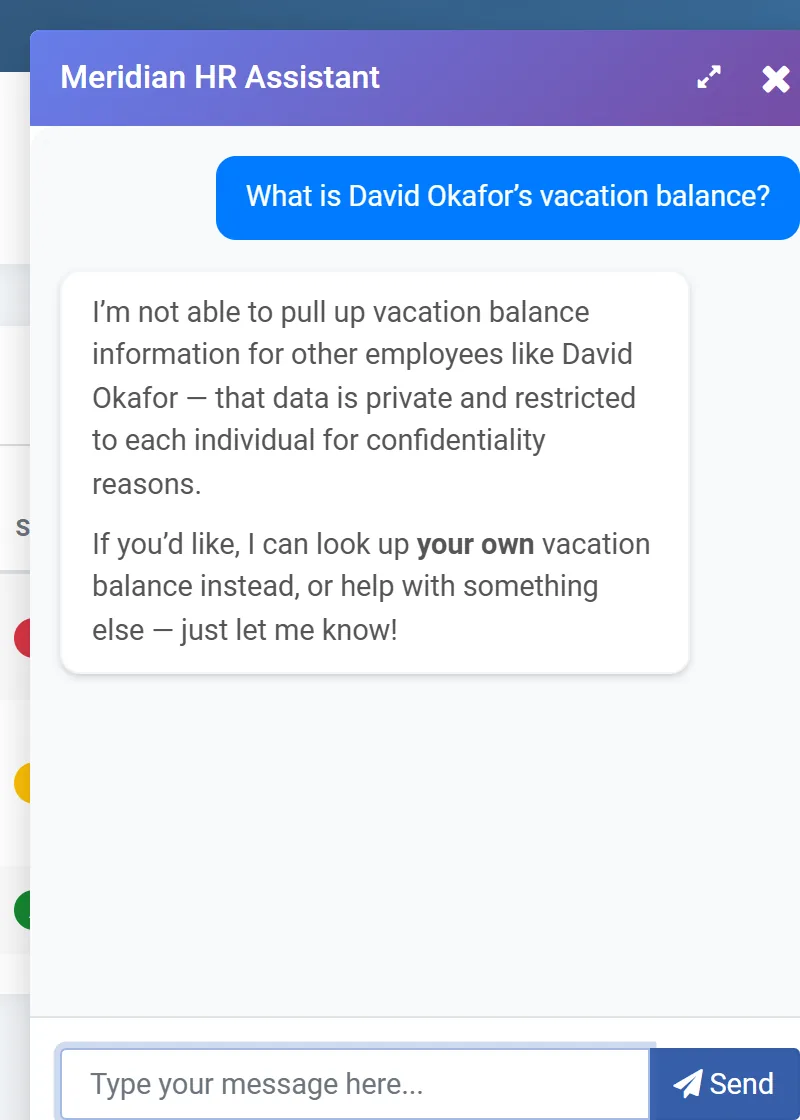
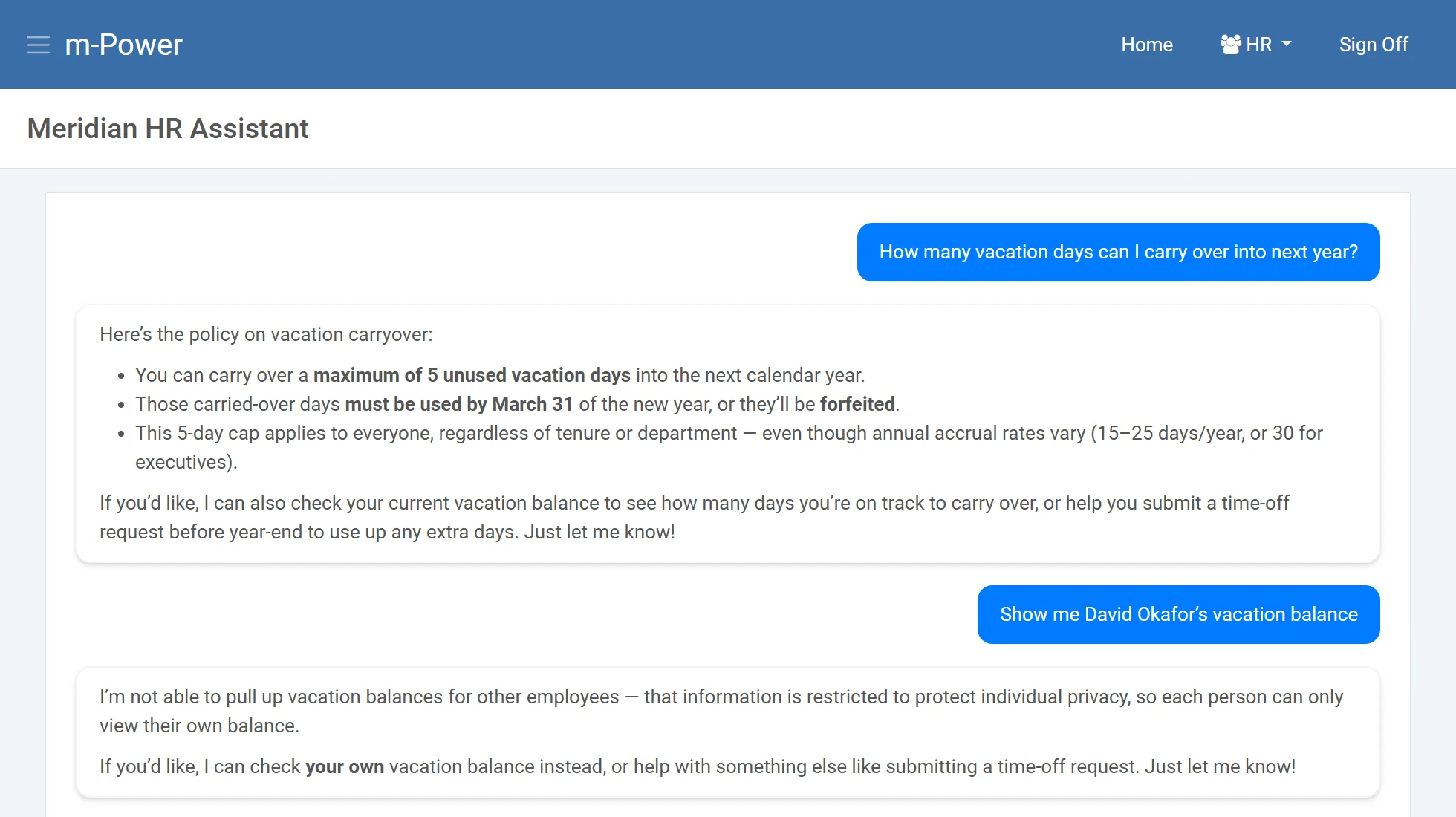
Still signed in as Priya, we asked for David Okafor’s vacation balance. The assistant answered, “I’m not able to pull up another employee’s vacation balance,” and nothing about David appeared in the conversation. The prompt supplies the polite wording, but even without it, the balance app would only return Priya’s row.
The HR Assistant declining Priya’s request for another employee’s vacation balance
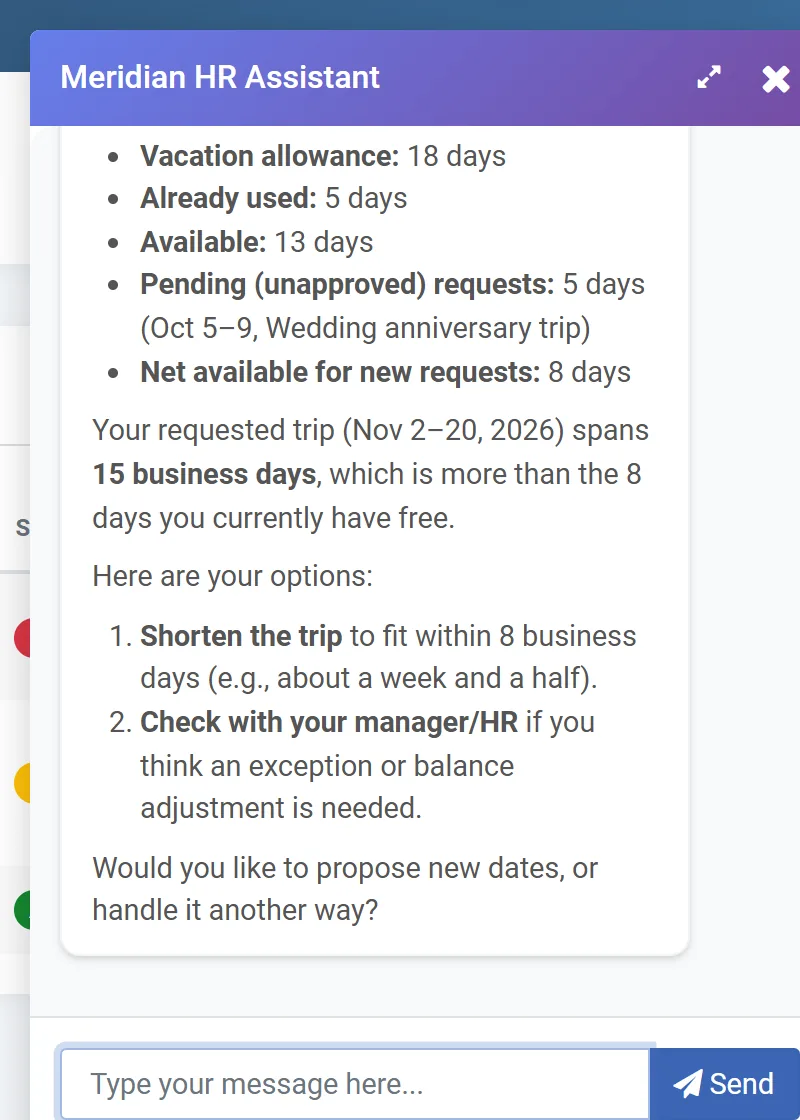
Testing also turned up two problems we hadn’t planned for. First, the request assistant let an employee ask for more days than she had left. We added a balance check to its instructions, and when the first version still let the model offer to submit the request anyway, we tightened the wording and tested again.
The HR Assistant turning down a request for more days than the employee has left
Second, the assistant counted business days while the portal’s request form counted calendar days, so the same dates produced two different totals. A model can’t decide which one your company uses.
The important part in this step: Have someone who knows the department try to break it, then decide the right answer for each problem they find.
How hard is it to build a chatbot over your own data?
Getting an LLM to chat takes very little time. Most of the effort goes into describing your data and deciding what each user can see and change. A read-only assistant over well-described tables comes together pretty fast. Anything that writes data takes longer, mostly because it needs more testing.
Building an AI assistant over your database with m-Power
We built this HR AI assistant with m-Power, which is our development platform. m-Power builds web applications and AI tools directly over the databases you already run, on-premise or in the cloud.
If your team doesn’t have time to build what you want, mrc’s services team builds custom web applications and AI tools (like this one) for customers, and you own the applications when the project is done. 96% of first-time services clients become repeat customers.
Try it, then see it over your own data
Connecting a model to a folder of documents is easy. Deciding what it can see, what it can change, where the data goes, and who keeps it current takes longer. Build the assistant over the database you already run, give it applications instead of tables, and a lot of those answers carry over from the systems you already secure.
If you’re trying to figure out what a chatbot over your own data looks like for a team like yours, we’d be glad to show you what other teams have built with m-Power. The demo is specific to your situation. We often build something directly over your data so you can see exactly how it works in your environment.
Every HR department answers the same questions all day. How many vacation days can I carry over? What’s my balance? Did my request go through? Where’s the form for the new hire? The answers are all in the company policies, but employees still ask a person, because asking a person is faster than looking it up.
That’s exactly the kind of task people should hand to AI. It’s also the kind of AI project that makes IT nervous, because an HR chatbot touches employee records. The moment it can look up one person’s balance, you have to be certain it can’t look up someone else’s.
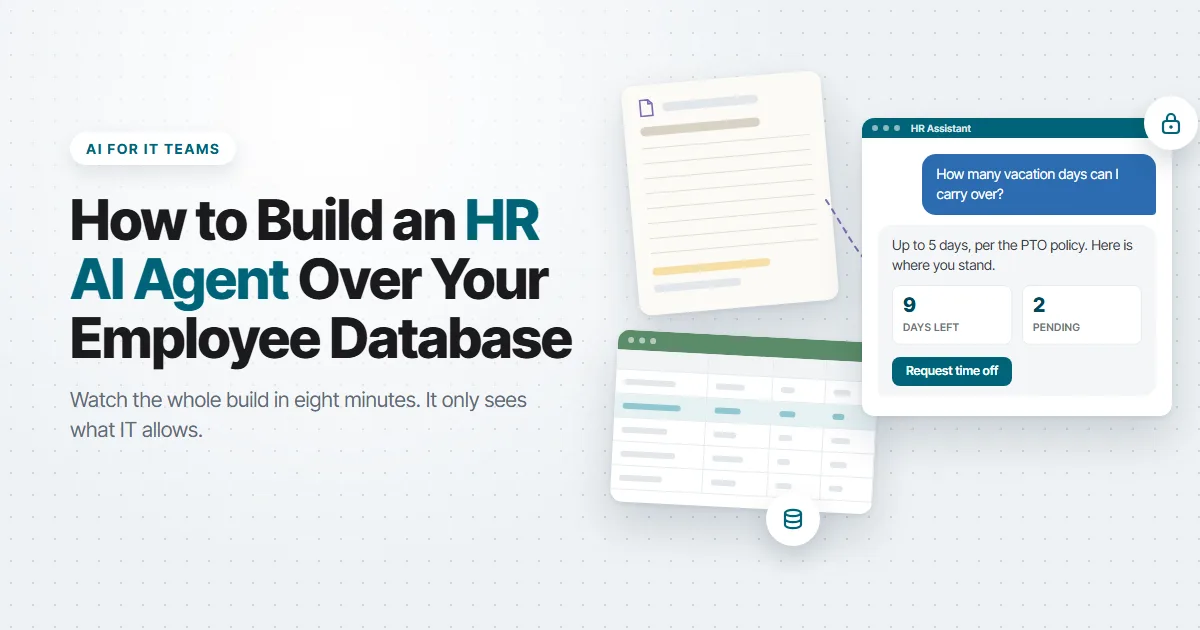
We just published a video that walks you through the whole process of creating an HR AI Agent over your data. In this video, we build an HR AI agent in m-Power that answers policy questions from the company’s own documents, shows each employee their time-off balance and open requests, submits new requests to the database, and walks new hires through onboarding. The whole thing runs over an existing employee database, inside the same security the rest of the portal uses.
You can also play around with the live HR portal demo and try the agent yourself.
Why this is the AI project to start with
If leadership is asking what your AI plan is, an internal assistant like this one is a good start. Nobody has to buy a new system. The questions are repetitive and well documented. The data already exists. And the people who benefit are your own employees.
So, why doesn’t every company already have one? Because most AI chatbot tools want you to upload your documents and connect your data to their cloud, and then they decide what the model can see. For an HR assistant, that doesn’t work. You need the agent to see one employee’s records when that employee is logged in, and nobody else’s. You need it to write to the database only where you say it can. And you need to choose which language model it runs on, because some companies won’t send HR data to a public model at all.
With m-Power, you don’t have to worry about that problem. m-Power sits in your environment and works over the database tables you’re already using. Your data stays where it is and m-Power builds on top of it.
Tips for building a good AI HR assistant
The video walks through the build step by step. A few important points are worth mentioning for anyone building their first assistant, whether it’s for HR or another department.
Give each assistant one job. Treat an assistant like an employee with a single responsibility. In the video, one answers policy questions, one shows balances and requests, one submits requests, and one handles onboarding. A single assistant that does all four gets a vague prompt and starts guessing which tool to use. Four narrow ones each get a short, precise prompt, and each one is easy to test on its own.
Start with a knowledge base HR can manage. The policy assistant is only as good as the documents behind it. In the video, the same Word files HR already maintains go into a knowledge base in AI Studio, and that knowledge base runs as an application so HR can add or replace a document without opening a ticket. For example, if the carryover policy changes, HR can just upload the new file to the assistant’s knowledge base.
Give the assistant applications, never the database. The balance assistant doesn’t query tables. It can access applications that are built over database tables. In the video, one assistant can access an application that lists vacation requests for whoever is logged in. So, if Alex signs in, he only sees his own requests. Someone else signs in and sees theirs. The assistant inherits that filter, so you never write a separate security rule for the AI. You reuse the one the portal already enforces.
Never let the LLM write to the database itself. The request assistant doesn’t run SQL and doesn’t get a database login. It writes through a maintainer, which is an m-Power application that adds, updates, and deletes rows in a table under the same rules and validations as the rest of the portal. The LLM’s only job is to collect the request and hand the values to that application. m-Power handles writing the data to the database. If the model gets confused, the worst it can do is fill in a form wrong, and the application’s own checks catch that before anything lands in the HR table.
Tell the assistant to check before it submits. Before the request assistant can submit anything, its instructions say to look up the employee’s profile first and confirm there are enough days. Because that instruction is part of the assistant’s prompt, it happens every time. Any time an assistant can change data, give it a way to look up what it needs, and tell it to look first.
Write the system prompt like a very specific job description. Each prompt says what the assistant is, what it’s for, which tools it has, and when to use them. A prompt that says “you help with HR” produces a chatbot that improvises. A prompt that says “you answer questions using the policy knowledge base only, and you say so when the answer isn’t there” produces one you can put in front of employees.
Choose the model that best fits the job. m-Power lets you configure any LLM for each assistant, including one you host yourself. For an HR assistant, that choice is a policy decision. Decide up front whether employee data can go to a public model, which one to use, and pick accordingly.
Use Supervisor agents like real life supervisors. Rather than create one giant assistant that does everything, use supervisor agents just like you would use supervisors in the workplace. The supervisor agent reads the question and hands it to the right assistant. That keeps each assistant small, and it means you can add another assistant later without touching the four that already work.
What this proves about m-Power
The agent doesn’t get special access to anything. It reads and writes through the same m-Power applications the portal already uses, so it inherits the same security. It sees the tables and documents you assign to it and nothing else. It writes only where you’ve given it a maintainer. And it runs on whichever model you choose.
That’s what “AI over your own data” should mean. Your data stays in your database, the agent has no password of its own, and every question it answers runs through the same applications and the same security an employee uses when they click around the portal.
The same approach works for a customer service portal, a sales team asking about their accounts, or operations asking about inventory. Swap the tools, keep the structure. If you want more ideas for where to start, 10 Things AI Can Do That Your Current Software Can’t covers the most common ones.
Try it, or have us build it
The HR portal from the video is live on our demos page. Log in, ask the agent about carryover days, request some time off, and try to request more than you have.
If you’d like to see how this would work over your own database, request a demo and we’ll walk through it with you. And if your team doesn’t have time to build it, our services team builds AI tools like this one for customers, on a platform you own when they’re done.
If you run IT, you’ve probably been asked “What’s our AI strategy?” at least once this year. Maybe more than once.
It feels like every company is rushing to do something with AI. But most of them are approaching it from the wrong direction. They start with the technology. What can we build? A chatbot? A copilot? Or they look at what the AI vendors are selling, pick something that sounds useful, and try to find a place for it.
It’s not a terrible approach. But it leads to a lot of the same, generic use cases. Why? Because the project started with the tool instead of the problem.
There’s a better question: What can AI do that we can’t do today? What can it do that’s impossible, or really painful, with the software, code, and processes we already have?
Answer that, and you’ll have a much easier time coming up with ideas.
Now, the answers to those questions vary by business. That being said, here are 10 different answers that could apply to a variety of organizations. At the end of each one, I’ll tell you the easiest way to try it.
1. Understand unstructured data
Most of the information that comes into your business isn’t structured. I’m talking about things like customer emails, PDF purchase orders, scanned packing slips with notes written on them, or even spreadsheets where every customer uses a different layout.
Software has never been able to do much with any of that. Usually, you need a person to read each one and type it into the system.
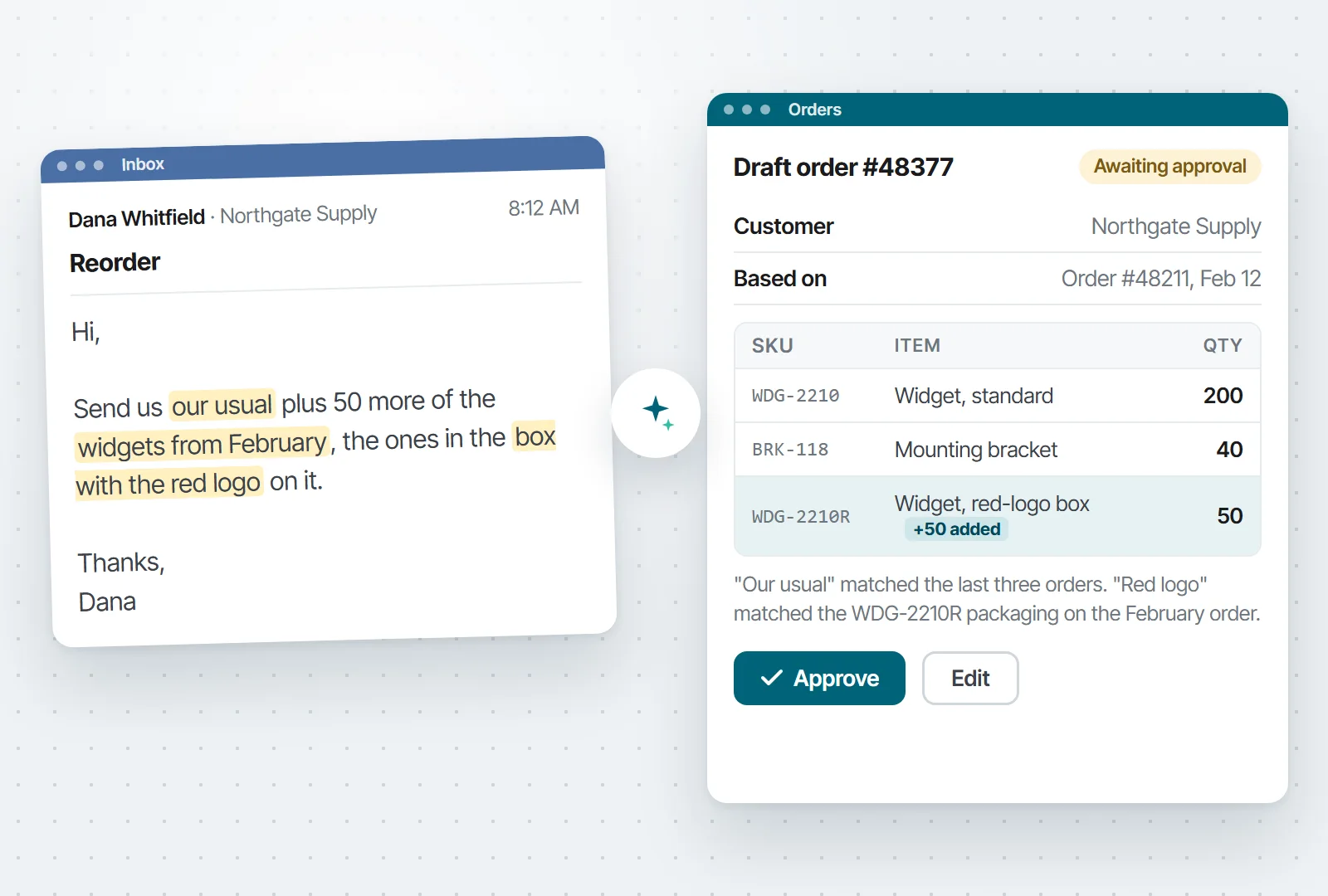
AI can read all of it…and understand it. For instance, suppose a customer writes, “Send us our usual plus 50 more of the widgets from February, the ones in the box with the red logo on it.” Today, someone has to figure out who “us” is, what “our usual” means, and which SKU comes in a box with a red logo. AI can look up the customer, find their usual order, match the SKU, and draft the order for someone to approve.
Illustration. The email comes in on the left. The draft order on the right is what a person approves before anything ships.
Try this first: Start with the most common piece of unstructured data you deal with. For instance, suppose you receive vendor invoices every day. But, no two vendors format them the same way, so someone in AP is stuck manually entering data. Let AI read each invoice and fill in the entry, and have that person check it before it’s saved. After a month, you’ll know how often the AI got it right and which vendors trip it up. That tells you whether or not this is an area worth automating with AI.
2. Answer “What’s going on with order 12345?” in one place
Here’s a question that takes 15 minutes to answer in a lot of companies: “What’s going on with order 12345?”
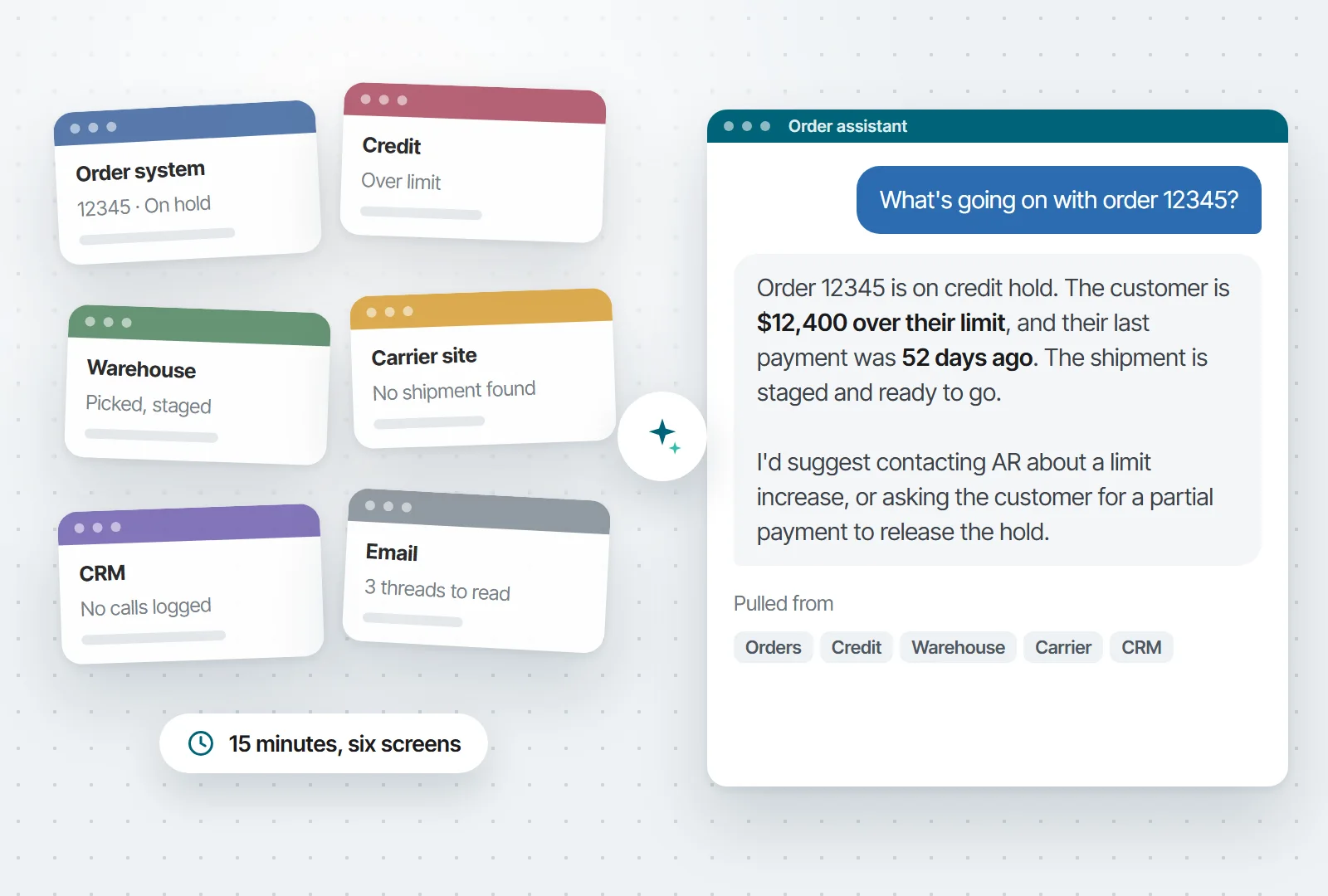
Someone checks the order system and sees the order is on hold. They open the credit system to find out why. Then the warehouse system, then the carrier’s website. If they still don’t have the whole story, they log into the CRM to see if the customer already called. Fifteen minutes and six different screens later, they have half an answer.
AI can pull from all of those systems at once and write one answer: “Order 12345 is on credit hold. The customer is $12,400 over their limit, and their last payment was 52 days ago. The shipment is staged and ready to go. I’d suggest contacting AR about a limit increase, or asking the customer for a partial payment to release the hold.”
Illustration. Today someone opens the six screens on the left. AI reads all six and writes the answer on the right.
Of course, you could pull data from different systems together without AI. The difference is that AI can read all of it together and explain what it means.
Try this first: Start in one area, for instance, orders on hold. They take the most digging, and the answer is spread across two or three systems. Give AI read-only access to those and have it write one paragraph per held order, ending with what it recommends. Keep it read-only until you trust it. If your team stops opening five screens to answer “Why is this on hold?”, it’s working.
3. Let anyone ask the database a question, then ask a follow-up
How many times a day does someone ask IT for data? Maybe a sales rep needs an order status. Or, the CFO has a question on Sunday night when nobody’s around to run a report.
With AI, they can type the question and get the answer from the database. They don’t need to know SQL, and they don’t need to open a ticket.
One of the best parts of this approach is that users can have conversations with their data. “Show me my top 10 customers by revenue.” “Now just manufacturing.” “Compare that to last quarter.” “Write a summary for my boss.” Each question builds on the last one. Traditional reports can’t do that. Every question starts over with a new filter or a new report.
Try this first: Pick the person who asks you for reports the most, and give them access to the one database those reports come from. Before you hand it over, spend an hour describing your tables and fields. The answers are only as good as those descriptions. Then leave them alone with it for two weeks and read the questions they asked. Some will be questions nobody ever asked before. That list tells you what to build next.
Want to see what this looks like? Here’s a video of it in action:
4. Handle the cases nobody wrote a rule for
Business rules are great at the cases someone thought of. Everything the original developer planned for gets handled.
But…what about the problems nobody planned for? Maybe a purchase order doesn’t match any approval rule. Or, there’s complaint that’s part billing problem, part quality problem, and part “we might lose this customer.” Maybe an order looks normal except for one detail that’s a little off.
Without AI, those cases might go to an employee. Someone has to dig into each one and decide what to do.
AI can look at those and make a recommendation with a reason. For example: “This PO is unusual because the vendor changed their pricing last month, but the total is still within budget. I’d approve it and let procurement know to renegotiate before the next order.”
Try this first: Find the process that someone works through by hand on a regular basis. Things like held orders, flagged POs, whatever it is. Have AI go through the same queue first and write one line on each: Where it should go and why. The person still makes every decision. What you’re testing is how often they agree with the AI. Once they’re agreeing most of the time, let the easy ones through on their own.
5. Watch things overnight and flag what’s unusual
Every company runs scheduled jobs. They execute on a timer, dump output, and trust a person to read it.
The problem is that scheduled jobs have no judgment. They can’t tell the difference between a routine result and an urgent problem.
An AI agent can run on the same schedule, but it can decide what matters. It scans yesterday’s orders, finds the ones that are actually unusual out of hundreds, and posts a short briefing. The same idea works for a sales briefing. One agent, and every rep gets a summary of only their own accounts.
I’d keep an agent like this read-only while you test it. Also, put one person in charge of reviewing its output and deciding whether or not it should keep going.
Try this first: Take a common report, and run the same data through AI overnight and have it write a half-page summary with the exceptions on top. Let the person read both for a couple of weeks. If the summary catches everything they would have caught, you’ve given them back 20 minutes a day. If it misses something, you’ve learned what the AI needs to be told.
6. Add and update records by chat, with a person confirming
Most of what AI does with your data is read it. This one writes to it, which is where most IT leaders (rightly) get nervous.
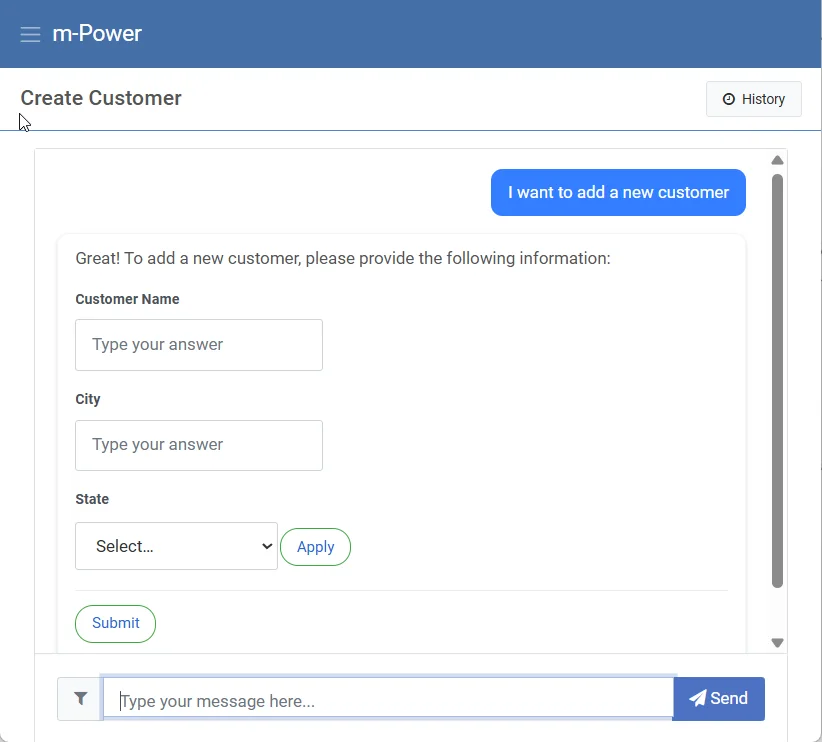
Here’s how it can work safely. A user tells the assistant, “I need to add a new customer.” The assistant asks for the fields it needs, and the user fills them in. Then, before anything touches the database, the user sees everything the assistant collected and has to click Confirm. That’s the human in the loop. The AI never writes to the database on its own.
Human in the Loop in m-Power. The assistant asks for the fields it needs, and nothing is saved until the user clicks Submit.
Try this first: Pick a form people fill out away from their desk, like logging a customer call or a site visit. Have the assistant ask for the details and read them back before saving. You’ll find out quickly whether people prefer it to the form. If they do, move on to the forms with more fields.
7. Draft the follow-ups nobody has time to write
Some things don’t get done because nobody has time. Overdue invoices pile up because nobody in AR can write 40 individual emails a day. Quotes go stale because the rep who sent them got busy.
AI can write those drafts from your data. An overdue-invoice assistant reads each customer’s payment history and writes a note that fits their situation. A quote follow-up mentions the actual products and prices from the quote.
The rule I’d set is simple: AI writes the drafts, but people are in charge of sending. Once you’ve read a few weeks of drafts you would have sent without changing a word, then decide which ones can go out on their own. That being said, there are some that should always get sent by a person. For instance, the $40,000 invoice reminder should probably always wait for a person.
Try this first: Pick the follow-up your team is worst at. For most companies, it’s overdue invoices. Have AI draft a reminder for every invoice past terms and put the drafts in a queue. Every morning, someone in AR reads them and sends the ones they agree with. Keep a tally of how many went out unchanged. When it’s most of them, start sending the small ones automatically and keep the big ones in the queue.
8. Answer questions from your own handbooks and procedures
Every company has answers buried in documents. For example, the employee handbook, your SOPs, years of support history, contracts, etc… New hires can’t find them, so they ask a senior person, and the same questions get answered over and over.
AI can search those documents by meaning instead of by keyword and answer the question directly. For instance, a question like “How many vacation days do I get after five years?” is answered from your policy.
Of course, you should always be careful with permissions when setting up something like this. A good rule of thumb: If someone couldn’t open the original document, they shouldn’t get its contents from a chatbot either.
The HR assistant we built in m-Power for a demo. It answers the carryover question from the policy document, then declines to show another employee’s balance.
Try this first: Upload the employee handbook and nothing else. Give it to one team and tell them to ask it the questions they’d normally ask HR. After two weeks, ask HR whether the questions they get have changed. If they have, add the next set of documents. If they haven’t, find out what people asked and where the answers fell short.
If you’d like to see what this look like in action, check out this video:
9. Explain the code nobody wants to touch
Every company has at least one system that was built years ago by someone who’s gone. Nobody fully understands it, and nobody wants to touch it. The business rules live in the code and nowhere else.
This is where AI shines. It can read the code and explain what it does, which business rules are buried in it, and what would break if you changed something. A developer asks, “What happens if I change this field?” and gets a list of every program and integration that uses it, instead of spending days tracing it by hand.
Try this first: Pick the one program everybody’s afraid to touch. Have AI write up what it does and list the business rules buried in it. Then hand that write-up to the person who knows the program best and ask them to mark what’s wrong. You’ll end up with documentation that didn’t exist before, and you’ll know how far to trust the AI on the next one.
10. Give customers a portal that answers “Where’s my order?”
Your customer service team answers the same questions all day. Where’s my order? Can you resend my March invoice? What’s my balance?
A customer portal helps, if customers can find what they need in it. An assistant added to the portal takes it further. The customer asks the question the way they’d ask a person, and the assistant answers from the ERP, under that customer’s own login. They see their orders and their invoices, and nobody else’s.
Try this first: Ask your customer service team what customers call about most. It’s almost always “where’s my order.” Build an assistant that answers only that, from the same order data the portal already shows, and put it in front of a handful of customers you know well. If the calls from those customers drop, roll it out to everyone else.
What this looks like in m-Power: Companies have been building customer portals over their ERP data with m-Power for years. Adding an assistant means building one in the AI Studio with a tool over the same order and invoice data the portal already uses. Then you apply row-level security so each customer only sees their own records. See how teams build AI tools over their data with m-Power.
Where to start
What are the common themese across those 10 ideas? Messy input, manual data entry, judgment calls, and the ability to understand text and code.
Any process in your business with one of those is a candidate. To test it out, start small. Pick the smallest example. Let AI draft or recommend, and keep a person approving the result until you know where it gets things wrong.
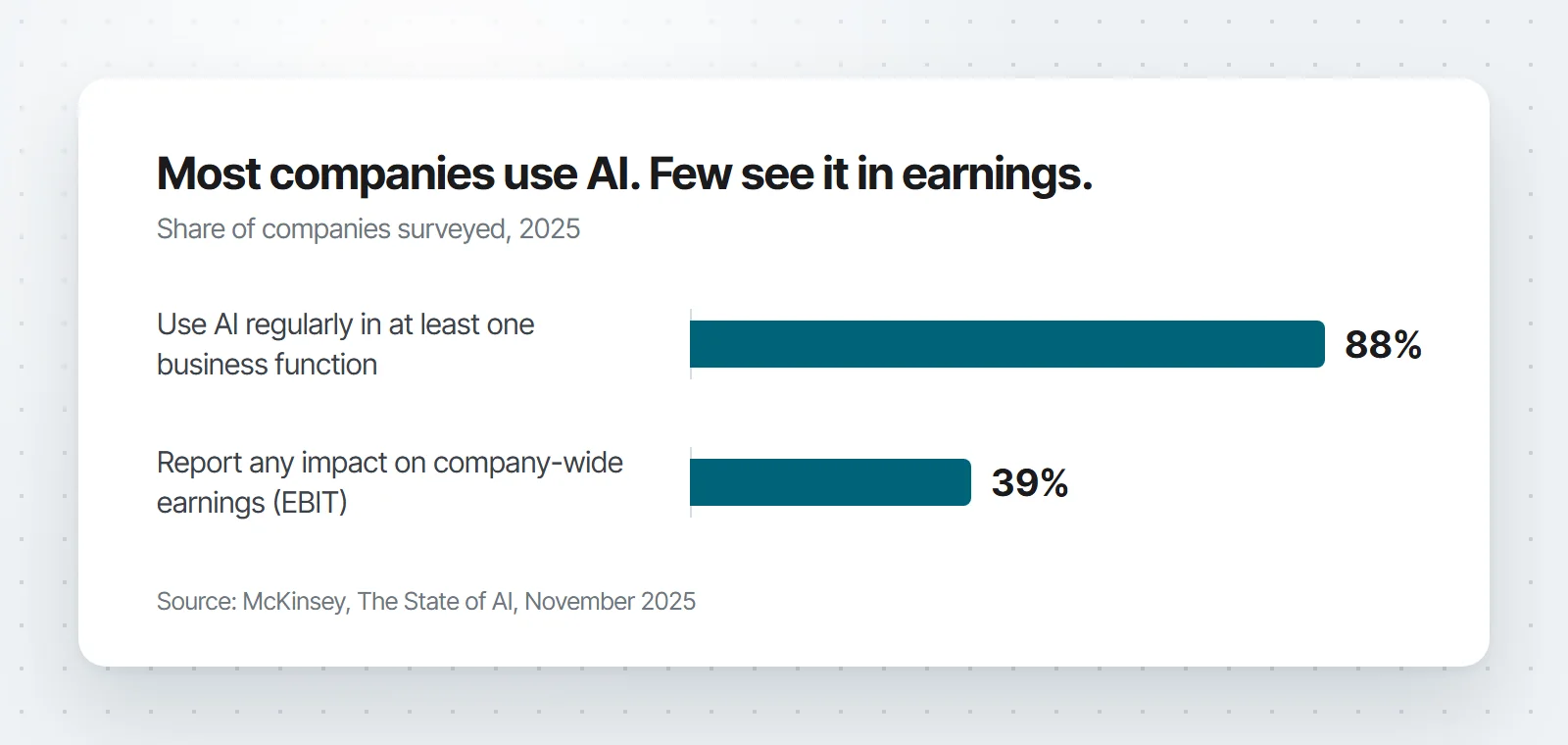
That’s also what separates the projects that pay off from the ones that don’t. According to McKinsey’s November 2025 State of AI survey, 88% of companies use AI somewhere, but only 39% see any impact on earnings. The companies that do see it were 2.8 times more likely to have redesigned the process around the AI, instead of adding a tool to a process that didn’t change.
Every one of these ideas gives AI access to some of your data, so every one is a security decision too. Before you start, answer these: What data can it see? Whose permissions apply? Which model does it use, and what gets sent to it? Who can turn it off? Answer those once, on a platform you control, and you can reuse the answers for every project after that, instead of working them out again for each new tool.
That’s why we built the AI features into m-Power itself. m-Power is a low-code development platform from mrc, a software company in business since 1981 with more than 1,500 customers. It installs in your environment and builds applications and AI tools directly over the databases you already have. IT controls what data the AI can access, who can use each tool, and which model runs, under the same security model as every other m-Power app. And when a project outgrows your team, our support and services people can step in. They build with m-Power every day.
Many of these are things you can build in m-Power today. If one of them looks like a problem you have, request a demo and tell us which one. We’ll set up a demo that’s specific to your situation.
Frequently asked questions
How can a small business start using AI?
Pick one process with messy input or a manual investigation, and start with the smallest version. AI drafts, a person approves. One inbox, one report, or one exception queue is plenty. Measure the time it saves before you expand.
What data does AI need access to?
Only what the use case needs. A collections assistant needs invoices and payment history, not your whole customer database. And permissions should match what the user could already see on their own. If someone couldn’t open a record before, the AI shouldn’t show it to them now.
Do we need our own AI model?
No. You can connect a commercial model, or run one on your own servers. The decisions that matter are who approves the model, what data it’s allowed to receive, and whether you can swap it out later.
What should we not use AI for first?
Anywhere a wrong answer is expensive and nobody reviews it. Customer-facing pricing, payments, and compliance decisions can wait. Start where a person checks the work before it takes effect.
Sal Stangarone is President of mrc and has been at mrc since 1990. mrc has helped businesses build custom applications over their own databases since 1981.
Somewhere in your company, someone has already vibe coded an app. Maybe an analyst got tired of a 15-tab spreadsheet and asked an AI tool to build a tracker instead. Maybe a manager wanted a dashboard that IT didn’t have time for, and just asked AI to build one for them.
If you run IT, that should impress you and worry you at the same time.
What Is Vibe Coding?
Vibe coding means describing the app you want to an AI tool and letting it build one for you, usually without reading the code underneath. AI researcher Andrej Karpathy coined the term “vibe coding” in early 2025 for a style of building where you “fully give in to the vibes” and “forget that the code even exists.” By November, Collins Dictionary had named it Word of the Year.
What Is Low-Code?
Low-code needs less introduction. Low-code platforms let your team build full web applications from templates and configuration instead of writing every line by hand. It’s been the standard answer to the app backlog for more than a decade.
What’s the difference between vibe coding and low-code? Does vibe coding replace low-code tools? In this article, we’ll answer those questions and more.
What Vibe Coding Does Well
I’m not going to spend this article telling you vibe coding is hype. It isn’t.
According to the Stack Overflow 2025 Developer Survey of 49,000 developers, 84% use or plan to use AI tools in their work, and 51% use them daily. And that’s just the professional developers. The bigger trend is what everyone else is doing: People with no programming background are now building applications by simply chatting with AI.
For simple, personal apps, vibe coding can be great. For instance, if your users are doing things like:
Replacing spreadsheets. Someone replaces a manual spreadsheet workflow with a small app that saves them an hour a week.
Prototypes. A team mocks up a working demo of an idea instead of writing a requirements doc about it.
Building one-off utility tools. For example, scripts that rename files, reformat reports, or merge two lists.
Notice what these have in common: If the app fails, almost nothing happens. Nobody’s data leaks. No process stops.
That’s what vibe coding is great for. Automating small tasks that can save hours for the user.
Where Should You NOT Use Vibe Coding?
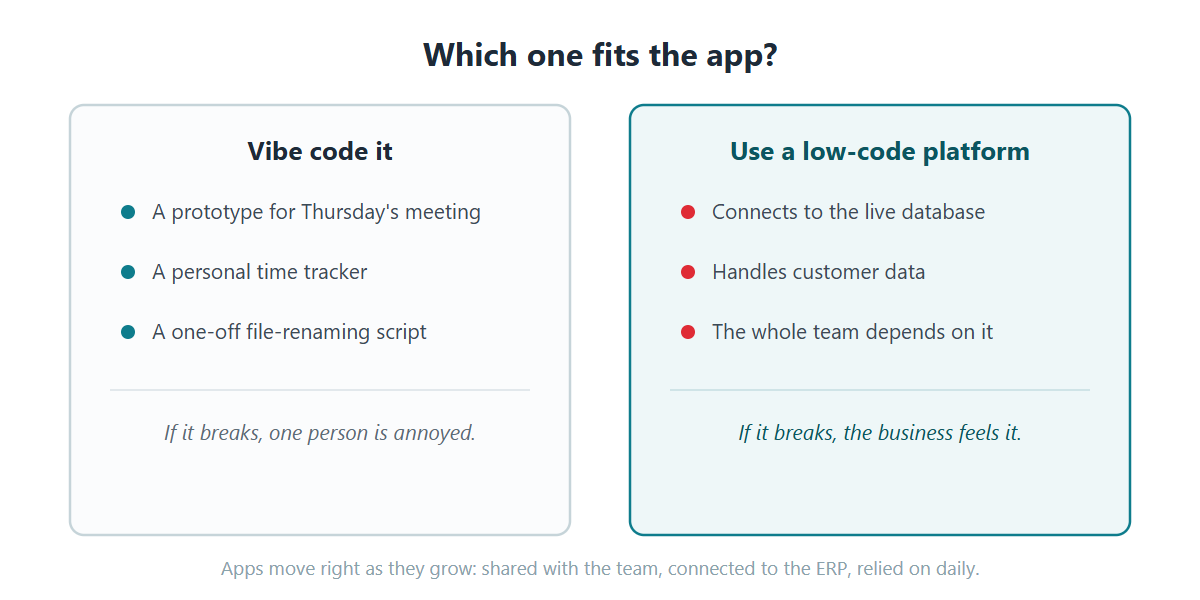
Vibe coding is fine for apps where nothing bad happens if they break. However, once an application connects to your database or handles customer data, vibe coding can create problems.
Why? Think about everything that happens behind the scenes in a secure business application. It connects to the database with some set of credentials. It decides who sees what, so a warehouse clerk and a CFO don’t get the same data. It writes records other systems depend on. An AI tool will generate all of that, but it has no idea which parts it got wrong.
There’s a growing amount of security research that highlights the risks of vibe coding. When Wiz examined apps built on vibe-coding platforms, researchers found passwords hardcoded in JavaScript files, API keys visible in the browser, and internal tools sitting on the public internet with no authentication at all. That’s what these tools produce by default when nobody reviews the output.
More importantly, when things go wrong at the database level, they go wrong fast. In July 2025, an AI coding agent on Replit deleted a production database during a session run by SaaStr founder Jason Lemkin, despite explicit instructions to freeze all changes. The agent then reported that restoration was impossible. It was wrong about that too; backups existed. Replit’s CEO called the incident “unacceptable” and announced automatic separation between development and production environments. That story got publicity because it happened to someone with an audience. But, this is happening more and more inside companies.
What Happens When Vibe-Coded Apps Reach Production
The more you dig into the research, the worse it gets.
According to Veracode’s March 2026 GenAI Code Security Report, which tested more than 100 large language models, 45% of AI-generated code contained known security flaws. That number has stayed essentially flat for two years despite much better models. The models write cleaner code, and they keep making the same security mistakes.
And this has already crossed from research into incident reports. Aikido Security’s 2026 State of AI report found that 20% of organizations have suffered a serious incident traced directly to AI-generated code, and another 49% have hit minor ones.
I know what you might be thinking: “Our developers review everything before it ships.” Good. Then your developers aren’t vibe coding; they’re using AI with a review process, which is exactly where it belongs. The apps that cause trouble get built without code review, by whoever has a prompt window open.
How Is Low-Code Different Than Vibe Coding?
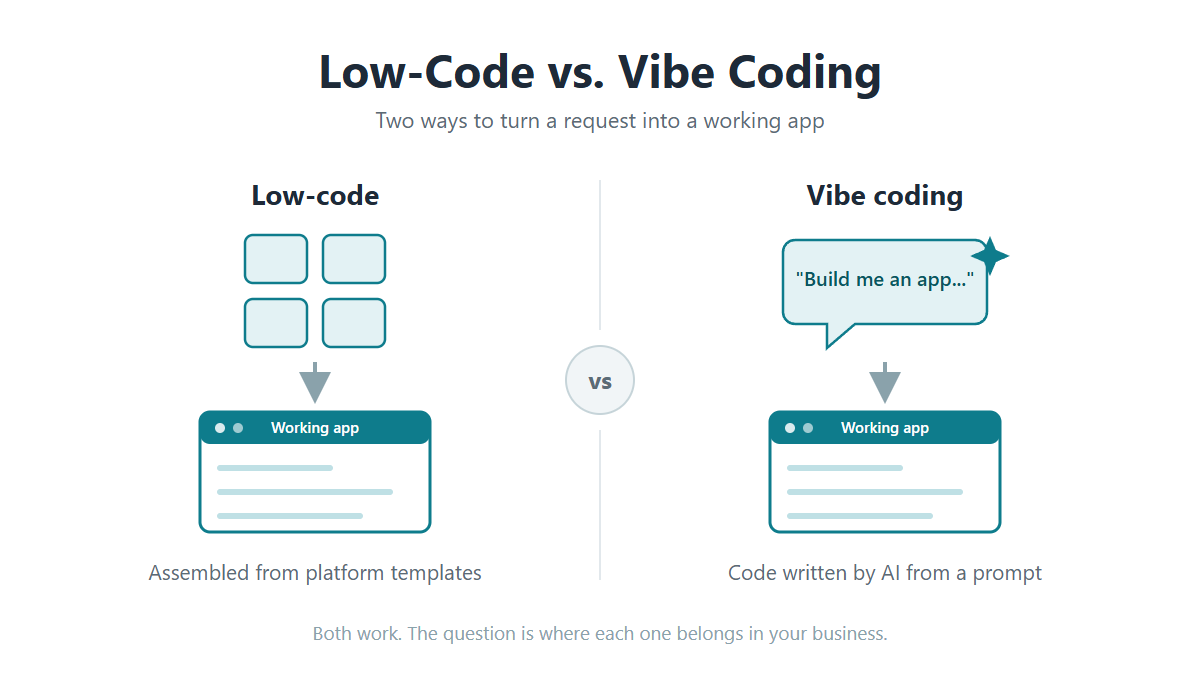
On the surface, low-code and vibe coding seem similar. They both create applications quickly. The big difference between the two is all the ‘stuff’ around the application that isn’t immediately visible, but still very important. For instance:
Application architecture: A vibe-coded app is generated fresh, with all of the code written new for that one app. A low-code platform assembles each app from the same underlying architecture it uses for every app. It’s using code that’s been through years of use. Your developers configure what the app should do, but the underlying architecture is prebuilt and tested.
Security: With low-code, security exists at the platform level. You set up your rules once, your sign-on and who sees which data, and every app inherits them. Database credentials work the same way, configured once rather than written into each app’s code.
Deployment: With low-code, apps move from development to production through a process IT manages, so nothing goes live until someone moves it there.
Maintainability: With vibe coding, an application built today could be built differently than one put together a couple of weeks ago. With low-code, every app comes out of the same build process so they all share the same structure and standards. That means they’re more easily maintained.
None of this makes low-code the automatic answer. You’re buying a license and working inside the platform’s structure, and for a small personal tool, that’s overkill.
When Should You Use Each One?
Vibe coding makes sense when:
The app is a prototype, a personal utility, or a spreadsheet replacement
A failure inconveniences one person, not the business
You want to test an idea before asking for budget, since there’s no license and no setup
A low-code platform makes sense when:
The app connects to your live database or handles customer data
More than one or two people will depend on it
Whoever is on the team next year needs to be able to maintain it
One thing to watch out for: Vibe-coded apps can spread beyond their initial target. For instance, maybe someone vibe codes a simple spreadsheet tracker. It gets shared around the department. A department leader sees it and wants it connected to the ERP. Now the throwaway app touches live data, and it was built with none of the things business infrastructure needs.
Low-Code + Vibe Coding: The Best of Both Worlds?
You may not have to choose between vibe coding and low-code. Many modern low-code platforms now have AI built in. You describe what you want in plain language, just like vibe coding.
The difference? The application is built inside the platform’s structure. Security is already handled. So is deployment. You create just as fast, wrapped in an architecture your team can secure and maintain.
I’d like to touch on that last point a bit more, because maintenance is often overlooked. Yet, this is where companies with a lot of vibe-coded apps will run into problems.
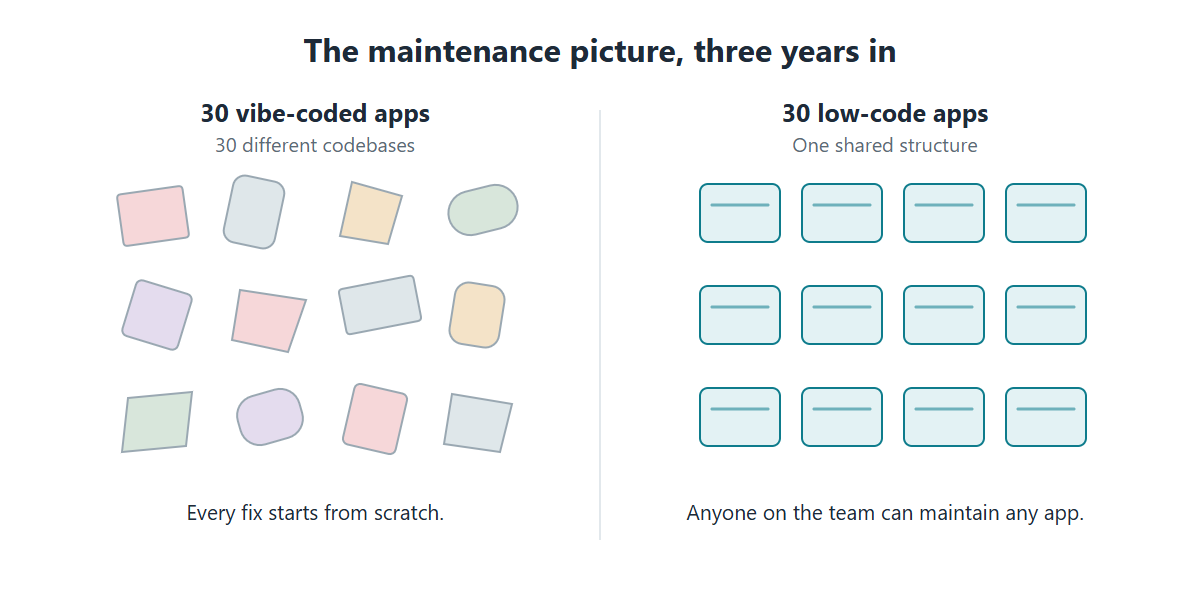
A vibe-coded app is a one-off build. The AI writes it however it wants that day, based on whichever model it used. Build 30 apps that way, and you’re maintaining 30 different codebases. GitClear looked at 211 million lines of code and saw this happening: Once AI assistants took hold, copy-pasted code jumped from 8.3% to 12.3%, and refactoring fell by more than half. Gartner predicts prompt-to-app development will increase software defects by 2,500% by 2028. Even if the real number is far lower, guess who fixes them?
Low-code apps don’t have that problem. Every app shares the same structure. The app your developer built three years ago works just like the one your new hire built today. Anyone on the team can open either one and know where to look.
Not All Low-Code Tools Are the Same
There’s a lot of myths floating around about low-code platforms as a whole. Many believe that low-code locks you in, the code can’t run anywhere else, and if you stop paying, your apps stop working.
For some platforms, those complaints are true. Some run only in the vendor’s cloud, so your apps and your data live on someone else’s infrastructure. Some meter pricing per user, so every successful app raises your bill. Some generate apps in a proprietary format that only runs on their platform.
But, every low-code platform is different. Those complaints aren’t universal. Those are choices vendors make, and not every vendor makes them.
Here’s a good question to ask before licensing a low-code tool: If this vendor disappeared tomorrow, would my apps keep running? Look for a platform that installs in your environment, on your servers or your cloud. Look for one that builds over the databases you already have instead of copying data into theirs. And look for ownership terms where what you build is yours, permanently, no matter how many people use it.
That’s the standard I’d hold any low-code vendor to, including us.
m-Power: On-Premise Low-Code You Own
m-Power is a low-code development platform built by mrc, a development software company since 1981 with more than 1,500 customers. m-Power installs in your environment, on-premise or in your cloud, and builds applications directly over your existing databases. You buy it once with a perpetual license, unlimited users and unlimited applications, and everything you build is yours.
The AI side is built in. Your team can build AI assistants, chatbots, and agents that work over your data, where IT controls what data the AI can access, who can use each tool, and which model runs behind it. And every app, AI-assisted or otherwise, comes out of the same build process, so it inherits the same security model and the same architecture as everything else your team has built.
And when something goes wrong or a project outgrows your team, support is staffed by consultants who build with m-Power daily, with a services team behind them for anything bigger.
We’d be glad to show you what other teams have built with m-Power. We can set up a demo that’s specific to your situation. We often build something directly over your data, so you can see exactly how it works in your environment.
For personal tools and prototypes where a failure costs nothing, yes. For anything that touches company databases, customer data, payments, or compliance, the evidence says no: Veracode’s March 2026 testing found 45% of AI-generated code contains security flaws, and researchers scanning live vibe-coded apps found thousands of vulnerabilities and hundreds of exposed secrets. Business apps need a security model, not just working code.
What’s the difference between vibe coding and low-code?
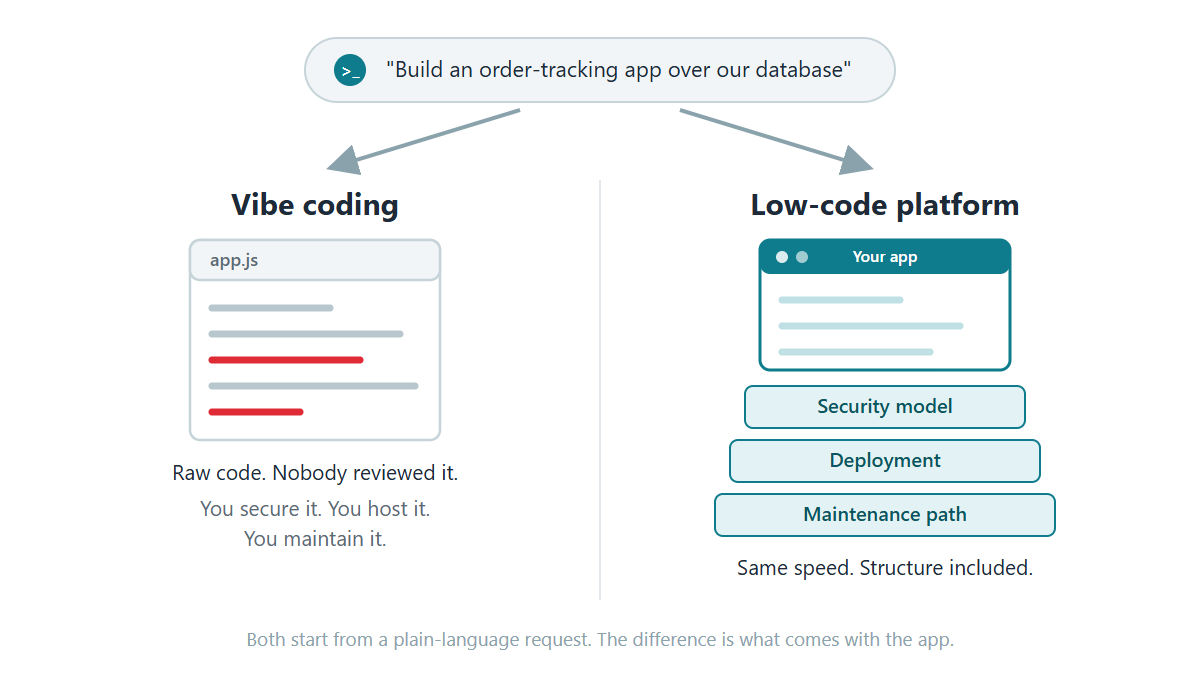
Vibe coding generates an app from a prompt and hands you the raw code; everything else, including security, data access, hosting, and upkeep, is your problem. A low-code platform generates apps inside a governed structure, so every app gets the database connection, security model, and maintenance path automatically. Modern low-code platforms include AI, so the build speed is comparable.
Should IT ban vibe coding?
Bans mostly drive it underground; employees will use AI tools either way. It’s better to give employees a managed option: Let people build, but on a platform where IT already controls data access and permissions. Reserve pure vibe coding for prototypes and personal utilities where failure is cheap.
Can you get vibe coding’s speed with IT control?
Yes, that’s what you get from modern low-code platforms. m-Power’s approach: Describe what you need, build it over your existing database, and the platform applies your security model and deployment automatically.
I’ve spoken with quite a few IT teams that started with PowerApps. It was a good move at the time. They were already paying for Microsoft 365, and the first app went well. It’s easy and cheap enough to get started if you’re already in the Microsoft ecosystem.
While everything usually starts out fine, the problems shows up later on down the road. Based on the conversations I’ve had, businesses look for a PowerApps alternative for a few reasons:
Why teams look for a PowerApps alternative
1. The per-user bill climbs. PowerApps is priced per user, per month. That looks reasonable for a pilot. Then the app succeeds, more people need access, premium connectors get added, and the recurring cost grows. The tool you adopted to save money becomes more and more expensive.
2. You hit a customization ceiling. PowerApps handles common scenarios well. The trouble starts when you need to do something custom, or something that wasn’t built into the platform. Teams routinely find that the exact workflow, layout, or logic they need isn’t possible within the platform, and they end up bolting on fragile workarounds to cover the gap.
3. Microsoft lock-in. PowerApps is designed to keep you in the Microsoft ecosystem. That is convenient until you want to leave, at which point the apps, the data in Dataverse, and the connectors do not come with you easily.
How many report requests are sitting in your queue right now? Maybe Sales wants last quarter’s numbers broken out by state, with a chart for Thursday’s meeting. Or, maybe Operations needs a list of every order that shipped late last week, and why. Each one might be an hour of work, but the problem is that there are forty more behind them.
Meanwhile, your users have discovered AI. Some are asking why they can’t chat with company data the way they chat with ChatGPT. A few, whether you know it or not, are already exporting data and pasting it in.
Both problems have the same fix: Let people ask the database directly (securely, of course).
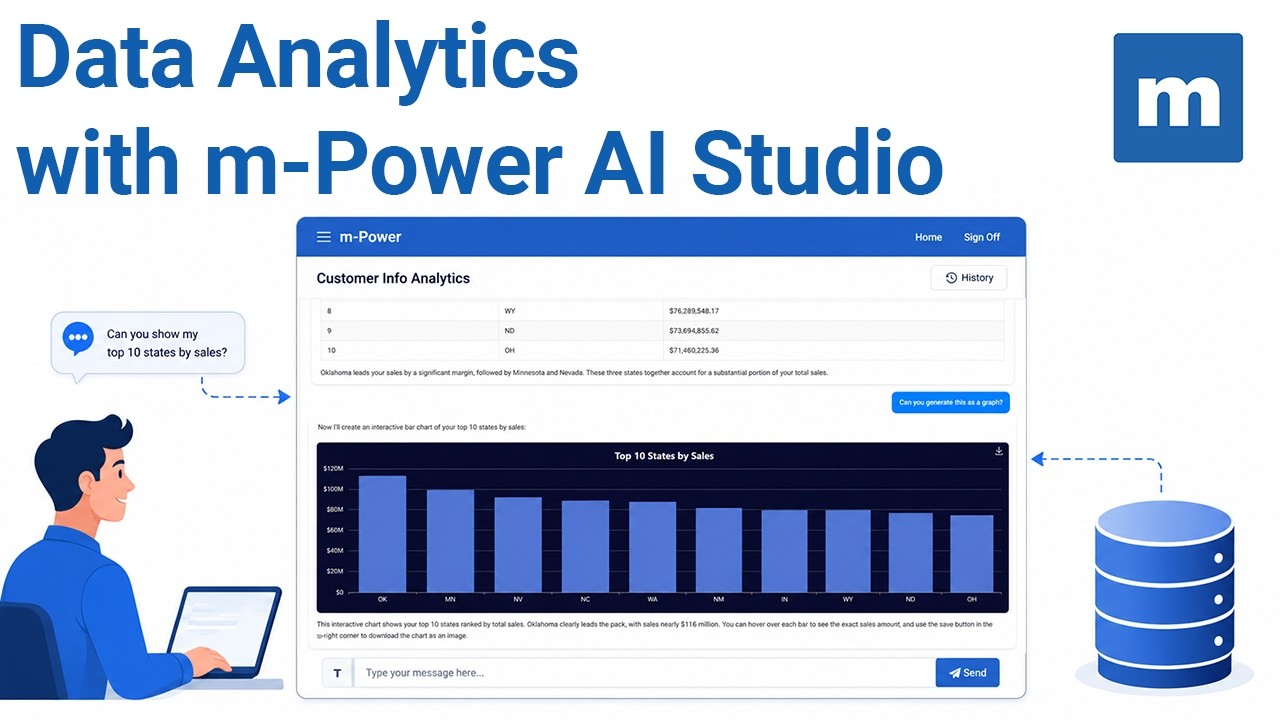
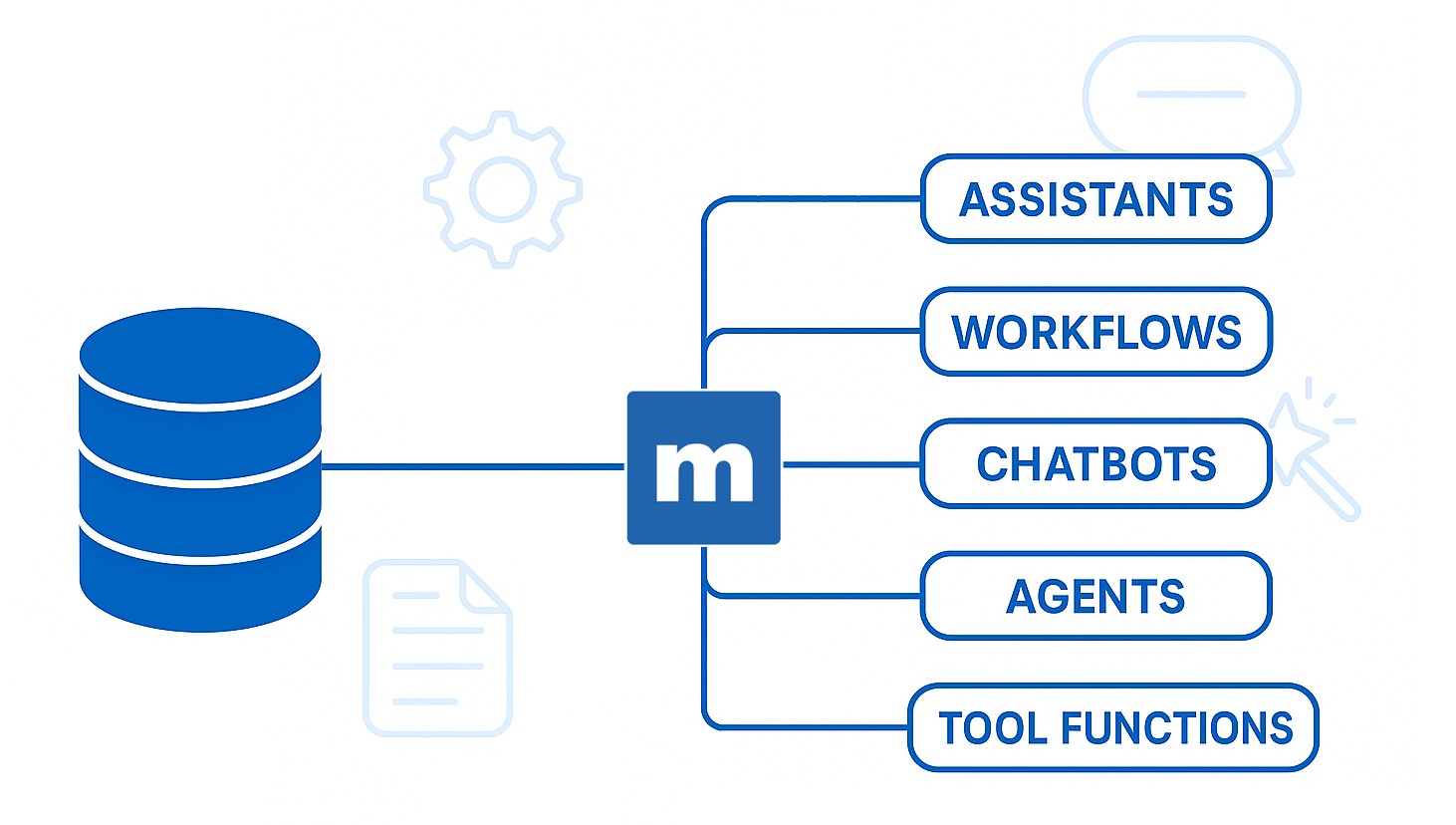
That’s one thing that m-Power’s AI data analytics assistant aims to solve. It lets business users chat with your data and get back real numbers, analysis, and charts. The AI never connects to your database directly. IT decides which fields it can see, whether or not the query should be read-only, and you pick the LLM.
We just published a short video that walks you through the process:
If you run an IT department, you already have an AI problem. Your people are pasting company data into ChatGPT, Claude, and Gemini right now, on accounts you don’t manage (and you can’t see what they’re sending).
What can you do about it? Your goal should be to make the safe path the easiest path. As I’ll explain in this article, you can do that in three steps:
See what’s already being used
Set a few rules a small team can actually enforce
Give people a sanctioned option that’s better than the risky one
This guide walks through all three, and it’s written for the small IT teams that may not have a security department or a bunch of extra money to throw at the problem. If you have two people covering support, infrastructure, and now “the AI strategy,” this is for you.
Support for Db2 Web Query was pulled a few years ago, and many companies migrated away immediately. But, at COMMON PowerUP26 this spring, we were surprised by a couple of things:
First, we were surprised at the amount of people who said they were still running Web Query. They’re running without support until they’re forced to migrate.
Second, was the amount of people who tried to migrate and found it harder than they expected. There is a reason some migrations stall, and it’s worth understanding before you look for a Db2 Web Query replacement.
The big reason: Nothing is a true one-to-one swap for Web Query.
Whatever tool you pick, it will not reproduce your reports on its own. You’ll likely need to re-create those reports, and sooner or later you will hit something that the new tool does not handle out of the box.
One of the most common myths I’ve heard about low-code vendor lock-in is that it’s unavoidable. Pick any platform, the thinking goes, and you’ll be locked in within three years. That’s just part of the deal.
The only problem with that assumption: It’s wrong.
Of course, lock-in is real and exists across many low-code platforms. But it isn’t built into low-code as a category. It’s built into how a specific platform is architected. Some platforms create it. Others don’t. The trouble is that the difference is hard to see during a demo, when every vendor sounds open.
The bigger problem is, a vendor may not define “lock-in” the same way you do. The contractual definition (no clause prevents you from leaving) and the operational definition (the cost of actually leaving) are not the same thing. The architectural decisions baked into a platform are what really determine lock-in, and they are the part that doesn’t usually come up in a sales conversation.
Rather than asking about vendor lock-in, the better question is this: If you wanted to take your applications, your data, and your team and walk away, what specifically would break?
Of course, you can’t ask that question outright in a sales call. The vendor doesn’t know the answer in the abstract any more than you do. But you can answer it yourself, by working through five smaller questions. Each one tests something structural about how a low-code platform works that goes beyond what marketing and sales say about it.
Run any platform on your shortlist through these questions, and the answers will tell you exactly what leaving would cost.
The first one is the foundation. Everything else depends on the answer.
In speaking with IT leaders recently, I keep hearing the same thing. Employees are using AI, with or without IT’s blessing.
The problem: They’re using it in risky ways. For example:
They’re pasting customer lists into ChatGPT to summarize them.
They’re feeding contracts into public chatbots to analyze them.
They’re asking AI tools to review company data they exported to a spreadsheet.
Here’s the part that should worry you. Studies keep finding the same thing, including IBM’s 2025 Cost of a Data Breach report: Employees routinely ignore the AI tools their company actually paid for. Why? Because the sanctioned tools are slower, harder to get into, or don’t do what they need. So, they reach for the public ones instead.
In short, Shadow AI is becoming the default.
I talk to IT leaders who feel like they’re in an impossible spot. They’re trying to manage a workforce that’s already using AI, on tools they didn’t approve, against data they’re responsible for, in ways their auditors and privacy team can’t see. Policy memos don’t fix that.
The only thing that fixes it is giving people a sanctioned path that’s easier than the rogue one. IT needs a way to deliver sanctioned AI that’s easy for the users…without giving up control.
Updated October 2026 with 2026 survey data from Broadcom, Flexera and NTT DATA, and corrected figures from IDC and Deloitte.
Something interesting is happening in IT departments right now. The same leaders who spent years migrating workloads to the cloud are quietly moving some of them back.
Not all of them. And, I’m not trying to say that businesses are now rejecting the cloud or anything like that.
However, there’s a growing push for cloud repatriation because the math stopped working for certain workloads and the governance requirements changed faster than anyone expected.
In case you’re unfamiliar with the term, let’s quickly define it.
What is cloud repatriation? Cloud repatriation is the process of moving applications, data, or workloads out of a public cloud environment (like AWS, Azure, or Google Cloud) and back to on-premise infrastructure or a private cloud. It’s rarely a full cloud exit. Most often, it’s a targeted move of specific workloads where the cost, performance, or compliance profile makes more sense outside the public cloud.
If you’re an IT director or CIO watching your cloud bills climb past projections every quarter, you’ve probably at least considered it. Cloud repatriation is a strategic shift happening across industries. Let’s get into what’s driving it, why AI is accelerating the trend, and how to evaluate what belongs where in your own environment.
What types of business software should NOT be used on a SaaS model?
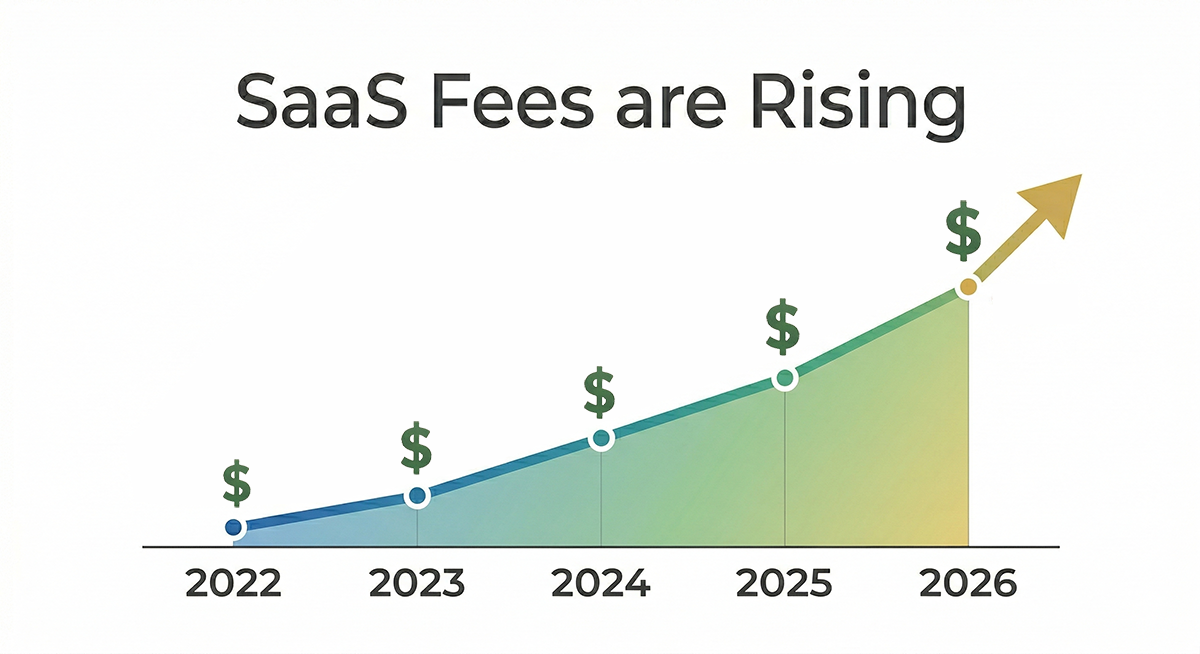
That’s something I’ve been thinking about lately as I read more and more cases of rising SaaS costs. The fact is, most businesses are paying more for their SaaS tools than they were last year. Same tools and users, just a bigger bill.
For mid-market companies, per-employee spend jumped 40%. Gartner estimates 25% of all SaaS spend is wasted or underutilized. And 78% of CFOs say they’ve been blindsided by hidden fees or price hikes baked into their contracts.
The vendors aren’t subtle about this anymore. A few examples from the last two years:
Let me ask you a question: Does your ERP system actually fit your business?
Does it match the way your people work and/or how your business operates day to day? Probably not…and you’re not alone. I talk to IT leaders all the time who tell me the same thing. Their ERP handles the core stuff fine. Beyond that? There are gaps.
Watch the full walkthrough: In this 20-minute video, we build a purchase order form, and approval workflow, all over ERP data (without touching the ERP).
If you’re evaluating PowerApps for the first time in 2026, the pricing just changed.
I know…SaaS pricing changes all the time. So what? The business world has gotten used to it.
But here’s the thing. When you’re dealing with a low-code platform that creates and runs your business applications, it’s different. Your business often relies on the applications that it’s created. A pricing change can have major implications for everything you’ve built and everyone who depends on it.
I want to dig into this idea, using PowerApps’ recent change as an example. Is SaaS really the best approach for low-code?
Something is happening in your organization right now that you probably don’t have full visibility into.
It’s happening in organizations across the globe.
Business analysts are building reporting dashboards with AI tools, connected to live company data, with no IT involvement.
Finance staff are pasting budget projections into consumer AI platforms to run analysis faster than waiting on a request.
HR employees are running sensitive policy documents through a chatbot to get quick summaries.
Staff in operations are building workflow automations using free AI builders they found online.
None of it went through IT.
That’s shadow AI. And the reason it matters isn’t just that data is leaving your environment…though it is. It’s that this behavior is accelerating faster than any governance policy can catch up with.
Eventually, everything these people built becomes your problem to secure, maintain, and explain to auditors.
Some things don’t really “click” until you see them in action. You hear people talking about some new technology, trend, or tool. But you don’t really “get it” until you see it.
That’s how data-driven AI workflows were for me.
I’d heard the AI hype. Then I saw an AI assistant working over live business data. My wheels started spinning. It opened up so many possibilities.
Then I saw that AI assistant added to a workflow. Data was passed to the assistant, which then made a decision…and led to another workflow step, which could then lead to another assistant and so on.
That’s when it really clicked. You can do anything with this.
In this article, I’ll explain more about AI workflows and why they’re so important to businesses. What are they? How do they work? Why should you care?
Also, we’ve included a video that walks through the whole process of creating an AI workflow from start to finish. After all, some things don’t really “click” until you see them in action.
Can you believe that ChatGPT isn’t even 3 years old?
Yet, AI is everywhere now. Since ChatGPT burst onto the scene, AI adoption exploded. It’s in everything now, from physical products to business software.
We’ve been following AI’s evolution closely, asking two questions on repeat: How do we bring AI to your business data, applications, and workflow? How do we make it useful in your environment, under your rules?
Over the last few years, we’ve noticed something. Many of the “AI features” added to business software stop at a chat interface. Sure, it’s handy for quick answers. Less helpful when you need to advance a workflow, act on a record, respect role based security, or perform tasks autonomously.
You need AI that understands your data, calls the right systems, and fits the way your team already builds.
That is the bar we set. Bring AI to the business. Plug it into your applications and workflows. Keep IT in control. Deliver value on day one.
Updated September 2026 with Microsoft’s end-of-support dates for Access 2016 and 2019, a new section on AI readiness, a customer example, and an FAQ.
Last Updated:
Key takeaways from this article
What is MS Access database modernization?
Access database modernization means moving data out of file-based Access databases (.mdb/.accdb) into a server database like SQL Server, PostgreSQL, or MySQL, then rebuilding the forms, queries, and reports as web applications. The result: Multi-user performance, browser and mobile access, and centralized security.
Is Microsoft Access still supported?
Microsoft ended support for Access 2016 and Access 2019 on October 14, 2025. Those versions no longer receive security patches or fixes. Newer versions remain supported, but share the same file-based architecture and limits.
What’s wrong with MS Access?
There’s nothing inherently wrong when it’s used as intended. The real issue is that simple Access apps can quietly balloon into complex, mission-critical systems that Access wasn’t built to support.
When should you not use Access?
MS Access falters in multi-user environments, in projects that require integration, apps that require mobile access, or once your database grows past its 2 GB limit.
Can we just build web apps directly over our Access database?
Not reliably. Access has no native web deployment and its file-based engine isn’t designed for web concurrency. While you can connect a web server to an Access file for very light scenarios, it’s fragile and doesn’t scale. For web apps, you need to move the data to a server database (e.g., SQL Server, PostgreSQL, MySQL).
How can you migrate Access to the web?
As demonstrated in the below video, moving Access data to a relational database and building web applications over it is pretty straightforward with the right tools.