Skip to Content mrc logo mrc logo
  • What is m-Power?
    Overview Demos Build Process Case Studies Specs Pricing Trial
    m-Power Resources
    Overview How-To Videos Webinars & Podcasts White Papers Fact Sheets
  • What does m-Power build?
    Solutions by Industry
    Overview Database Front-Ends AI Reporting CRM Systems Business Intelligence Dashboards Inventory Management Mobile Apps ERP Enhancements Modernization
    Spreadsheets to the Web MS Access to the Web B2B/Web Portals Scheduling Embedded Analytics Web Forms Workflow Data Exploration Budgeting & Forecasting APIs & Web Services Db2 Web Query Alternative
    Solutions by Industry
    Overview Manufacturing Government Foodservice Software Vendors Logistics & Supply Chain Software Consultants Healthcare
  • Development Services Training Mentoring
  • Overview Partners Press Releases Careers Events Contact Blog
  • Support Home FAQ Documentation Customer Portal Enhancements Updates Roadmap Techblog
Try m-Power

m-Power Manual

Browse:

  • Home
  • m-Power Data Explorer
  • White Labeling in m-Power DX
Back to Manual

White Labeling in m-Power DX

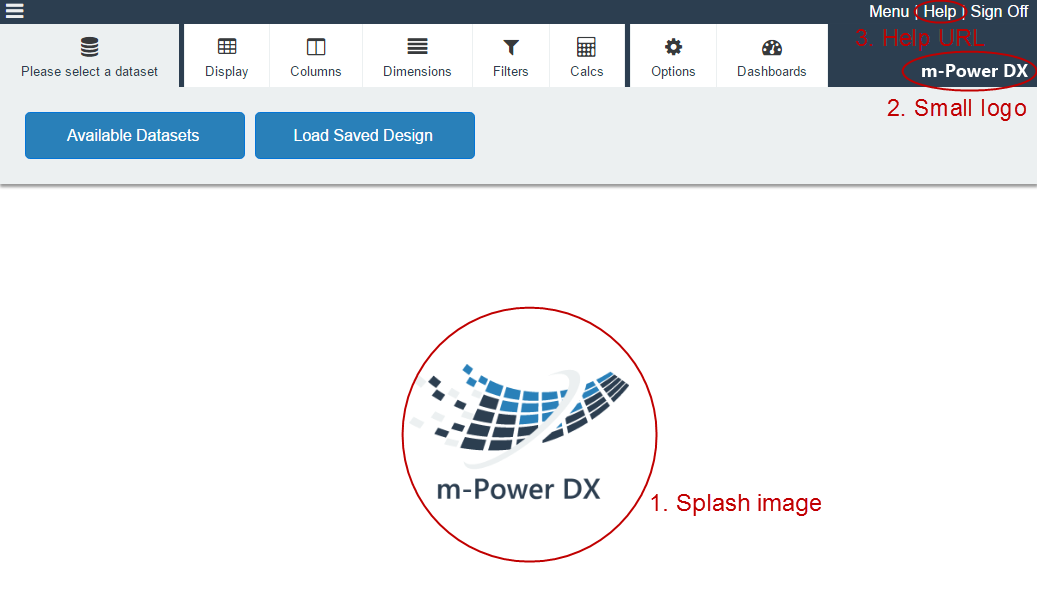
The m-Power Data Explorer supports the use of white labeling. This may be particularly important to you if you wish to rebrand the look of the Data Explorer for your end-users.

At present, three aspects of the Data Explorer are customizable for white labeling, they are:

  1. Splash Image
  2. Small logo
  3. The "Help" URL

To customize these options, please edit your /mrcjava/WEB-INF/classes/mrc-runtime.properties file.
Add the 3 following lines to the file:
DX_small_logo=
DX_splash_image=
DX_help_url=

Enter the necessary image file names for DX_small_logo as well as DX_splash_image. While any image works, mrc recommends .png images with transparent backgrounds.
Note: This feature requires images to be stored in the /mrcjava/mrcclasses/dx folder.

Your DX_help_url should resolve to a fully qualified help site.

Here is an example of

Once saved, restart tomcat so your changes can take effect.

Note : You are not required to customize all 3 options. Any option not customized will revert back to the default.

Created: May 10, 2017

Search


Browse By Category

Build Process (13)
Starting with m-Power (8)
Retrievals (10)
Reports (15)
Summaries (4)
Maintainers (17)
Graphs (8)
m-Power Data Explorer (4)
General (24)
Calculations (5)
Utilities (9)
m-Power Administration (23)
Security (11)
Freemarker (6)
m-Painter (29)
Form Validation (5)
External Objects & UDFs (12)
Deprecated Documentation (23)
Bootstrap Templates (7)

Popular Tags

Bar Graphs Bootstrap Templates Retrieval Parameters Graph Properties Application Properties App Properties Dropdowns Dates m-Painter Retrievals Tomcat Calculations SQL Getting Started External Objects Email Database Data Dictionary Graphing Maintainers Video DB2 Reports Security Maintainer Performance Administration Advanced Record Selections Form Validation Production mrc-Productivity Series Excel Admin Popular Freemarker Report Prompt Screens Build Process RPG Summaries Graphs Java Compiling

See all tags »

michaels, ross & cole, ltd. (mrc)

Privacy Policy Cookie Policy Cookie Settings Notice at Collection Do Not Sell or Share My Personal Information

mrc (US)

2001 Midwest Road
Suite 310
Oak Brook, IL 60523
630-916-0662

mrc (UK)

Mortlake Business Centre
20 Mortlake High Street
London, SW14 8JN
+44-20-335-59566


© mrc. All rights reserved.