

m-Power maintainer type applications have long supported checkboxes as alternative options to a text input.
A checkbox list in a web form would imply multiple values can be selected, as opposed to just one single value. This document will explain specifically how multi-value checkboxes can be set up in your maintainer form.
To implement:
- Open m-Painter
- Insert an option list on your input that will be a checkbox.
That’s it! Once you save and run your application, the checkbox option will appear and innately allow multiple selections:
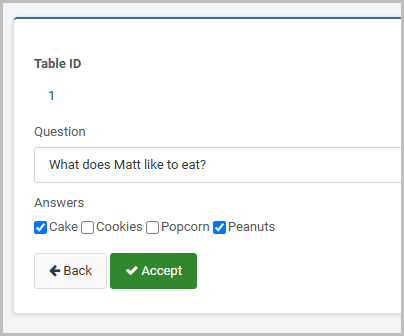
In the database, the multiple selections will be stored in a single column, delimited with the || separator:
| ID | QUESTION | ANSWER |
| 1 | What does Matt like to eat? | Cake||Peanuts |
| 2 | What does Billy like to eat? | Cake||Popcorn |
| 3 | What does Rick like to eat? | Cake||Cookies||Popcorn |
Note: The default delimiter will be double pipes:
value1||value2||value3If you wish to use a different symbol set as a delimiter, go to
Admin -> Dictionary Configuration -> Runtime Application Settings.
Here you should change the Delimiter for Multi Checkbox option to a character(s) of your choosing.
