Does your company rely heavily on spreadsheets? Would you like to learn how to better secure your spreadsheet data and make it 100x more useful to your business?
How? It’s simple. Move it to a database. Before I show you how, let me explain why this is so important. Moving your spreadsheet data to a database helps in a few specific ways: …
A recent study finds that a whopping 93% of businesses indicate there is an IT skills gap–a substantial shortfall between the supply of qualified IT professionals and the demand for modern IT skills. As technology evolves at breakneck speed, this IT skills gap is widening. Businesses are having more and more trouble finding IT pros with the modern skills they require–and the problem is only growing worse.
The big(ger) problem: The same study finds that the importance of information technology to a company’s overall success is growing. In other words, as technology becomes more important, finding employees with modern technology skills is becoming more challenging.
The real difficulty: Your company must address this skills gap while staying current with the ever-changing tech trends. After all, your business won’t stop and wait while you fix the skills gap. The competition won’t take a timeout while you search for modern skills. You must bridge the IT skills gap while operating at full speed.
How can companies deal with the shortage of qualified IT pros and developers? Outside of outsourcing everything or bringing in high-priced consultants, how can your company bridge this growing skills gap while remaining competitive?
Today, I’d like to focus on a few ways to address this IT skills gap in your company. How can your company stay on the cutting edge of technology in the midst of a skills gap? Here are 6 ways: …
Today, let’s explain another important term in the world of web application development: event-triggered messaging. What is it, why is it important, and how does it help your company? Let me explain.
Event-triggered messaging is a web application feature that involves automated email or sms messages sent on a pre-determined schedule, or based on application events. Messages can be triggered by any event, from customer interactions to changes in data and everything in between. …
Every week, I share the most interesting and useful tech articles that I’ve found over the past week. This week’s top articles focus on data visualization, best practices for updating legacy applications, and more. I hope you find them useful:
IT Shifting from support function to business strategy
Nearly two out of three CIOs and other technology professionals say there’s a “major IT transformation” underway in their organizations, driven largely by broader efforts to deliver added value, enhance business performance and increase security, according to a new survey. …
Every week, I share the most interesting and useful tech articles that I’ve found over the past week. This week’s top articles focus on data visualization, measuring mobile app ROI, and more. I hope you find them useful:
Application modernization a top federal priority
Over the past five years, legacy modernization has been a hot topic in federal government IT discussions. Modernization makes application environments more efficient and responsive, and puts them in a stronger position to address new requirements and technology. …
Every new tech trend comes with varying levels of acceptance among IT departments. When the web first rolled around, some recognized its value and jumped on board. Others sat back and waited. I’ve noticed similar responses to the recent major trends, like mobile and cloud computing.
Now, I’m not going to sit here and tell you which trends to adopt and which to ignore. After all, every company has different needs.
However, I’d like to take a step beyond the recent trends, and focus instead on the new “realities” brought about by these trends. What’s the difference between a trend and a reality? While you can choose whether or not to adopt a trend, realities aren’t up for debate. They’re happening, whether you like it or not. You can’t sit back and see what others are doing. You must adapt.
So, what are these new realities? While this isn’t an exhaustive list, here are 5 realities to which IT departments must adapt: …
Every week, I share the most interesting and useful tech articles that I’ve found over the past week. This week’s top articles focus on mobile skills IT pros must master, security statistics that show we need to reinvent enterprise IT, and more. I hope you find them useful:
Developing enterprise mobile applications
Mobile applications seem like a rite of passage for many enterprise development teams until they face the reality of supporting multiple devices and platforms. If your company doesn’t have one or two enterprise mobile applications, the perception is that the organization is getting left behind.
Top 10 mobile skills IT Pros must master
In a recent blog post, Gartner outlined 10 mobile technologies and skills that organizations need to master over the next two to three years. Additional training for enterprise IT staff will be especially critical during this time since mobile technology is evolving so quickly, with new risks as well as new capabilities emerging.
Security statistics show we need to reinvent enterprise IT
It seems that in a headlong race to become more agile and deliver on the innovation that the organization and the marketplace demands, enterprises are taking a fairly slack approach towards security. But perhaps this is an unavoidable reaction to the pressures organizations are under – is it feasible to deliver product more rapidly while still remaining secure?
What to consider when selecting a legacy modernization vendor Legacy modernization isn’t an easy task, which is why in some situations an organization may opt to bring in a service provider. To achieve the maximum cost-saving benefits, it’s crucial that the relationship between a client and a vendor be solid. An organization’s laundry list of business needs and provider deliverables needs to be kept in mind when it’s hiring consultants and buying products for business transformation needs.
Updated September 2026 with industry examples, a comparison with dashboards, a section on AI, and an FAQ.
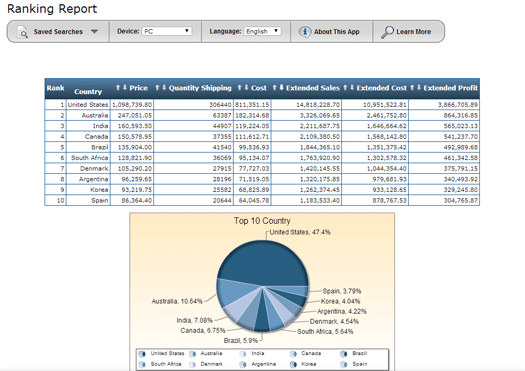
Today, let’s explain an important type of web report that could be a useful addition to any company’s reporting repertoire: the ranking report (also known as “the top N report”). What is it, why is it important, and how does it help your company? Let me explain.
The ranking (or top N) report creates variable rankings, across multiple dimensions, while specifying various selection criteria at run-time. In short, it lets you rank any aspect of your data from best to worst, or vice-versa. It lets users choose from a number of different criteria at run-time, and then instantly run a top/bottom ranking report complete with a graph.
Why use a ranking report?
Ranking reports are simple, yet powerful end-user reporting tools. An IT department can create a single ranking report, include the necessary selection criteria (like product sales, customer info, sales data, etc..), and turn it over to the end users. Based on their desired selection criteria, end users can easily generate top/bottom ranking reports for different aspects of the business.
Sample ranking report, which ranks profitability by country
How are ranking reports used?
As the name implies, this reporting type delivers top-N style rankings. For example, businesses use ranking reports to:
Rank their most profitable products over a select time-frame
Understand their best and worst performing salespeople
View their top/bottom retail locations over the past year
and more
Going one step further, some even combine ranking reports with multi-tenancy. This lets multiple user levels access the same ranking report, but only view the data they’re authorized to view. This approach lets the IT department create just one ranking report, and distribute to all user levels.
Ranking report demo
Here’s a great demo of a ranking report in action. Select from the criteria, click “Run Report,” and you’re all done!
5 Industry Examples of Ranking Reports
Ranking reports work across most industries. Here are five concrete examples that show why this report type is so versatile.
1. Manufacturing: Top 10 Defective Parts by Cost
A quality manager selects a date range and ranks parts by total defect cost. The report instantly shows which components are driving the most waste, so the team can prioritize supplier reviews or process changes.
2. Healthcare: Bottom 5 Departments by Patient Satisfaction Score
Hospital administrators rank departments by patient satisfaction over the past quarter. Instead of sifting through spreadsheets, they see the lowest-performing departments at a glance and can drill into the data to understand why.
3. Retail: Top 20 Products by Revenue (by Region)
A regional sales director runs a ranking report filtered by their territory. They see their top-selling products, compare against the prior period, and adjust inventory or promotional spending accordingly.
4. Distribution: Bottom 10 Customers by Profit Margin
A CFO ranks customers by profit margin to identify accounts that generate revenue but cost more to serve than they return. This data drives pricing conversations and contract renegotiations.
5. Financial Services: Top 15 Loan Officers by Approval Rate
A branch manager ranks loan officers by approval-to-application ratio. High performers are identified for mentoring roles. Officers with unusually low or high rates are flagged for review.
Ranking Reports vs. Dashboards: When to Use Each
Ranking reports and dashboards do different jobs.
Dashboards give a broad, at-a-glance view of multiple KPIs at once. They’re built for monitoring. A dashboard might show you that revenue is down, but it won’t tell you which products or regions are responsible.
Ranking reports answer a specific question: “What are the top (or bottom) performers across a given dimension?” They let users change the criteria at run-time, so a single report can answer dozens of different questions.
The most effective reporting strategy uses both. Dashboards for daily monitoring. Ranking reports for the follow-up analysis when a number looks off.
How AI Is Changing Ranking Reports in 2026
Traditional ranking reports require the user to choose what to rank and how. In 2026, AI adds automated anomaly detection on top. Instead of waiting for a manager to run a “bottom 10” report, an AI-enhanced system can proactively flag when a product, location, or employee falls outside expected ranges.
What matters is governance. AI-driven alerts are only useful if they run over accurate, governed data. If your ranking reports pull from ungoverned spreadsheets or siloed systems, AI amplifies the problem instead of solving it. It needs clean data in a real database, with access that IT controls.
How to Build Ranking Reports with m-Power
m-Power is mrc’s low-code development platform. It runs directly over a company’s existing databases, so an IT team can build ranking reports, dashboards, and AI tools without migrating data. Here’s what building a ranking report looks like:
Connect to your database.m-Power runs directly over DB2, SQL Server, MySQL, Oracle, and PostgreSQL. No data extraction or migration is needed.
Select your ranking criteria. Using a point-and-click interface, choose the fields users can rank by (product, region, salesperson, time period, etc.).
Set run-time parameters. Let users choose how many results to display (Top 5, Top 10, Top 50) and the sort direction (best to worst or worst to best) at run-time.
Add charts and graphs.m-Power generates interactive charts alongside the tabular data, so users get both the numbers and the visual story.
Apply security. Use row-level security so each user only sees the data they are authorized to access. One report serves every role in the organization.
The build takes minutes. And because m-Power is sold as a perpetual license with unlimited users, you can give ranking reports to every department without adding per-user costs.
John Perrin, CIO at Farner-Bocken, put it this way: “Easily the best technology investment I’ve made in my 20+ year career.”
Want to see it in action?Request a demo and we will build a ranking report over your own data so you can see how it works in your environment.
Frequently Asked Questions
What is the difference between a ranking report and a sorted list?
A sorted list displays every record in order. A ranking report limits the results to the top or bottom N records based on user-selected criteria, and typically includes a chart. The ranking report is meant for quick analysis rather than reviewing every row.
Can non-technical users run ranking reports on their own?
Yes, if the report is built correctly. The IT department creates the report and defines the available criteria. End users then select what they want to rank, choose how many results to display, and run the report themselves. No technical knowledge is needed.
How are ranking reports different from dashboards?
Dashboards provide a high-level view of multiple metrics at once. Ranking reports answer a specific question: “What are the top or bottom performers in this area?” Dashboards are for monitoring. Ranking reports are for targeted analysis. Most organizations benefit from using both together.

 Does your company rely heavily on spreadsheets? Would you like to learn how to better secure your spreadsheet data and make it 100x more useful to your business?