
Updated November 2026
Summary
If you want to give employees a safe alternative to ChatGPT, start by finding out what they’re pasting into it. Most of the time, they’re looking for writing help or have a question about company data. The first one is easy. A business plan from a major AI provider can handle the writing.
The second one is a bit more complex. If employees want to ask AI about business data, they need an approved assistant that has managed access to your data and only shows each person what they’re allowed to see. Without one, people keep exporting files and pasting them into personal accounts. In this article, we’ll walk through how to set up both.
The Problem
Employees are pasting sensitive data into public-facing AI tools like ChatGPT, and unwittingly putting sensitive data at risk.
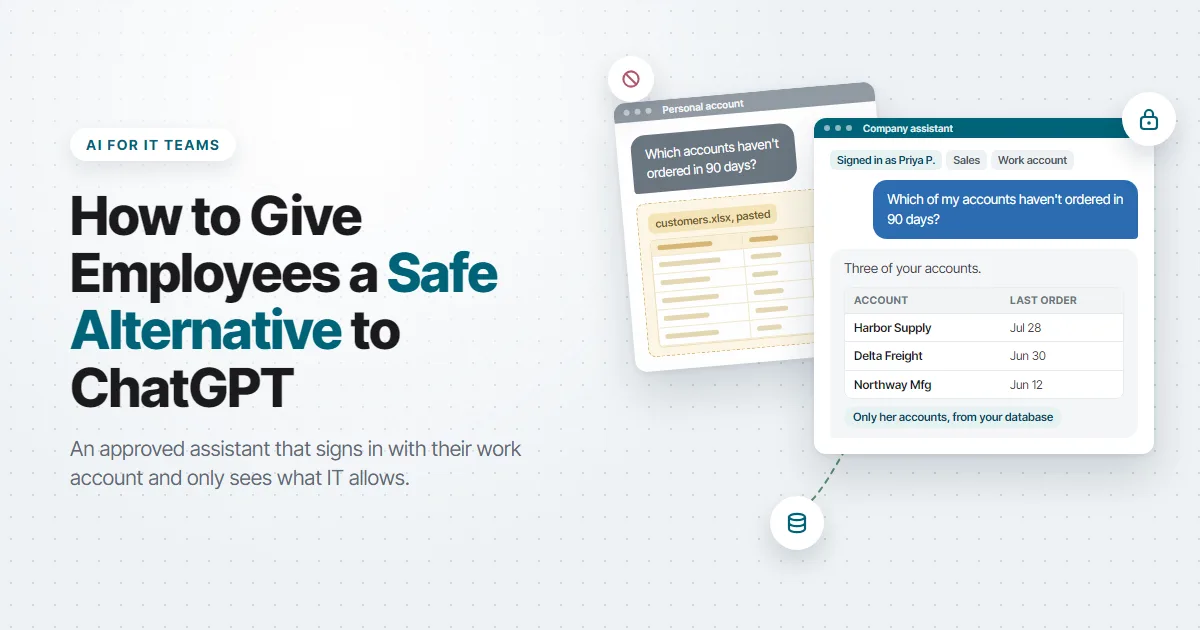
Here’s an example: Suppose a sales manager exports a customer list to Excel, pastes it into her personal ChatGPT account, and asks which accounts haven’t ordered in 90 days. She gets an answer in under a minute. IT never hears about it, and the customer list now sits in an account the company doesn’t control.
In her mind, she isn’t being reckless. She found a faster way to do her job, and doesn’t understand the risk.
Now, many IT leaders will hear about things like this and turn to outright bans. Nobody on their network should have access to these public AI tools, so they block the sites at the firewall and send out a memo. I understand the instinct, but it doesn’t solve the problem.
Why don’t ChatGPT bans work?
Bans don’t work because the people using personal AI accounts are mostly trying to get work done and don’t understand the risks. Blocking a website doesn’t change that.
According to Microsoft’s 2024 Work Trend Index, which surveyed 31,000 knowledge workers in 31 markets, 78% of AI users were bringing their own AI tools to work. At small and medium-sized companies, the figure was 80%. The same survey found that 52% of people who use AI at work are reluctant to admit using it for their most important tasks.
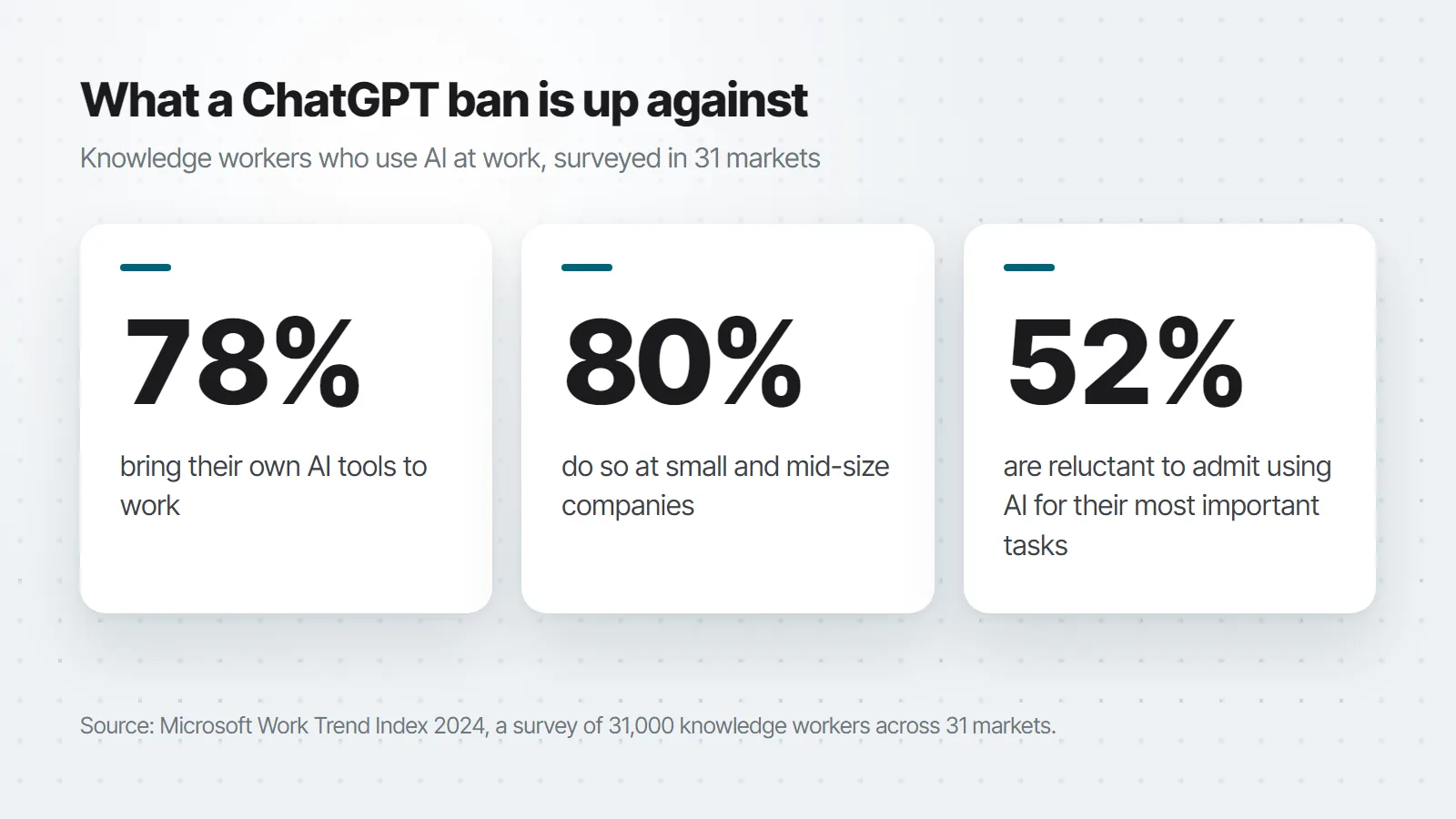
Put all of that together and you can see what a ban does. People keep using AI, on their phones, on home laptops, and in whatever tool the firewall doesn’t manage. They just stop telling you about it, and you lose track of what’s happening.
I know what you might be thinking: “So we just let everyone use whatever they want?” No. You give them something better than whatever they’d use on their own.
What’s the risk with personal AI accounts?
The risk comes from the account type more than the AI company. A personal account runs on consumer terms that the employee accepted, and those terms can be very different from what your company would sign.
Take a look at what the providers say. Google’s Gemini Apps Privacy Hub says human reviewers, including trained reviewers from its service providers, review some of the data it collects. It also tells users, “Please don’t enter confidential information that you wouldn’t want a reviewer to see or Google to use to improve our services.” Google adds that work and school accounts may be subject to different data handling terms.
Anthropic’s consumer terms update makes similar statements. Anthropic says it will train new models on data from Claude Free, Pro, and Max accounts when the user’s training setting is on, and keep that data for five years. Those terms don’t apply to its business plans or its API.
A personal account also leaves IT in the dark. You can’t see what was shared. You can’t pull access when someone leaves, because the account belongs to them. If a customer asks where their data went, you won’t have an answer.
What does an “approved” option look like?
An approved AI tool is one that IT can manage. Before you give one to your employees, make sure you can answer yes to each of these.
- People sign in with their work identity. The tool connects to your directory or single sign-on, so turning off someone’s account in one place turns off their AI access too.
- The data terms are business terms. Get it in writing that prompts and responses aren’t used to train the provider’s models, and know how long they’re kept. Microsoft’s Copilot Chat documentation, for example, says prompts and responses “aren’t used to train the underlying foundation models.” Have legal read the retention terms along with the training clause.
- You decide who sees what. If the tool can reach company data, each person should get back only what they’re already allowed to see in your systems. A sales rep sees their own accounts. HR sees salaries, and other departments don’t.
- Conversations are logged. You need to see what was asked and what came back, for audits and for fixing bad answers. Microsoft says Copilot Chat logs and stores both the prompt and the response for auditing and eDiscovery.
- You choose the model provider. Whatever the assistant sends goes to that provider, so pick one whose terms you’ve reviewed, and make sure you can switch later without rebuilding everything.
- You know what data it can reach. Write down which tables, documents, and fields the assistant can read, and which records, if any, it can change. If you can’t make that list, find out before launch.
How to roll out a safe alternative to ChatGPT
Step 1: Find out what people use today
Check your proxy or firewall logs for AI sites, and ask department heads what their teams use. Make it clear that nobody’s in trouble, or people won’t tell you what they really use. You want to learn two things: Which tools are in use, and what people are asking them to do.
Step 2: Pick an approved tool for general writing
A lot of personal AI use is drafting emails and summarizing documents. A business plan from a major provider can cover that, as long as it meets the checklist above. Before you buy anything new, check what your current vendors already offer under business terms.
On its own, a general chat tool doesn’t know your orders, your inventory, or how much vacation each employee has left. People export company data to answer questions like those, and that’s what step 3 is for.
Step 3: Build assistants for the questions about company data
This is the step that gets people to stop pasting company data into public AI tools. When the sales manager asked about lapsed accounts, she didn’t need writing help. She needed an answer from the customer table, and the only way she knew to get one was to export it and paste it somewhere.
An assistant built over your own database can answer that question directly, without anyone exporting a file. She types the question, the assistant looks up the order history, and she gets the list.
Set it up so the assistant can’t see more than she can. Instead of giving it the whole database, give it a short list of lookups your team has already built and secured, like “my accounts with no orders in 90 days.” Each lookup runs as the signed-in person, so a sales rep gets her own accounts back and nothing else. Then test it. Sign in as one employee and ask for another employee’s records.
We walked through how to build one in How to Build a Chatbot Over Your Own Data.
Step 4: Write a one-page policy that points to the tools
List out the approved tools. Say which kinds of data can go into each one, and say that personal AI accounts are off limits for company data. Keep it short enough that people will read it. When the policy names an approved alternative, people have somewhere to go.
Step 5: Put the assistant where people already work
If the approved tool takes more clicks than the personal account, people will keep using the personal account. Embed assistants in the applications employees already open every day. When you announce them, show each department specific use cases that they can try. If you show them ways that it will help them immediately, they’re more likely to keep using the approved version.
Step 6: Read the logs and add the next assistant
Review what people ask each month. Questions the assistant can’t answer tell you what to build next, and wrong answers tell you which instructions to fix.
Giving employees approved AI with m-Power
The simplest way to roll this out (without building everything yourself) is with a development platform like m-Power. It builds web applications and AI tools over the databases you already run, including SQL Server, Oracle, Db2, MySQL, and PostgreSQL, on-premise or in the cloud. It covers steps 3 and 5 above. You build the assistants over your data, and you can put them inside the applications people already use. Here’s what it gives you:
- Company data, filtered by user. Employees sign in through your authentication, with support for SAML, OAuth2, and Active Directory. Add tools to an assistant in m-Power‘s AI Studio, and it looks up live data through m-Power applications that already apply row-level permissions, so each person gets back only what they can already see. It can also answer questions from your tables with charts, limited to the tables and columns IT chooses.
- Inside the applications people already use. You can embed an assistant in any m-Power application, so people ask their question on a page they already have open, without going to a separate AI site.
- Logs you can read. The AI Trace Viewer keeps a running log of every user message and assistant response, including which tools and models each answer used. We recommend putting it behind a secure login.
- Your choice of model provider. The model is up to you. You set up the account with your provider, so its business terms are the ones that apply. If you connect a third-party model, the assistant uses that provider, so review its terms before you go live.
- No per-user fees. m-Power uses a perpetual license with no per-user fees, and the AI features are included in it, so you can give the assistant to every employee who needs it. Your model provider bills its usage separately.
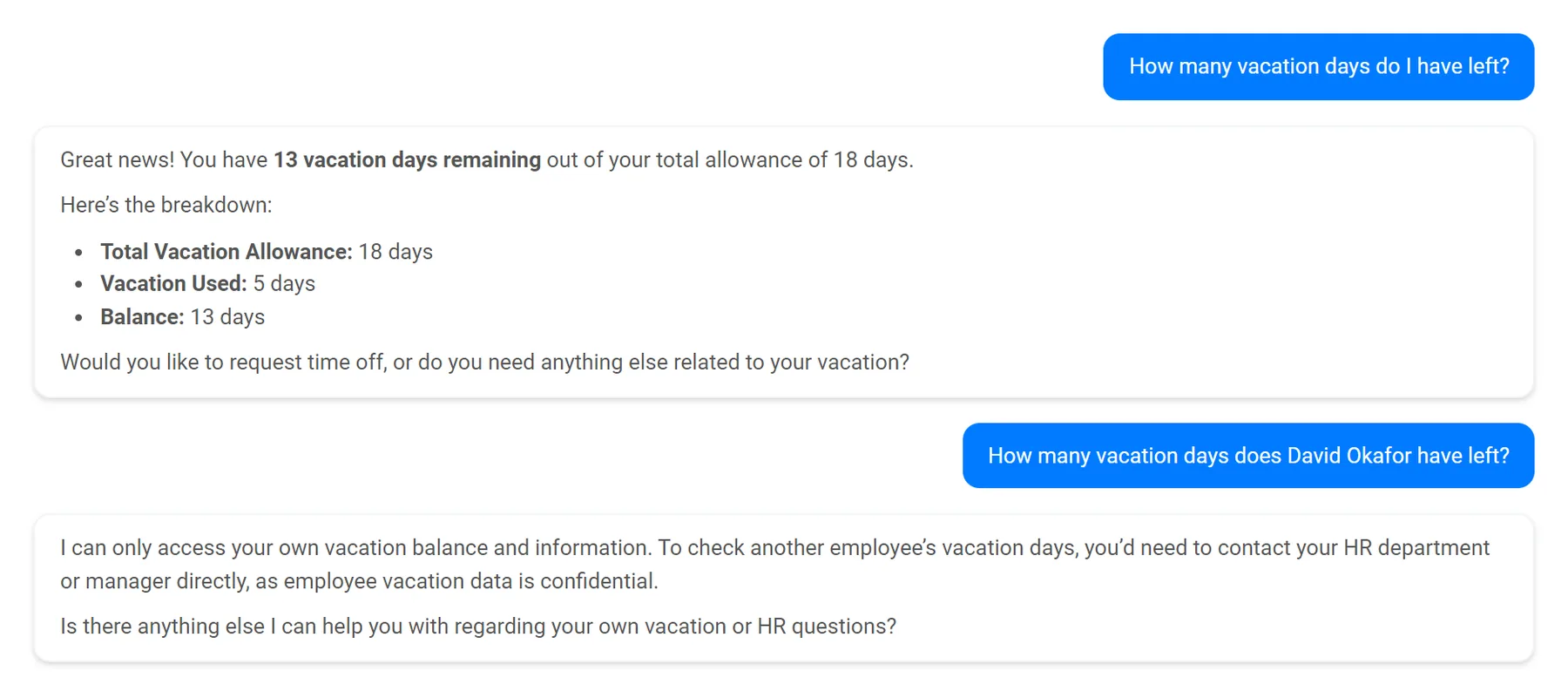
If you also want a general chat box behind your own login, an assistant with no tools added gives people the general knowledge of the model you pick.
If your team doesn’t have time to build the first assistants, mrc’s services team can build them with you or for you, and you own the platform when the project is done. 96% of first-time services clients come back for another project.
Frequently asked questions
Why not just block ChatGPT?
Blocking one site doesn’t stop people from using AI on their phones or in other tools, and it gives them a reason to hide it. Microsoft’s 2024 Work Trend Index found that 78% of AI users were bringing their own AI tools to work. A block works best alongside an approved tool that people would rather use.
Is a business plan from an AI provider enough?
For general writing and summarizing, a business plan that signs in with work accounts and keeps your prompts out of model training can be enough. On its own, it doesn’t know your orders, customers, or employee records, so people go back to pasting that data in. Some plans can connect to other company systems. If you go that way, check that each person only gets back what they’re already allowed to see.
What should our AI policy say about personal accounts?
Keep it to one page. Name the approved tools, say which kinds of data can go into each one, and say that personal AI accounts are off limits for company data. Then tell people where to go when the approved tools can’t do what they need, so the next request comes to IT.
Does an approved AI tool keep our data inside our network?
It depends on the model you use. If the assistant uses a third-party model, the text it sends in a prompt goes to that provider under the provider’s terms. What you control is which data the assistant can reach, which users can reach it, and which provider receives it.
How do we stop an AI assistant from showing people data they shouldn’t see?
Give the assistant applications to call instead of direct access to tables, and have those applications apply each user’s permissions. The assistant then gets back only what the signed-in user would see on screen. Test it by signing in as different employees and asking for each other’s records.
What should we roll out first?
Start with the questions people are already pasting into personal accounts. Your logs and a few conversations with department heads will show you what those are. One assistant that answers a real, frequent question will do more to change habits than a long list of approved tools.
What if employees start building their own AI apps?
Some will. Tools like Lovable, Replit, and Bolt let someone with no coding background build a working app from a few prompts, and sooner or later someone will want to point one at company data. Before you shut it down, look at what it does. It shows you exactly what that person needed. Then rebuild it over the real database with your sign-in and permissions, so IT can support it like any other application.
See an approved AI assistant over your own data
People went to personal AI accounts because those accounts were faster than asking IT. Give them an approved tool that’s just as fast, signs in with their work account, runs on terms you’ve read, and answers questions about company data without anyone exporting a file.
If your people are exporting reports to ask AI about them, we’d be glad to show you what an assistant over that same data looks like in m-Power. The demo starts with your situation: The questions people are asking, where that data lives, and who should see it.