Every HR department answers the same questions all day. How many vacation days can I carry over? What’s my balance? Did my request go through? Where’s the form for the new hire? The answers are all in the company policies, but employees still ask a person, because asking a person is faster than looking it up.
That’s exactly the kind of task people should hand to AI. It’s also the kind of AI project that makes IT nervous, because an HR chatbot touches employee records. The moment it can look up one person’s balance, you have to be certain it can’t look up someone else’s.
We just published a video that walks you through the whole process of creating an HR AI Agent over your data. In this video, we build an HR AI agent in m-Power that answers policy questions from the company’s own documents, shows each employee their time-off balance and open requests, submits new requests to the database, and walks new hires through onboarding. The whole thing runs over an existing employee database, inside the same security the rest of the portal uses.
You can also play around with the live HR portal demo and try the agent yourself.
Why this is the AI project to start with
If leadership is asking what your AI plan is, an internal assistant like this one is a good start. Nobody has to buy a new system. The questions are repetitive and well documented. The data already exists. And the people who benefit are your own employees.
So, why doesn’t every company already have one? Because most AI chatbot tools want you to upload your documents and connect your data to their cloud, and then they decide what the model can see. For an HR assistant, that doesn’t work. You need the agent to see one employee’s records when that employee is logged in, and nobody else’s. You need it to write to the database only where you say it can. And you need to choose which language model it runs on, because some companies won’t send HR data to a public model at all.
With m-Power, you don’t have to worry about that problem. m-Power sits in your environment and works over the database tables you’re already using. Your data stays where it is and m-Power builds on top of it.
Tips for building a good AI HR assistant
The video walks through the build step by step. A few important points are worth mentioning for anyone building their first assistant, whether it’s for HR or another department.
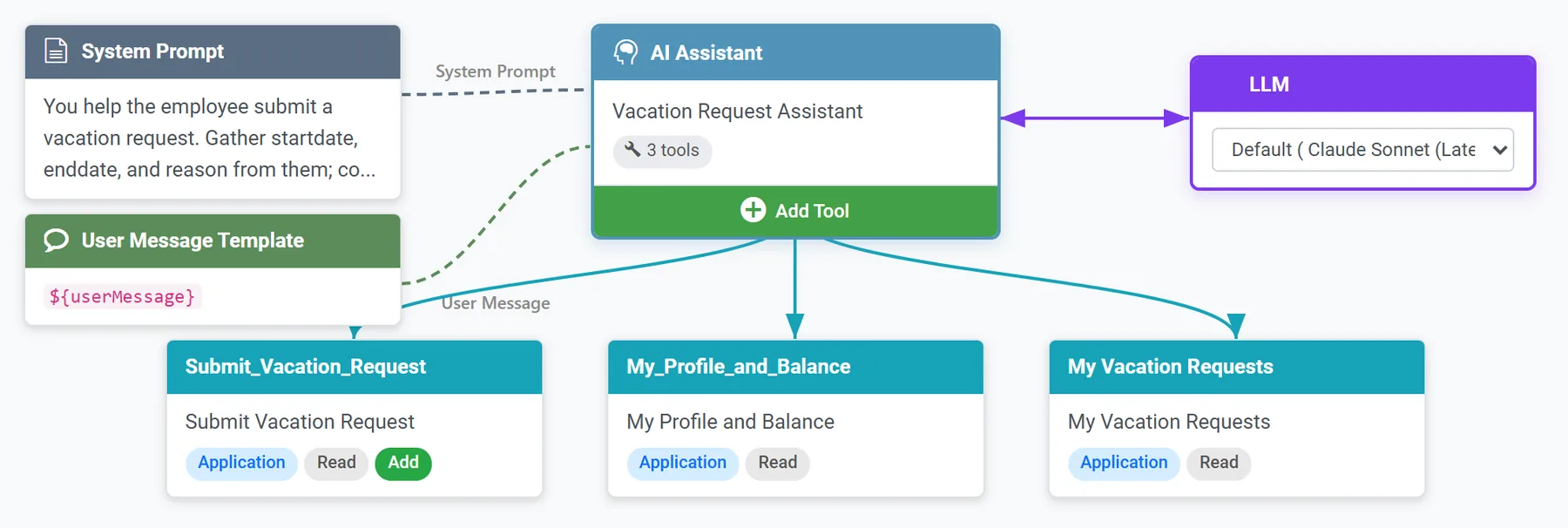
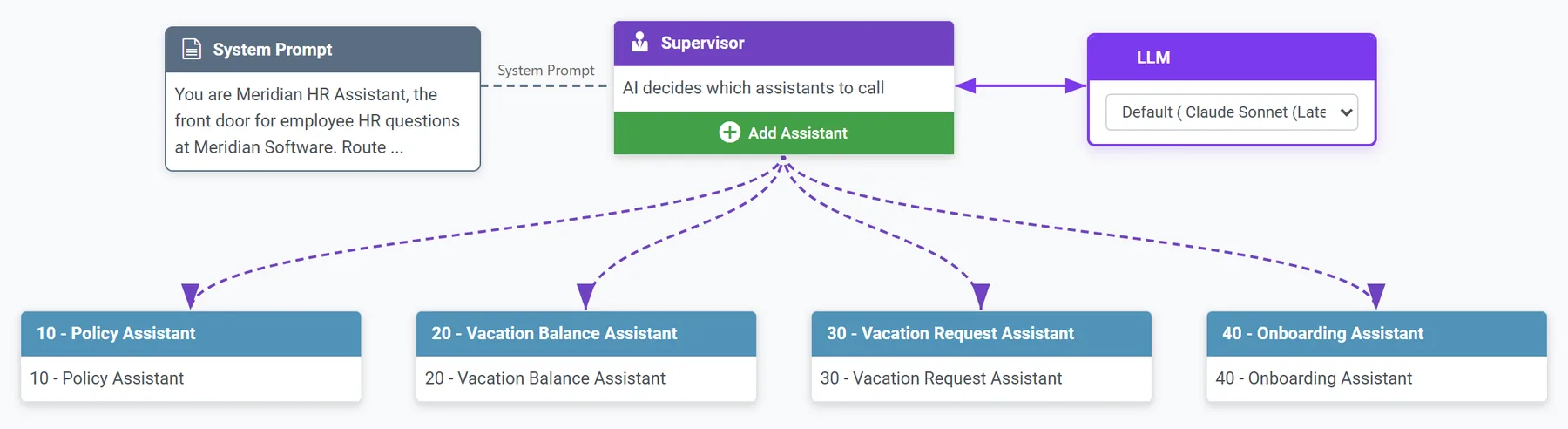
Give each assistant one job. Treat an assistant like an employee with a single responsibility. In the video, one answers policy questions, one shows balances and requests, one submits requests, and one handles onboarding. A single assistant that does all four gets a vague prompt and starts guessing which tool to use. Four narrow ones each get a short, precise prompt, and each one is easy to test on its own.
Start with a knowledge base HR can manage. The policy assistant is only as good as the documents behind it. In the video, the same Word files HR already maintains go into a knowledge base in AI Studio, and that knowledge base runs as an application so HR can add or replace a document without opening a ticket. For example, if the carryover policy changes, HR can just upload the new file to the assistant’s knowledge base.
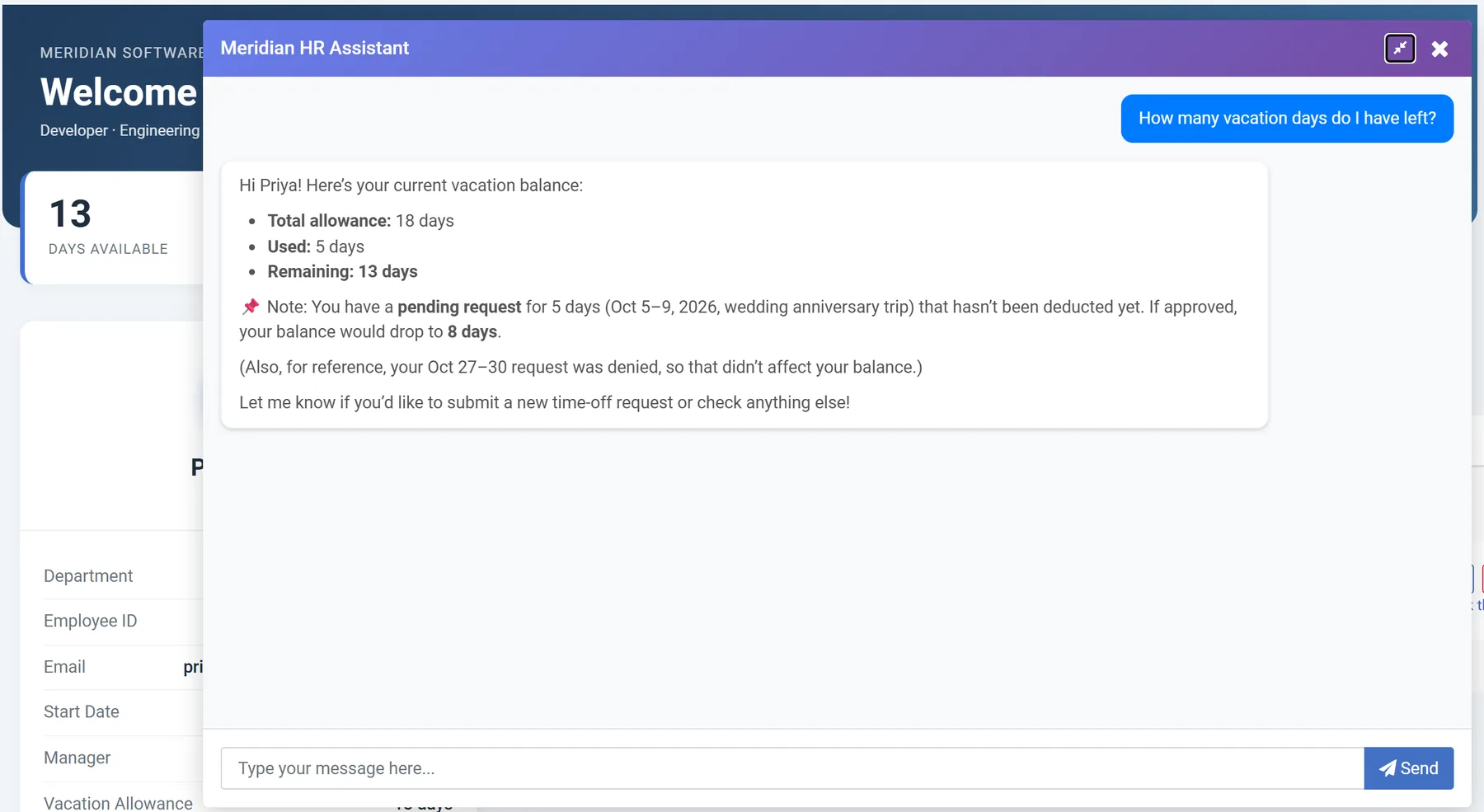
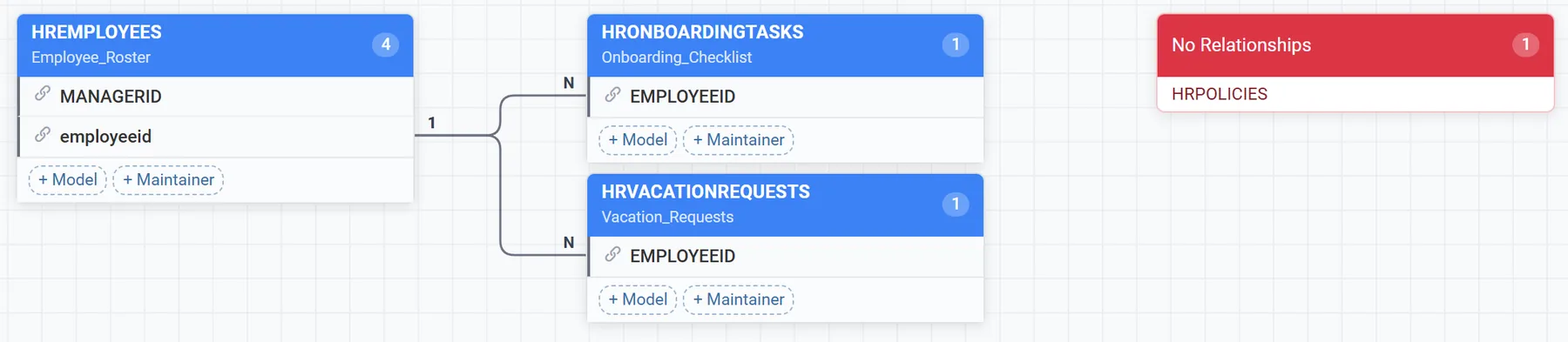
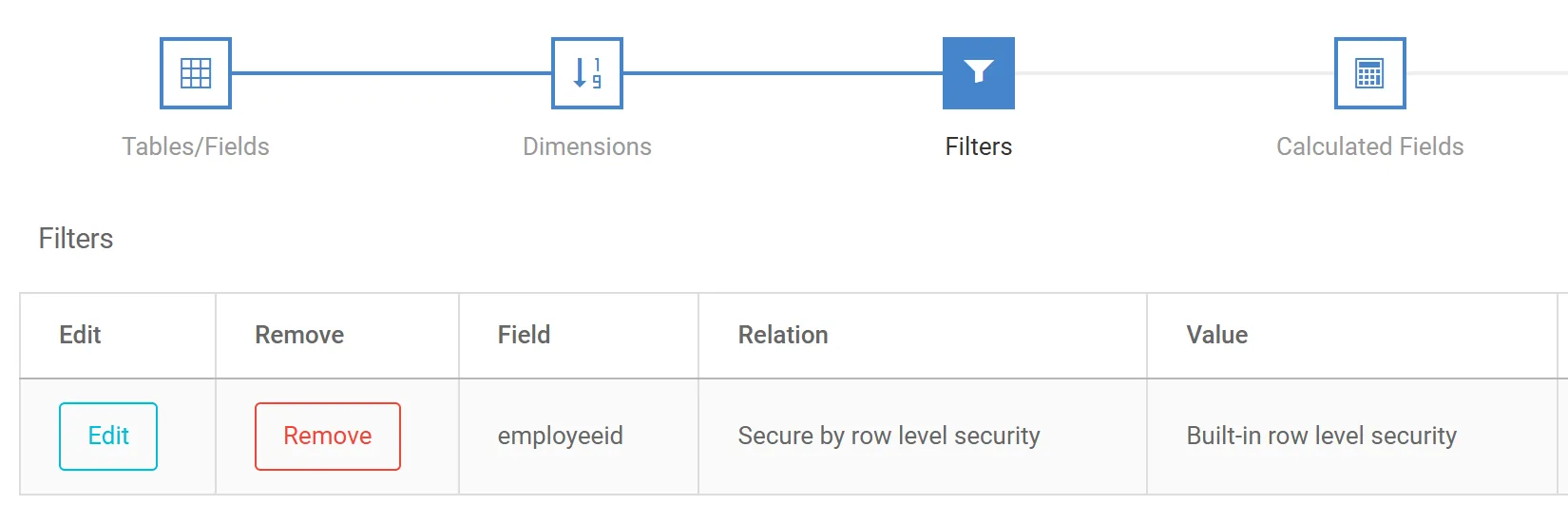
Give the assistant applications, never the database. The balance assistant doesn’t query tables. It can access applications that are built over database tables. In the video, one assistant can access an application that lists vacation requests for whoever is logged in. So, if Alex signs in, he only sees his own requests. Someone else signs in and sees theirs. The assistant inherits that filter, so you never write a separate security rule for the AI. You reuse the one the portal already enforces.
Never let the LLM write to the database itself. The request assistant doesn’t run SQL and doesn’t get a database login. It writes through a maintainer, which is an m-Power application that adds, updates, and deletes rows in a table under the same rules and validations as the rest of the portal. The LLM’s only job is to collect the request and hand the values to that application. m-Power handles writing the data to the database. If the model gets confused, the worst it can do is fill in a form wrong, and the application’s own checks catch that before anything lands in the HR table.
Tell the assistant to check before it submits. Before the request assistant can submit anything, its instructions say to look up the employee’s profile first and confirm there are enough days. Because that instruction is part of the assistant’s prompt, it happens every time. Any time an assistant can change data, give it a way to look up what it needs, and tell it to look first.
Write the system prompt like a very specific job description. Each prompt says what the assistant is, what it’s for, which tools it has, and when to use them. A prompt that says “you help with HR” produces a chatbot that improvises. A prompt that says “you answer questions using the policy knowledge base only, and you say so when the answer isn’t there” produces one you can put in front of employees.
Choose the model that best fits the job. m-Power lets you configure any LLM for each assistant, including one you host yourself. For an HR assistant, that choice is a policy decision. Decide up front whether employee data can go to a public model, which one to use, and pick accordingly.
Use Supervisor agents like real life supervisors. Rather than create one giant assistant that does everything, use supervisor agents just like you would use supervisors in the workplace. The supervisor agent reads the question and hands it to the right assistant. That keeps each assistant small, and it means you can add another assistant later without touching the four that already work.
What this proves about m-Power
The agent doesn’t get special access to anything. It reads and writes through the same m-Power applications the portal already uses, so it inherits the same security. It sees the tables and documents you assign to it and nothing else. It writes only where you’ve given it a maintainer. And it runs on whichever model you choose.
That’s what “AI over your own data” should mean. Your data stays in your database, the agent has no password of its own, and every question it answers runs through the same applications and the same security an employee uses when they click around the portal.
The same approach works for a customer service portal, a sales team asking about their accounts, or operations asking about inventory. Swap the tools, keep the structure. If you want more ideas for where to start, 10 Things AI Can Do That Your Current Software Can’t covers the most common ones.
Try it, or have us build it
The HR portal from the video is live on our demos page. Log in, ask the agent about carryover days, request some time off, and try to request more than you have.
If you’d like to see how this would work over your own database, request a demo and we’ll walk through it with you. And if your team doesn’t have time to build it, our services team builds AI tools like this one for customers, on a platform you own when they’re done.
If you run IT, you’ve probably been asked “What’s our AI strategy?” at least once this year. Maybe more than once.
It feels like every company is rushing to do something with AI. But most of them are approaching it from the wrong direction. They start with the technology. What can we build? A chatbot? A copilot? Or they look at what the AI vendors are selling, pick something that sounds useful, and try to find a place for it.
It’s not a terrible approach. But it leads to a lot of the same, generic use cases. Why? Because the project started with the tool instead of the problem.
There’s a better question: What can AI do that we can’t do today? What can it do that’s impossible, or really painful, with the software, code, and processes we already have?
Answer that, and you’ll have a much easier time coming up with ideas.
Now, the answers to those questions vary by business. That being said, here are 10 different answers that could apply to a variety of organizations. At the end of each one, I’ll tell you the easiest way to try it.
1. Understand unstructured data
Most of the information that comes into your business isn’t structured. I’m talking about things like customer emails, PDF purchase orders, scanned packing slips with notes written on them, or even spreadsheets where every customer uses a different layout.
Software has never been able to do much with any of that. Usually, you need a person to read each one and type it into the system.
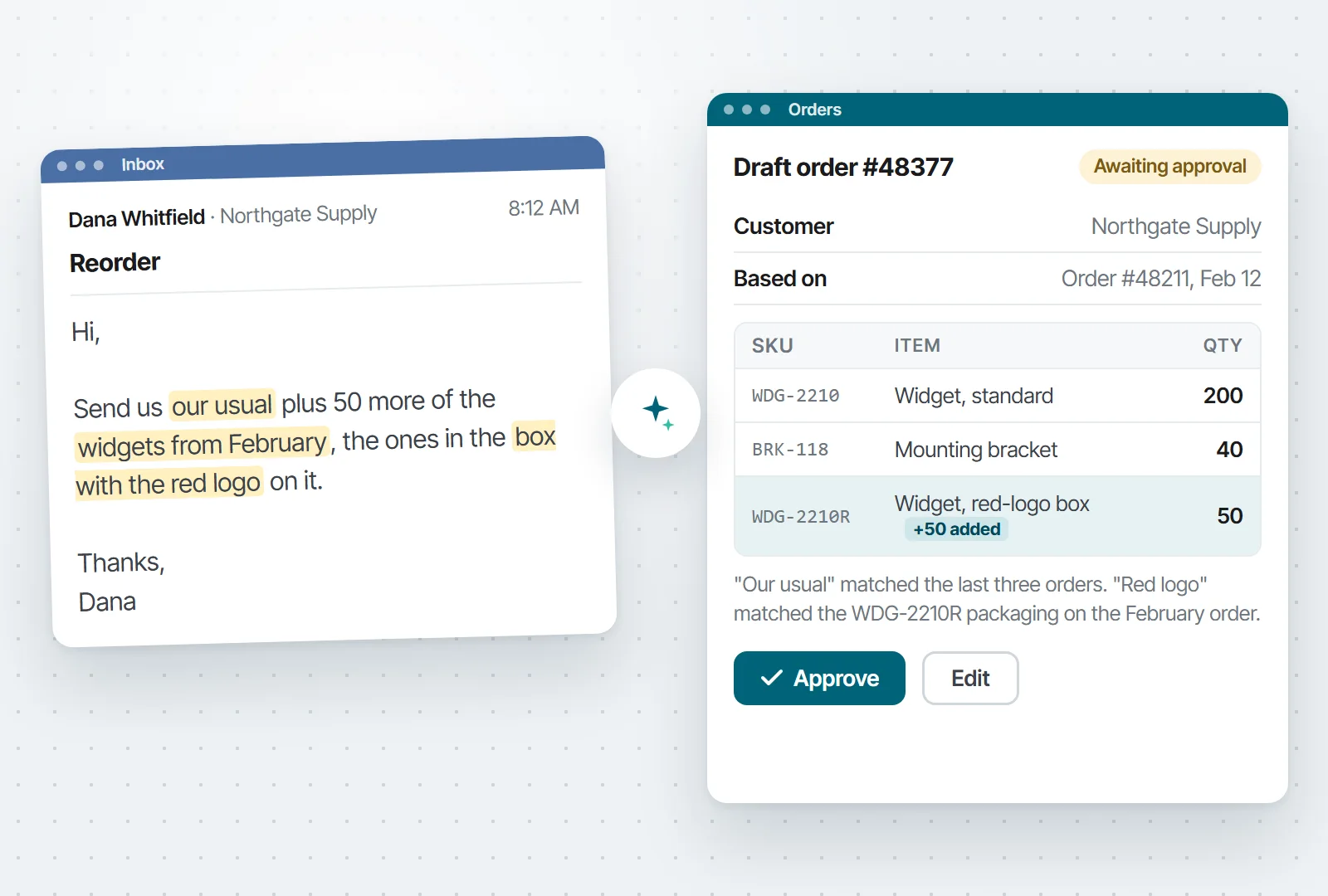
AI can read all of it…and understand it. For instance, suppose a customer writes, “Send us our usual plus 50 more of the widgets from February, the ones in the box with the red logo on it.” Today, someone has to figure out who “us” is, what “our usual” means, and which SKU comes in a box with a red logo. AI can look up the customer, find their usual order, match the SKU, and draft the order for someone to approve.
Illustration. The email comes in on the left. The draft order on the right is what a person approves before anything ships.
Try this first: Start with the most common piece of unstructured data you deal with. For instance, suppose you receive vendor invoices every day. But, no two vendors format them the same way, so someone in AP is stuck manually entering data. Let AI read each invoice and fill in the entry, and have that person check it before it’s saved. After a month, you’ll know how often the AI got it right and which vendors trip it up. That tells you whether or not this is an area worth automating with AI.
2. Answer “What’s going on with order 12345?” in one place
Here’s a question that takes 15 minutes to answer in a lot of companies: “What’s going on with order 12345?”
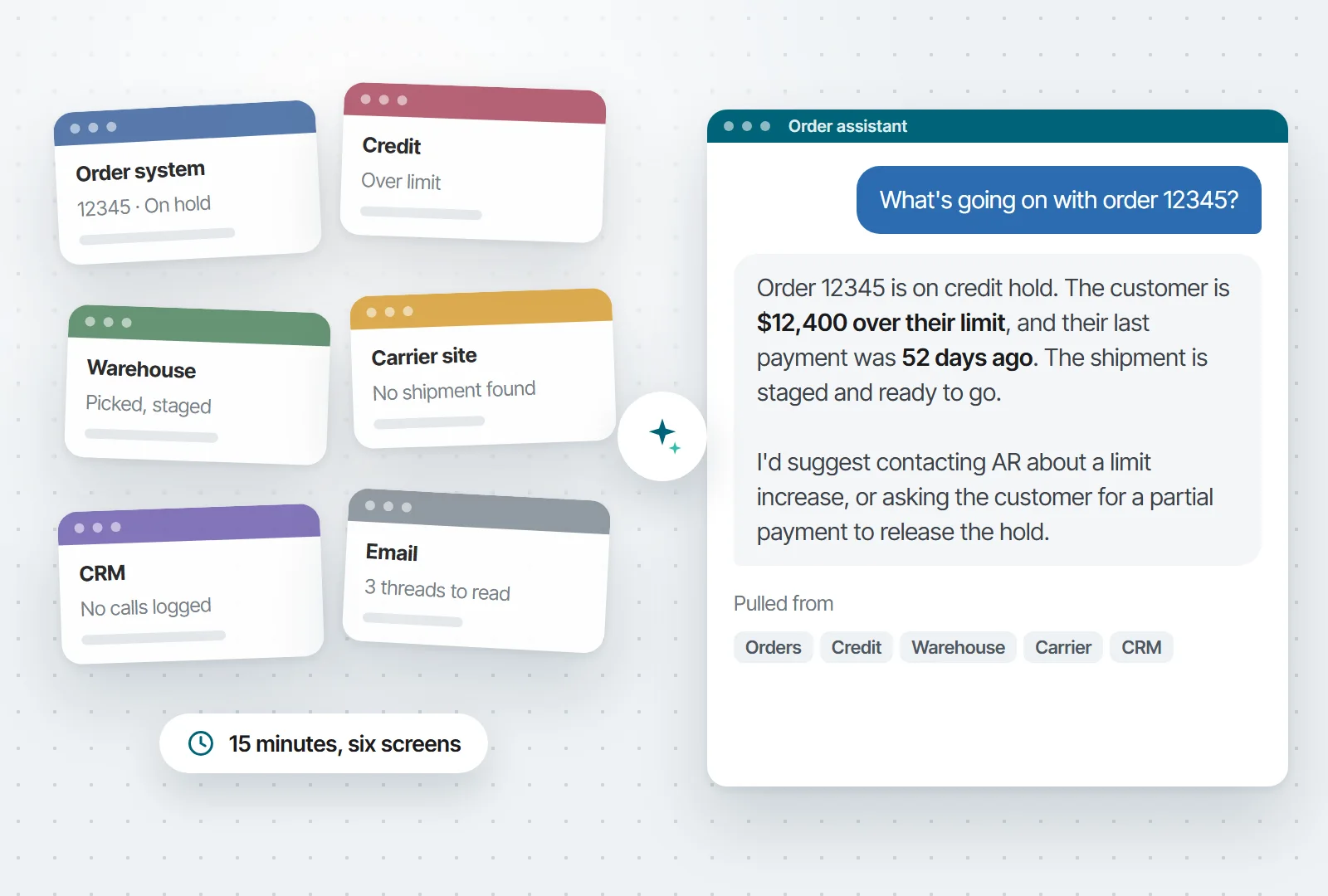
Someone checks the order system and sees the order is on hold. They open the credit system to find out why. Then the warehouse system, then the carrier’s website. If they still don’t have the whole story, they log into the CRM to see if the customer already called. Fifteen minutes and six different screens later, they have half an answer.
AI can pull from all of those systems at once and write one answer: “Order 12345 is on credit hold. The customer is $12,400 over their limit, and their last payment was 52 days ago. The shipment is staged and ready to go. I’d suggest contacting AR about a limit increase, or asking the customer for a partial payment to release the hold.”
Illustration. Today someone opens the six screens on the left. AI reads all six and writes the answer on the right.
Of course, you could pull data from different systems together without AI. The difference is that AI can read all of it together and explain what it means.
Try this first: Start in one area, for instance, orders on hold. They take the most digging, and the answer is spread across two or three systems. Give AI read-only access to those and have it write one paragraph per held order, ending with what it recommends. Keep it read-only until you trust it. If your team stops opening five screens to answer “Why is this on hold?”, it’s working.
3. Let anyone ask the database a question, then ask a follow-up
How many times a day does someone ask IT for data? Maybe a sales rep needs an order status. Or, the CFO has a question on Sunday night when nobody’s around to run a report.
With AI, they can type the question and get the answer from the database. They don’t need to know SQL, and they don’t need to open a ticket.
One of the best parts of this approach is that users can have conversations with their data. “Show me my top 10 customers by revenue.” “Now just manufacturing.” “Compare that to last quarter.” “Write a summary for my boss.” Each question builds on the last one. Traditional reports can’t do that. Every question starts over with a new filter or a new report.
Try this first: Pick the person who asks you for reports the most, and give them access to the one database those reports come from. Before you hand it over, spend an hour describing your tables and fields. The answers are only as good as those descriptions. Then leave them alone with it for two weeks and read the questions they asked. Some will be questions nobody ever asked before. That list tells you what to build next.
Want to see what this looks like? Here’s a video of it in action:
4. Handle the cases nobody wrote a rule for
Business rules are great at the cases someone thought of. Everything the original developer planned for gets handled.
But…what about the problems nobody planned for? Maybe a purchase order doesn’t match any approval rule. Or, there’s complaint that’s part billing problem, part quality problem, and part “we might lose this customer.” Maybe an order looks normal except for one detail that’s a little off.
Without AI, those cases might go to an employee. Someone has to dig into each one and decide what to do.
AI can look at those and make a recommendation with a reason. For example: “This PO is unusual because the vendor changed their pricing last month, but the total is still within budget. I’d approve it and let procurement know to renegotiate before the next order.”
Try this first: Find the process that someone works through by hand on a regular basis. Things like held orders, flagged POs, whatever it is. Have AI go through the same queue first and write one line on each: Where it should go and why. The person still makes every decision. What you’re testing is how often they agree with the AI. Once they’re agreeing most of the time, let the easy ones through on their own.
5. Watch things overnight and flag what’s unusual
Every company runs scheduled jobs. They execute on a timer, dump output, and trust a person to read it.
The problem is that scheduled jobs have no judgment. They can’t tell the difference between a routine result and an urgent problem.
An AI agent can run on the same schedule, but it can decide what matters. It scans yesterday’s orders, finds the ones that are actually unusual out of hundreds, and posts a short briefing. The same idea works for a sales briefing. One agent, and every rep gets a summary of only their own accounts.
I’d keep an agent like this read-only while you test it. Also, put one person in charge of reviewing its output and deciding whether or not it should keep going.
Try this first: Take a common report, and run the same data through AI overnight and have it write a half-page summary with the exceptions on top. Let the person read both for a couple of weeks. If the summary catches everything they would have caught, you’ve given them back 20 minutes a day. If it misses something, you’ve learned what the AI needs to be told.
6. Add and update records by chat, with a person confirming
Most of what AI does with your data is read it. This one writes to it, which is where most IT leaders (rightly) get nervous.
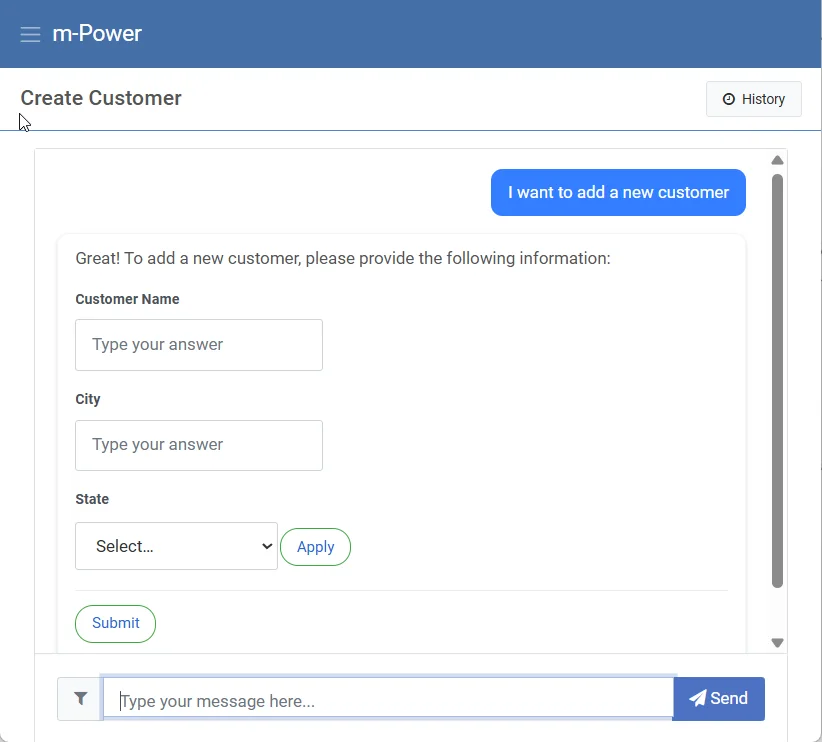
Here’s how it can work safely. A user tells the assistant, “I need to add a new customer.” The assistant asks for the fields it needs, and the user fills them in. Then, before anything touches the database, the user sees everything the assistant collected and has to click Confirm. That’s the human in the loop. The AI never writes to the database on its own.
Human in the Loop in m-Power. The assistant asks for the fields it needs, and nothing is saved until the user clicks Submit.
Try this first: Pick a form people fill out away from their desk, like logging a customer call or a site visit. Have the assistant ask for the details and read them back before saving. You’ll find out quickly whether people prefer it to the form. If they do, move on to the forms with more fields.
7. Draft the follow-ups nobody has time to write
Some things don’t get done because nobody has time. Overdue invoices pile up because nobody in AR can write 40 individual emails a day. Quotes go stale because the rep who sent them got busy.
AI can write those drafts from your data. An overdue-invoice assistant reads each customer’s payment history and writes a note that fits their situation. A quote follow-up mentions the actual products and prices from the quote.
The rule I’d set is simple: AI writes the drafts, but people are in charge of sending. Once you’ve read a few weeks of drafts you would have sent without changing a word, then decide which ones can go out on their own. That being said, there are some that should always get sent by a person. For instance, the $40,000 invoice reminder should probably always wait for a person.
Try this first: Pick the follow-up your team is worst at. For most companies, it’s overdue invoices. Have AI draft a reminder for every invoice past terms and put the drafts in a queue. Every morning, someone in AR reads them and sends the ones they agree with. Keep a tally of how many went out unchanged. When it’s most of them, start sending the small ones automatically and keep the big ones in the queue.
8. Answer questions from your own handbooks and procedures
Every company has answers buried in documents. For example, the employee handbook, your SOPs, years of support history, contracts, etc… New hires can’t find them, so they ask a senior person, and the same questions get answered over and over.
AI can search those documents by meaning instead of by keyword and answer the question directly. For instance, a question like “How many vacation days do I get after five years?” is answered from your policy.
Of course, you should always be careful with permissions when setting up something like this. A good rule of thumb: If someone couldn’t open the original document, they shouldn’t get its contents from a chatbot either.
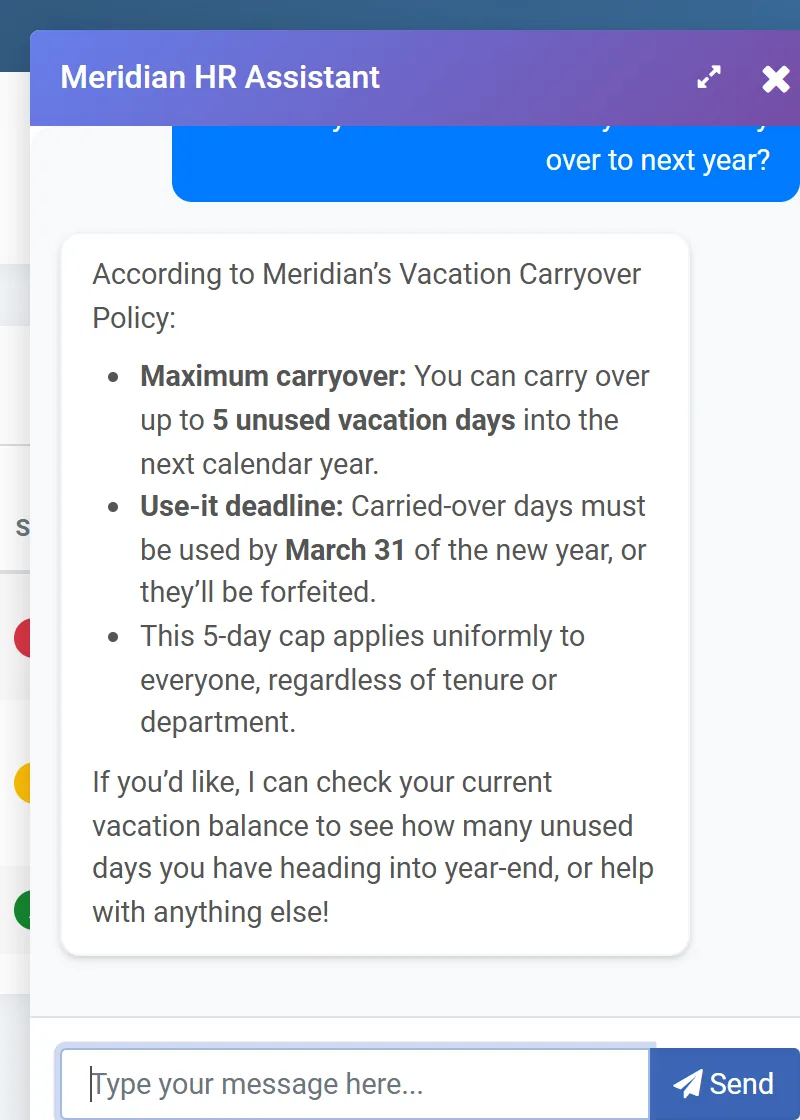
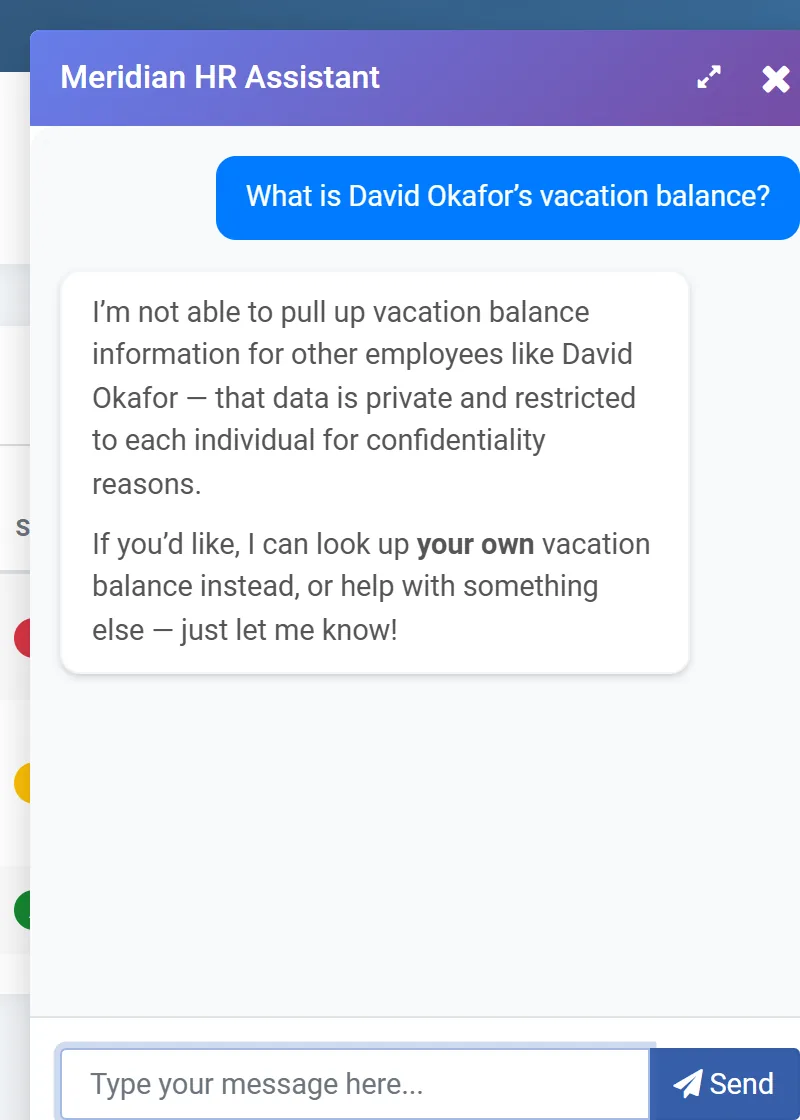
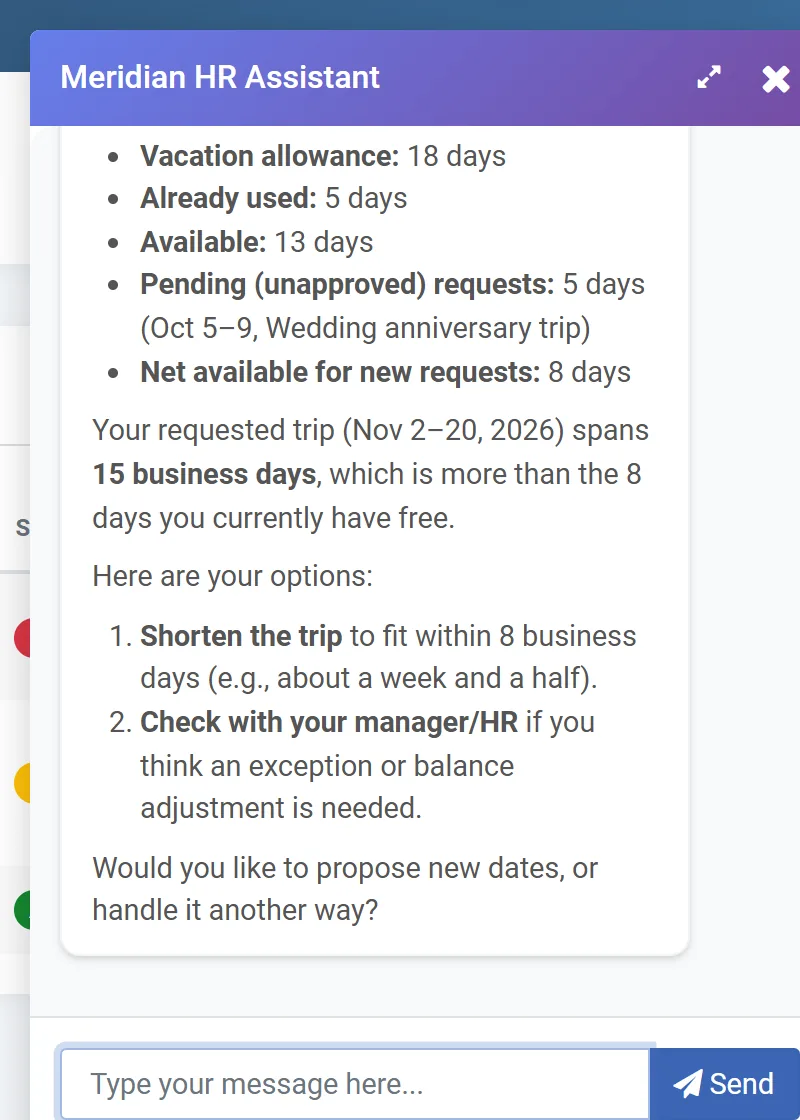
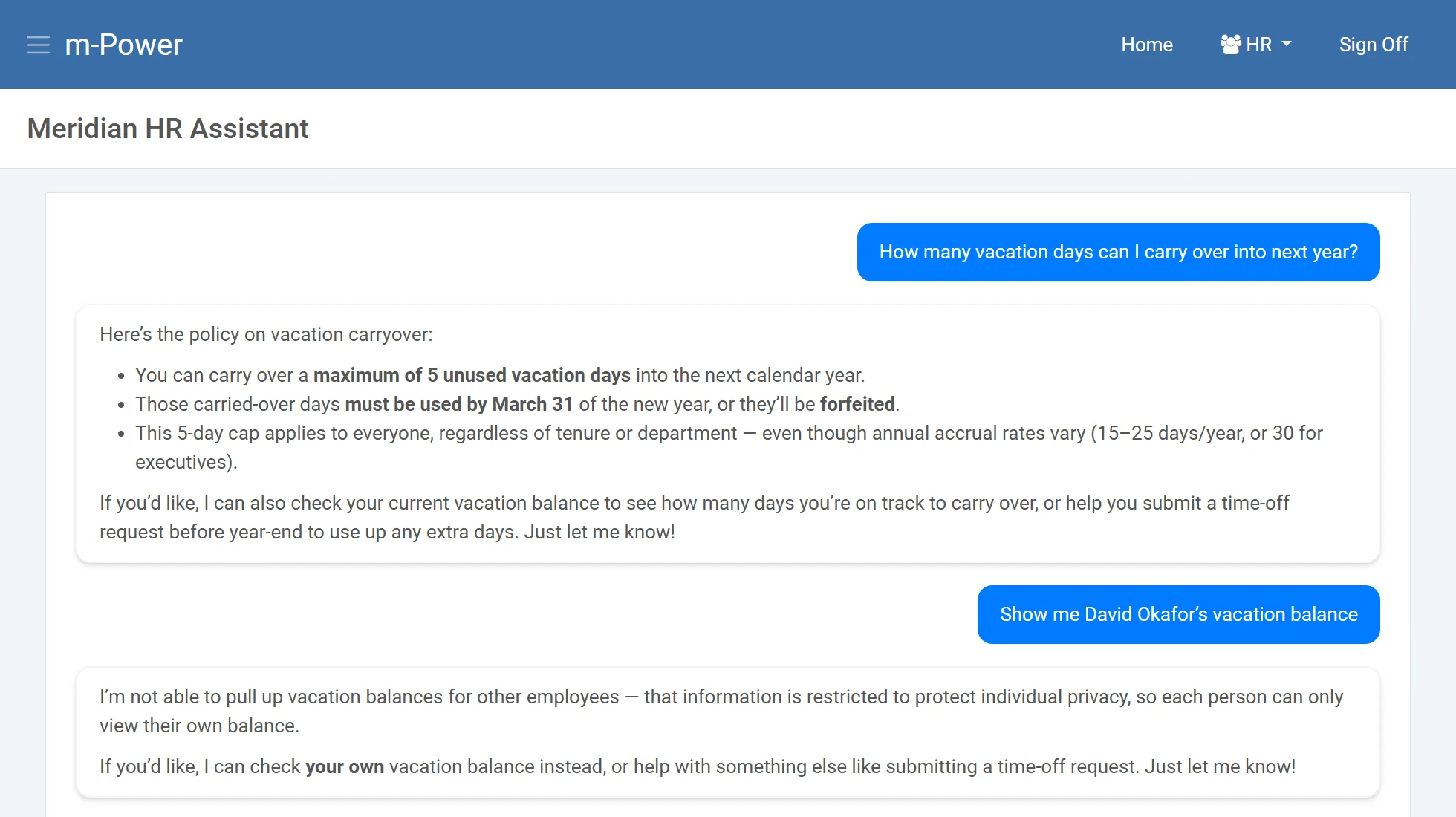
The HR assistant we built in m-Power for a demo. It answers the carryover question from the policy document, then declines to show another employee’s balance.
Try this first: Upload the employee handbook and nothing else. Give it to one team and tell them to ask it the questions they’d normally ask HR. After two weeks, ask HR whether the questions they get have changed. If they have, add the next set of documents. If they haven’t, find out what people asked and where the answers fell short.
If you’d like to see what this look like in action, check out this video:
9. Explain the code nobody wants to touch
Every company has at least one system that was built years ago by someone who’s gone. Nobody fully understands it, and nobody wants to touch it. The business rules live in the code and nowhere else.
This is where AI shines. It can read the code and explain what it does, which business rules are buried in it, and what would break if you changed something. A developer asks, “What happens if I change this field?” and gets a list of every program and integration that uses it, instead of spending days tracing it by hand.
Try this first: Pick the one program everybody’s afraid to touch. Have AI write up what it does and list the business rules buried in it. Then hand that write-up to the person who knows the program best and ask them to mark what’s wrong. You’ll end up with documentation that didn’t exist before, and you’ll know how far to trust the AI on the next one.
10. Give customers a portal that answers “Where’s my order?”
Your customer service team answers the same questions all day. Where’s my order? Can you resend my March invoice? What’s my balance?
A customer portal helps, if customers can find what they need in it. An assistant added to the portal takes it further. The customer asks the question the way they’d ask a person, and the assistant answers from the ERP, under that customer’s own login. They see their orders and their invoices, and nobody else’s.
Try this first: Ask your customer service team what customers call about most. It’s almost always “where’s my order.” Build an assistant that answers only that, from the same order data the portal already shows, and put it in front of a handful of customers you know well. If the calls from those customers drop, roll it out to everyone else.
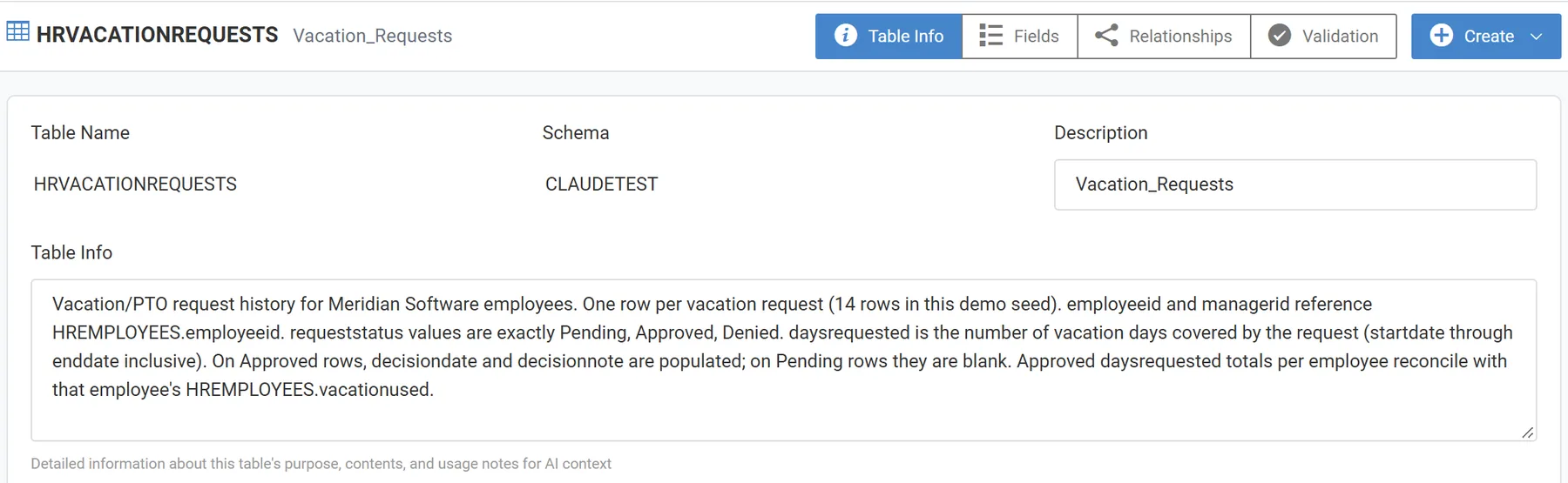
What this looks like in m-Power: Companies have been building customer portals over their ERP data with m-Power for years. Adding an assistant means building one in the AI Studio with a tool over the same order and invoice data the portal already uses. Then you apply row-level security so each customer only sees their own records. See how teams build AI tools over their data with m-Power.
Where to start
What are the common themese across those 10 ideas? Messy input, manual data entry, judgment calls, and the ability to understand text and code.
Any process in your business with one of those is a candidate. To test it out, start small. Pick the smallest example. Let AI draft or recommend, and keep a person approving the result until you know where it gets things wrong.
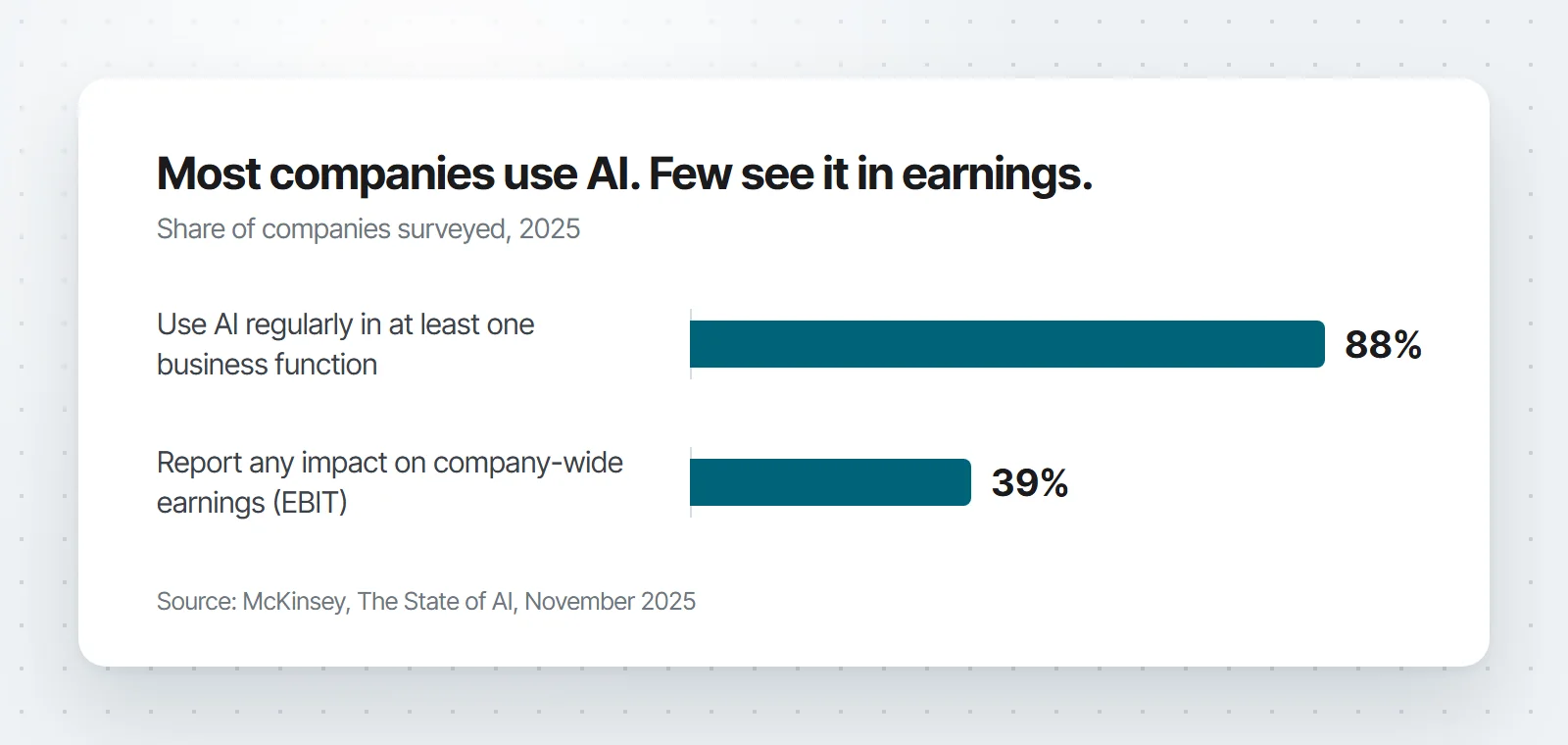
That’s also what separates the projects that pay off from the ones that don’t. According to McKinsey’s November 2025 State of AI survey, 88% of companies use AI somewhere, but only 39% see any impact on earnings. The companies that do see it were 2.8 times more likely to have redesigned the process around the AI, instead of adding a tool to a process that didn’t change.
Every one of these ideas gives AI access to some of your data, so every one is a security decision too. Before you start, answer these: What data can it see? Whose permissions apply? Which model does it use, and what gets sent to it? Who can turn it off? Answer those once, on a platform you control, and you can reuse the answers for every project after that, instead of working them out again for each new tool.
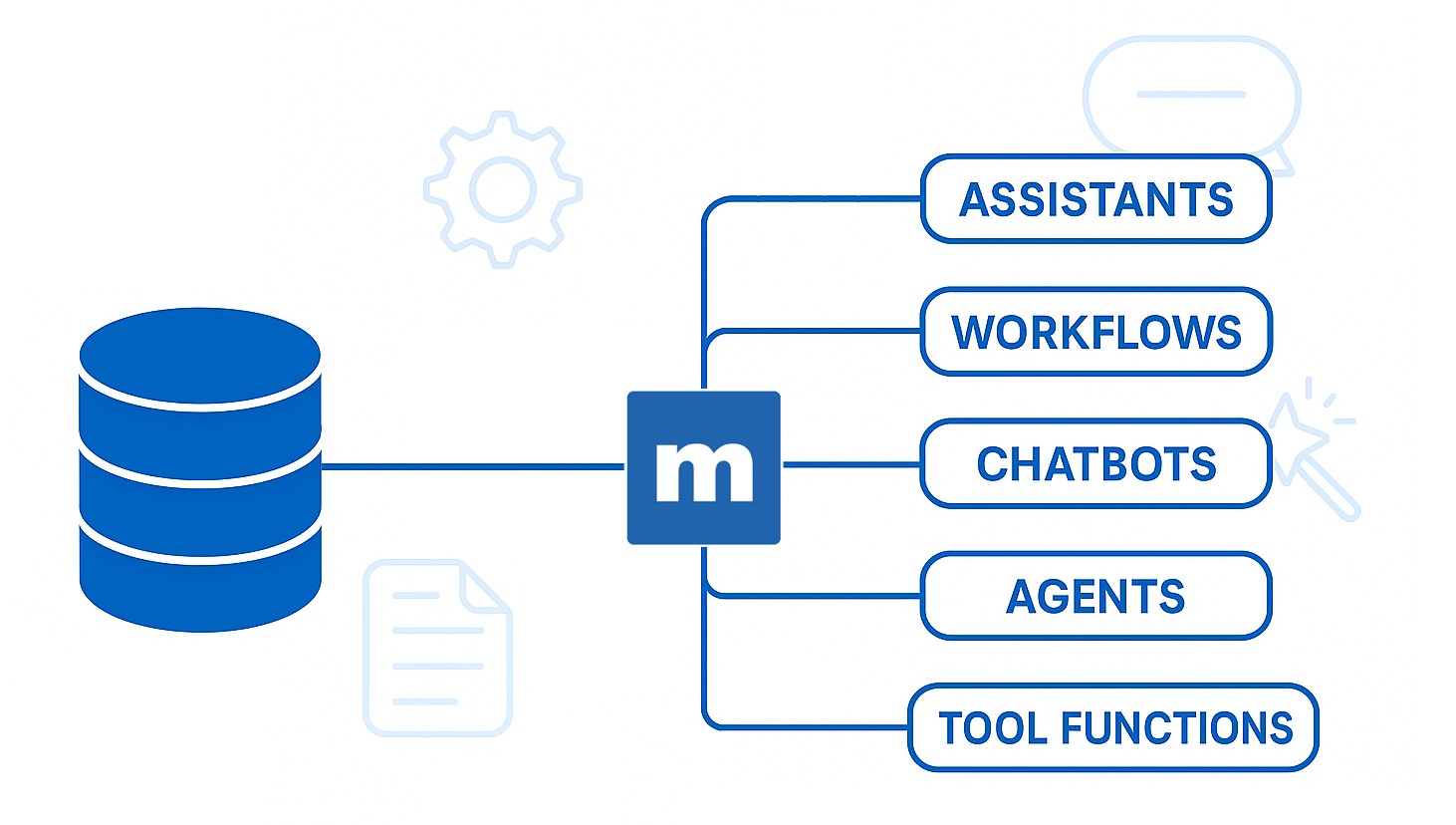
That’s why we built the AI features into m-Power itself. m-Power is a low-code development platform from mrc, a software company in business since 1981 with more than 1,500 customers. It installs in your environment and builds applications and AI tools directly over the databases you already have. IT controls what data the AI can access, who can use each tool, and which model runs, under the same security model as every other m-Power app. And when a project outgrows your team, our support and services people can step in. They build with m-Power every day.
Many of these are things you can build in m-Power today. If one of them looks like a problem you have, request a demo and tell us which one. We’ll set up a demo that’s specific to your situation.
Frequently asked questions
How can a small business start using AI?
Pick one process with messy input or a manual investigation, and start with the smallest version. AI drafts, a person approves. One inbox, one report, or one exception queue is plenty. Measure the time it saves before you expand.
What data does AI need access to?
Only what the use case needs. A collections assistant needs invoices and payment history, not your whole customer database. And permissions should match what the user could already see on their own. If someone couldn’t open a record before, the AI shouldn’t show it to them now.
Do we need our own AI model?
No. You can connect a commercial model, or run one on your own servers. The decisions that matter are who approves the model, what data it’s allowed to receive, and whether you can swap it out later.
What should we not use AI for first?
Anywhere a wrong answer is expensive and nobody reviews it. Customer-facing pricing, payments, and compliance decisions can wait. Start where a person checks the work before it takes effect.
Sal Stangarone is President of mrc and has been at mrc since 1990. mrc has helped businesses build custom applications over their own databases since 1981.
How many report requests are sitting in your queue right now? Maybe Sales wants last quarter’s numbers broken out by state, with a chart for Thursday’s meeting. Or, maybe Operations needs a list of every order that shipped late last week, and why. Each one might be an hour of work, but the problem is that there are forty more behind them.
Meanwhile, your users have discovered AI. Some are asking why they can’t chat with company data the way they chat with ChatGPT. A few, whether you know it or not, are already exporting data and pasting it in.
Both problems have the same fix: Let people ask the database directly (securely, of course).
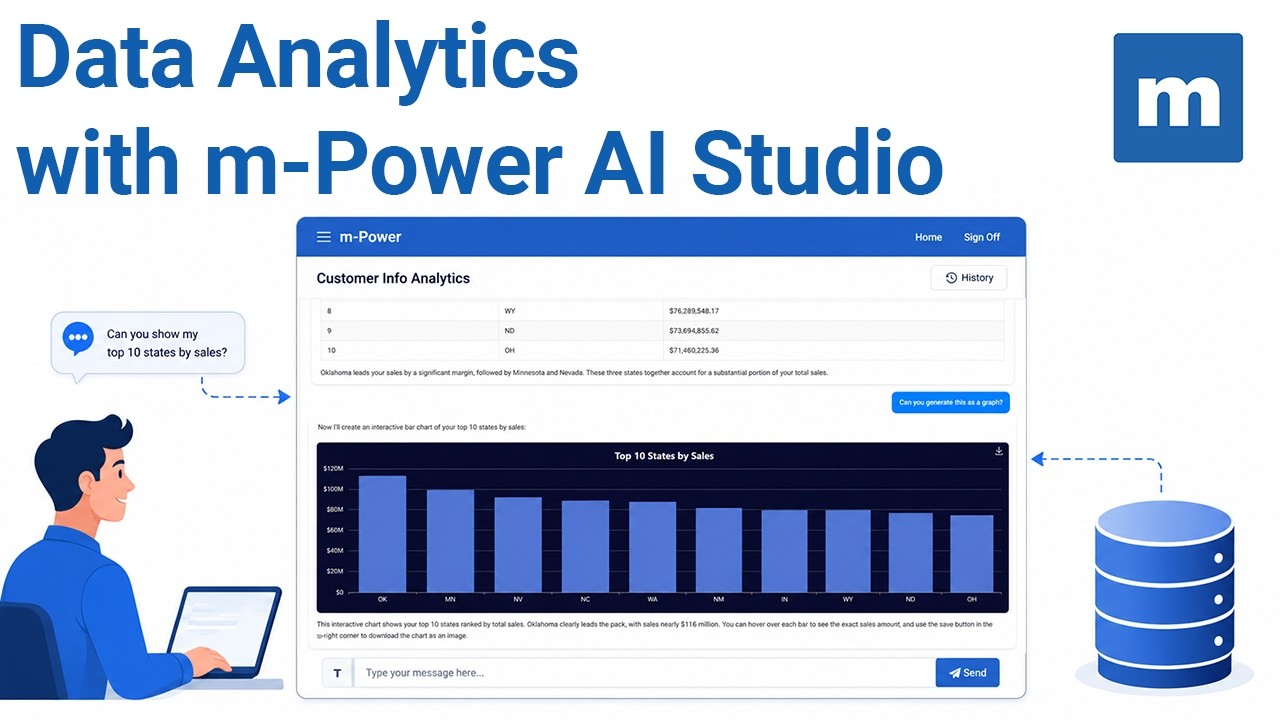
That’s one thing that m-Power’s AI data analytics assistant aims to solve. It lets business users chat with your data and get back real numbers, analysis, and charts. The AI never connects to your database directly. IT decides which fields it can see, whether or not the query should be read-only, and you pick the LLM.
We just published a short video that walks you through the process:
If you run an IT department, you already have an AI problem. Your people are pasting company data into ChatGPT, Claude, and Gemini right now, on accounts you don’t manage (and you can’t see what they’re sending).
What can you do about it? Your goal should be to make the safe path the easiest path. As I’ll explain in this article, you can do that in three steps:
See what’s already being used
Set a few rules a small team can actually enforce
Give people a sanctioned option that’s better than the risky one
This guide walks through all three, and it’s written for the small IT teams that may not have a security department or a bunch of extra money to throw at the problem. If you have two people covering support, infrastructure, and now “the AI strategy,” this is for you.
Something is happening in your organization right now that you probably don’t have full visibility into.
It’s happening in organizations across the globe.
Business analysts are building reporting dashboards with AI tools, connected to live company data, with no IT involvement.
Finance staff are pasting budget projections into consumer AI platforms to run analysis faster than waiting on a request.
HR employees are running sensitive policy documents through a chatbot to get quick summaries.
Staff in operations are building workflow automations using free AI builders they found online.
None of it went through IT.
That’s shadow AI. And the reason it matters isn’t just that data is leaving your environment…though it is. It’s that this behavior is accelerating faster than any governance policy can catch up with.
Eventually, everything these people built becomes your problem to secure, maintain, and explain to auditors.
Can you believe that ChatGPT isn’t even 3 years old?
Yet, AI is everywhere now. Since ChatGPT burst onto the scene, AI adoption exploded. It’s in everything now, from physical products to business software.
We’ve been following AI’s evolution closely, asking two questions on repeat: How do we bring AI to your business data, applications, and workflow? How do we make it useful in your environment, under your rules?
Over the last few years, we’ve noticed something. Many of the “AI features” added to business software stop at a chat interface. Sure, it’s handy for quick answers. Less helpful when you need to advance a workflow, act on a record, respect role based security, or perform tasks autonomously.
You need AI that understands your data, calls the right systems, and fits the way your team already builds.
That is the bar we set. Bring AI to the business. Plug it into your applications and workflows. Keep IT in control. Deliver value on day one.