

As your AI integrations grow in complexity, relying on a single AI Assistant to handle every possible user request becomes inefficient and difficult to manage. AI Agents solve this problem by acting as central orchestrators.
Instead of forcing one assistant to do everything (like answering FAQs, writing SQL, and triggering workflows), an AI Agent allows you to link multiple specialized assistants together into a unified workflow. When a user sends a message, the Agent takes charge—routing tasks, passing variables between steps, and executing logic based on the specific “Agent Type” you choose.
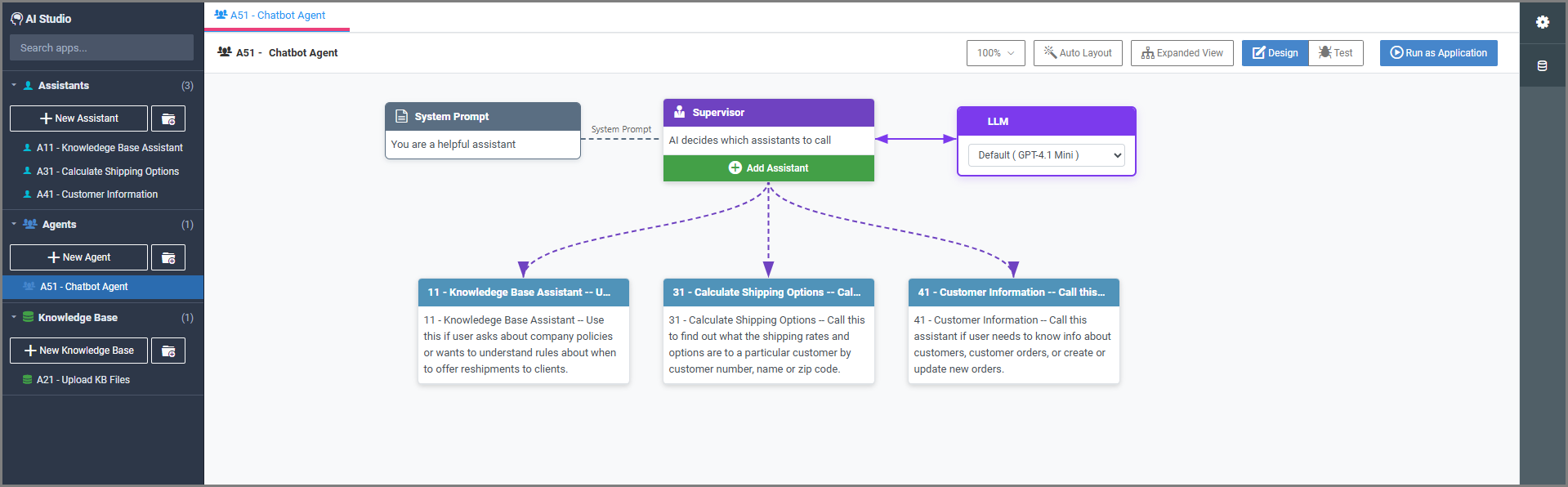
Adding Assistants to an Agent
Regardless of which Agent Type you choose, building an AI Agent involves adding and configuring one or more sub-assistants (or even sub-agents) to act as the nodes within your AI workflow. Clicking into any assigned assistant within the Agent diagram allows you to configure how it receives and passes data.
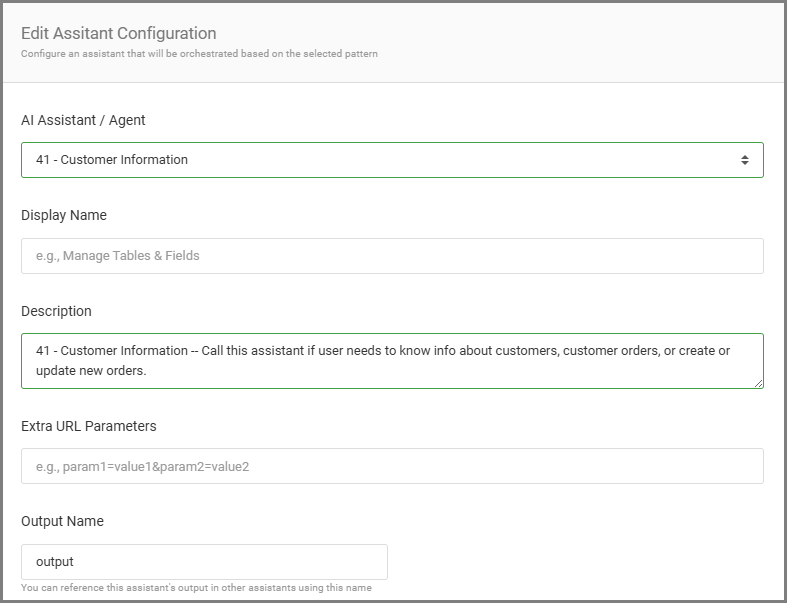
General
Select Assistant: Choose a previously built assistant or agent from your library and provide a brief description of its role in this workflow.
Output Name: The variable name where this assistant’s output will be stored within the workflow’s scope. You can reference this output in subsequent assistants using this exact name.
Add Input
Maps data into the assistant.
Input Field: Select the specific input field name expected by the selected assistant.
Description: A brief note on what this input is used for.
Scope Variable: (Optional) Map this input to a scope variable passed from a previous assistant or the global agent input.
Context Configuration
Defines how much historical context this specific assistant receives from the steps that ran before it.
No Context: The assistant starts fresh and receives no information about what previous assistants have done.
All previous agents: The assistant receives the full context, outputs, and history of all previously executed assistants in this workflow run.
Specific agents only: Allows you to explicitly select which previous agents’ context should be passed into this one, keeping the prompt clean and focused.
Planner Agent: (Supervisor agent only) If checked, this specialized agent is called first to create a logical, step-by-step plan that the Supervisor will then follow when routing tasks to other assistants.
Agent Types
When creating a new AI Agent, you must define its type. This dictates how the agent moves the user’s request through the connected sub-assistants.
Supervisor
The Supervisor type is designed to handle complex, multi-part requests. It breaks the user’s prompt into smaller tasks, delegates those tasks to multiple specialized assistants, gathers all of their responses, and compiles them into one cohesive final answer.
Example: A user asks, “How did Q3 revenue impact our hiring budget, and what is the new policy for Q4?” The Supervisor sends the revenue question to an assistant using a retrieval tool function, sends the policy question to the HR knowledge base, waits for both of their answers to come back to the supervisor, and the supervisor then writes a single, combined summary for the user.
Supervisor-Specific Settings
Supervisor Context: Specific instructions and background information that guides the Supervisor’s decision-making process when selecting which sub-assistants to invoke.
LLM: Select the specific Large Language Model that will act as the “brain” of the Supervisor.
Agent Configuration
General Settings
- Display Name: A friendly name shown to the user in the chat status (e.g., “Analyzing Request…”).
- Description: The overall purpose of this agent.
- Response Strategy: Determines what is sent back to the user—either the Last response (the exact output of the final assistant called) or a Summary (the Supervisor writes a consolidated summary of all assistant outputs).
- Enable Message Forwarding: Forwards the original user message directly to the sub-assistants instead of the Supervisor rewriting or paraphrasing it.
- Parallel Execution: Allows the Supervisor to invoke multiple independent assistants simultaneously to speed up processing times.
- Enable Chat Manager: Allows the agent to actively manage the chat state, routing, and conversation flow behind the scenes.
Context Management
- Share Memory: All connected agents share the same conversation history.
- Summarize Content: Automatically summarizes the context before passing it to the next agent to save on token limits.
Global Inputs
- Inputs passed into the agent via field mappings or URL parameters that any sub-agent can reference globally.
Router
Unlike the Supervisor, a Router agent acts as a traffic controller that performs a single hand-off. Instead of breaking a prompt apart, it evaluates the user’s initial request to determine their overall intent, and forwards the entire conversation to a single specialized assistant. Once the user is routed, the chosen assistant takes over completely to deliver the answer, and the Router’s job is done.
Example: A user asks, “What is our Q3 revenue?” The Router recognizes this is a financial question, sends the user directly to the appropriate financial assistant, and steps aside. The financial assistant fetches the data and replies directly to the user.
Agent Configuration
General Settings
- Display Name: A friendly name shown for the chat status. (e.g., “Analyzing Request…”).
- Description: The overall purpose of this sequential agent.
Context Management
- Share Memory: All agents in the sequence share the conversation history.
- Summarize Content: Summarize the output of a step before passing it to the next agent in the sequence.
Global Inputs
- Define top-level inputs that any step in the sequence can reference.
Sequential
The Sequential pattern is entirely deterministic. It routes the workflow through a hardcoded, linear path (e.g., Step 1 -> Step 2 -> Step 3). This is ideal for strict, multi-step processes where the output of one assistant is directly required by the next.
Agent Configuration
General Settings
- Display Name: A friendly name shown for the chat status. (e.g., “Analyzing Request…”).
- Description: The overall purpose of this sequential agent.
Context Management
- Share Memory: All agents in the sequence share the conversation history.
- Summarize Content: Summarize the output of a step before passing it to the next agent in the sequence.
Global Inputs
- Define top-level inputs that any step in the sequence can reference.
Loop
The Loop pattern iterates over a specific task or assistant until a certain condition is met, or until a maximum number of iterations is reached. This is useful for tasks that require refinement, validation, or processing multiple items in a list.
Agent Configuration
General Settings
- Display Name: A friendly name shown for the chat status.
- Description: The purpose of this looping agent.
- Max Iterations: A failsafe limit defining the maximum number of times the loop is allowed to run to prevent infinite looping.
- Final Output Variable: The specific scope variable that will hold the ultimate result once the loop finishes executing.
Context Management
- Share Memory: Retain conversation history across loop iterations.
- Summarize Content: Summarize the context between iterations.
Global Inputs
- Define top-level inputs that the looping assistant can reference.
Conditional
The Conditional pattern utilizes standard IF/THEN logic. It evaluates a specific condition or variable, and routes the workflow down different paths depending on the outcome (e.g., If ‘User Type’ is ‘Admin’, go to Assistant A; Else, go to Assistant B).
Agent Configuration
General Settings
- Display Name: A friendly name shown for the chat status.
- Description: The purpose of this conditional agent.
Context Management
- Share Memory: Ensure all potential paths share the conversation history.
- Summarize Content: Summarize context before passing it down the decided path.
Global Inputs
- Define top-level inputs that the conditional logic and subsequent sub-assistants can reference.