
How to Build a Chatbot Over Your Own Data
Sooner or later, a department will ask IT for an AI chatbot. HR might want one for policy questions. Sales might want one that knows its accounts. And leadership just wants to see AI being used in the business.
At first glance, this might seem fairly straightforward. You can set up a simple AI assistant tool and connect it to a folder of documents in a few hours.
That might work for basic chatbots that don’t need access to company data. But, what happens when your chatbot needs to work over your existing database? What happens when it needs to interact with sensitive data?
Then, you have a lot of questions to consider. Should the chatbot see employee salaries? Can it change records? How do you control which users have access to different pieces of data? How can you safely give it access to what it needs without touching your database?
There’s a lot to consider. Making a mistake could expose sensitive data, let employees see things they shouldn’t, and create privacy and legal problems.
We recently built an HR AI assistant demo and had to work through these questions. In this article, I’ll walk through the process step by step, basing it off of the HR assistant we just built.
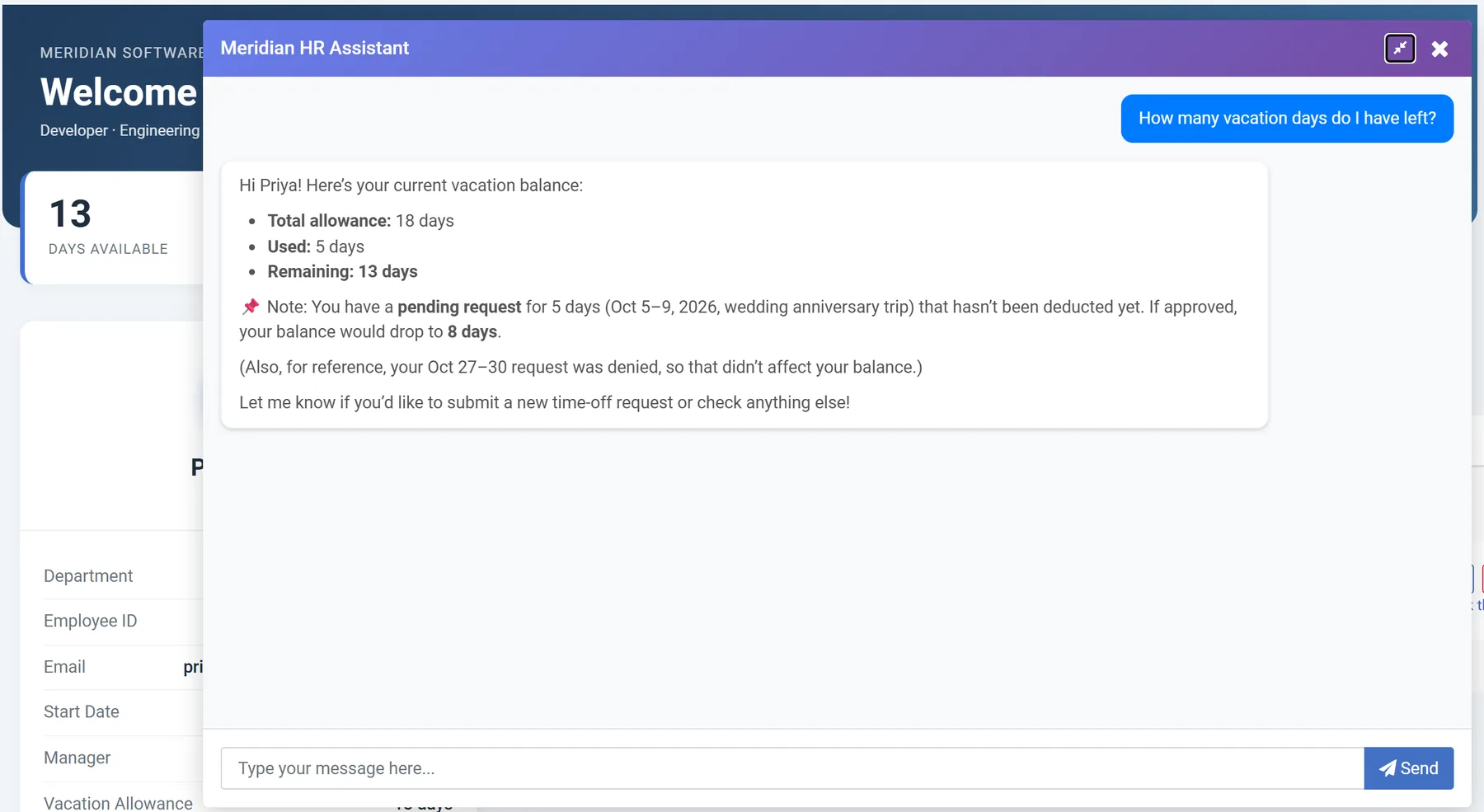
Why is a chatbot over company data harder than it looks?
The big challenge with building an HR assistant is that large language models (LLMs) don’t understand your data. An LLM has no idea who’s asking or what that person is allowed to see.
Somebody has to decide these things before the assistant goes live:
- What it can see, for each user. In an HR AI Assistant, an employee should see their own vacation balance and nobody else’s.
- How it understands user roles. Employees can only see their information, but what should managers see?
- What it can change. Should it write to the database, or should you put a human in the loop?
- Where the data goes. Whatever the assistant reads goes to the model you connect. Some companies are fine sending HR records to a public AI service. Many aren’t.
- Who keeps it current. If nobody manages the policy documents, the chatbot keeps giving old answers.
I know what you might be thinking: “Plenty of chatbot tools already handle this. Why not buy one?”
Many organizations do. However, most chatbot tools make you upload files or sync a copy of your data to their service, where you set up who sees what in their admin screen. For IT, that creates issues. You’d be keeping a second copy of your data and a second set of permissions in sync with the first. Plus, in many cases, you can’t upload employee data to a third party cloud.
What’s a better way to build an internal AI chatbot?
The best way (and the way we did it): Build it over the database you already run, and give it applications to call instead of tables to query. That way it inherits the security your systems already enforce.
For this AI assistant, we built applications that already track who’s signed in and limit them to the rows they’re allowed to see. When the assistant calls one of those applications as the signed-in employee, it gets what that employee would see on screen. You don’t write a separate set of rules for the AI.
The OWASP Gen AI Security Project recommends the same approach. Its guidance on prompt injection says to handle privileged functions in code rather than handing them to the model. If a line in the prompt is the only thing keeping the assistant out of someone’s records, a cleverly worded question can sometimes get around it.
How to build a chatbot over your own data
We built an HR assistant for a fictional 13-person company called Meridian Software. It answers policy questions, shows employees their vacation balances, takes time-off requests, and walks new hires through onboarding.
Our HR AI agent post shows the build on video and covers how each assistant is set up. You can also try the live HR portal as any of four employees. Here are the steps:
Step 1: Describe your data before the AI reads it
Start with the tables the assistant needs, and write down what they mean. Our project used four tables: One for employees, vacation requests, company policies, and onboarding tasks. Each got a short description, and each field got a plain label like “Employee number” or “First day off.”
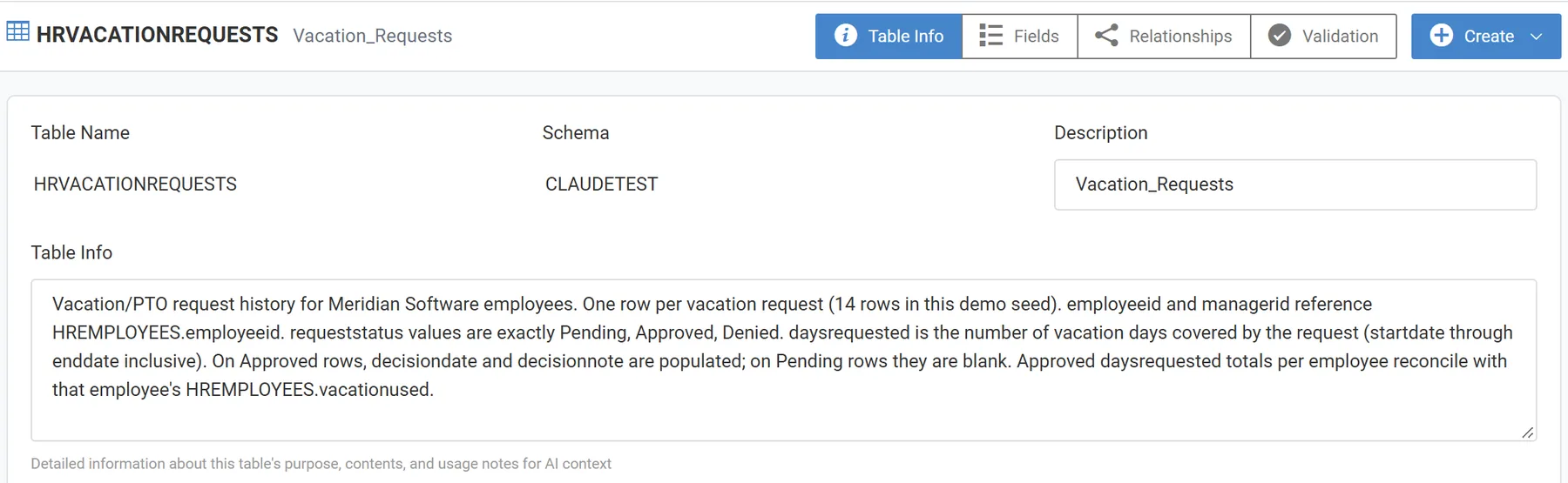
Some descriptions carry rules the model has to follow. The employee table says the remaining balance is the allowance minus the days used. The requests table lists the only valid statuses: Pending, Approved, and Denied. We also recorded how the tables relate, such as which employee is each person’s manager, and what the key field is for each table.
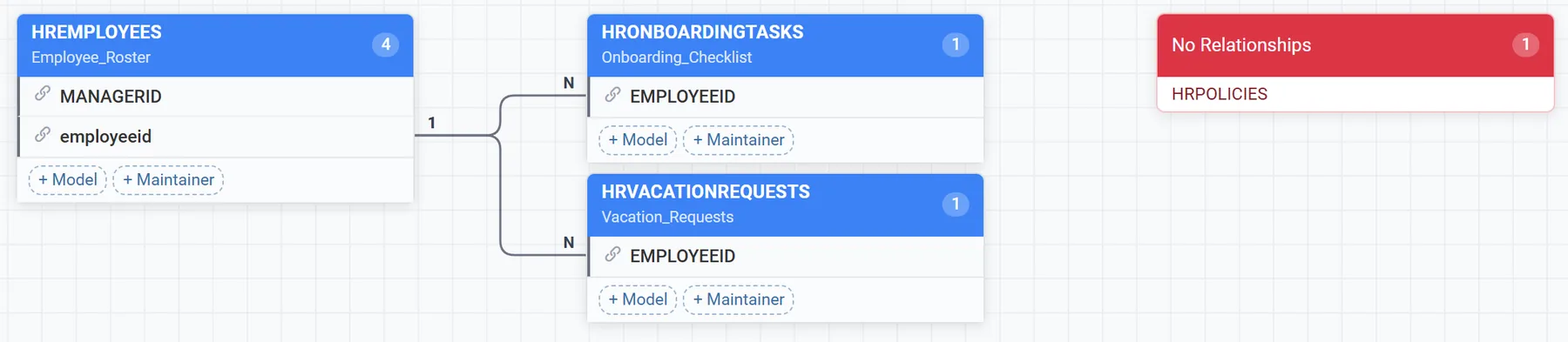
The important part in this step: Figuring out and identifying what each field means. In many databases, only one or two people know what some fields are for, and the model can’t ask them. You need to take the time to set your meta data up in a clear way.
Step 2: Set up users and row-level security
Next, decide which users can see what. Each of our four demo users has an employee number and a role. Priya Patel is an employee, David Okafor is her manager, Sarah Mitchell runs HR, and Alex Turner is a new hire.
Row-level security filters each application by the signed-in user’s employee number. Priya sees one employee record (her own). David’s number does double duty. In an app filtered by manager, it should also show requests from his team, because his employee number is the manager number on each one.
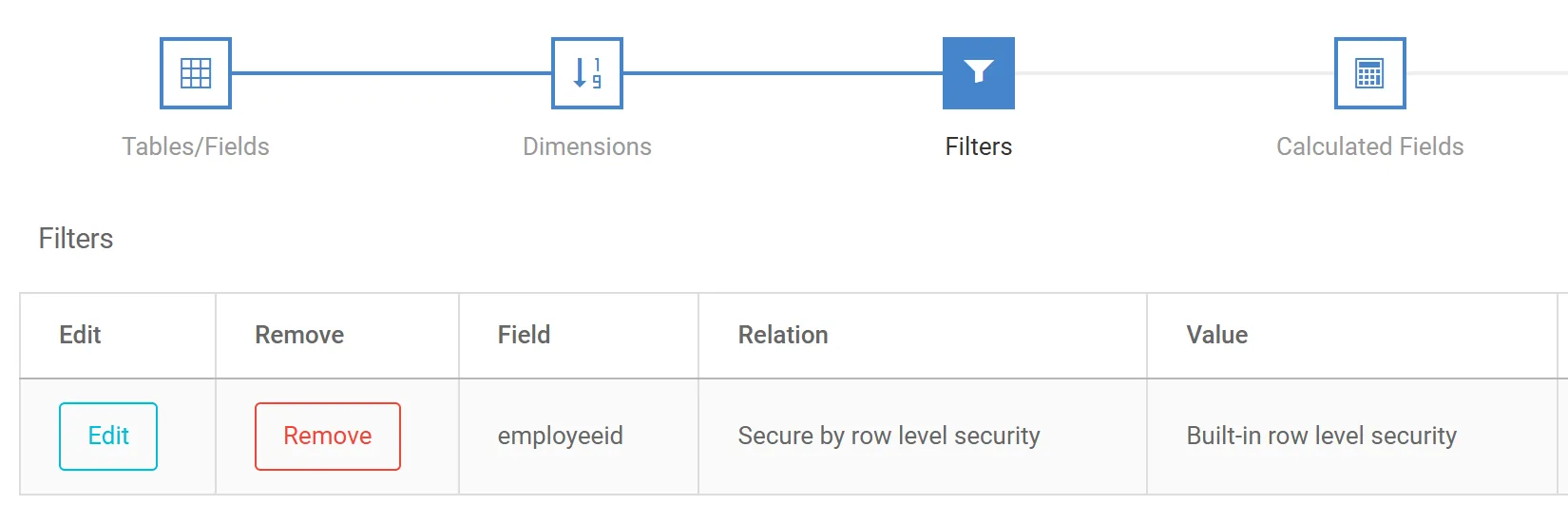
We made sure this worked before building anything else. Why? If row-level security didn’t work, nothing else mattered.
The important part in this step: Settling edge cases with the business. Should a manager see the team’s balances? Should HR see every request? Get those answers figured out before you build.
Step 3: Build the applications the assistant will call
We don’t want to give the assistant direct access to our database tables. Instead, give it access to data through applications that are built over our database tables. Those applications include rules, filters, and security to limit what the LLM can see and do. For instance, I could hide fields, only show certain records, or make the application read-only. This ensures that the LLM can only access what you want it to access.
Example: In our project, the HR assistant has access to a few different applications that are all secured with row-level and application security. So, for example, if Priya tried to open the employee directory, she gets a “not authorized” message.
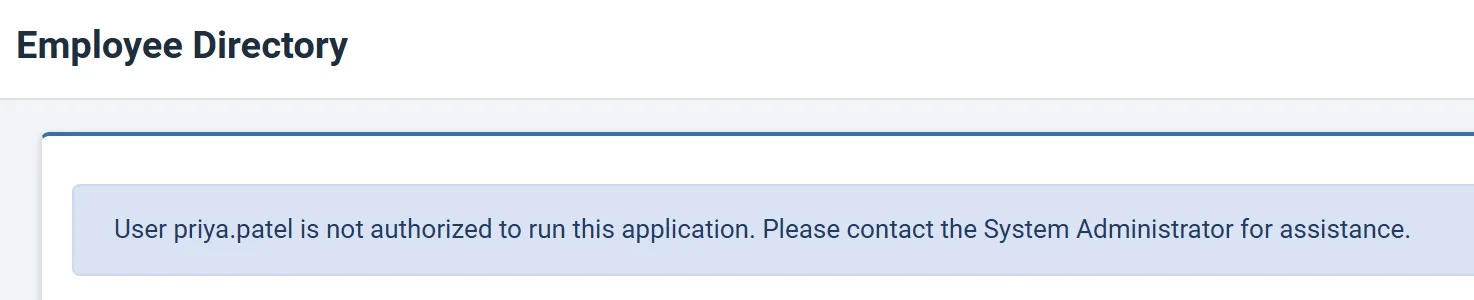
The other important note is that the assistant can only see the apps you give it, and each app returns only what the signed-in user can see. It can’t read our database tables directly, so if we don’t give it access to specific data through an application (as seen in the image below), it can’t see that data.
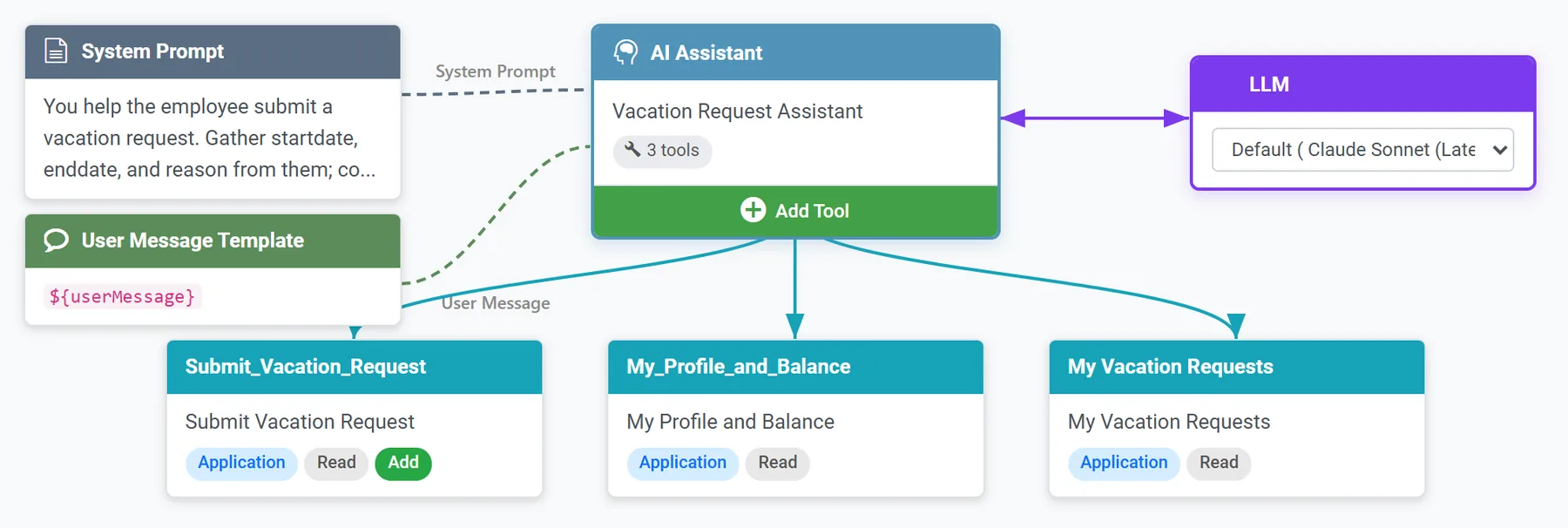
The same is true for writing to the database. We created a database CRUD application for writing vacation requests to the database and added that as a tool function to our AI assistant. However, the assistant cannot submit data on its own. It can only fill in the fields and then ask the user to submit. This is called “human in the loop” and is one way to ensure that an LLM cannot directly write to your database.
The important part in this step: Deciding, app by app, what the assistant can read and what it can change is crucial to any AI assistant that works over business data.
Step 4: Give the knowledge base an owner
Some answers aren’t in database tables. For instance, your vacation carryover policy might be a document, so the assistant needs a knowledge base to search.
In our demo, we created a knowledge base with all of our HR policies and information. The policy assistant is told to answer only from those documents, and point the employee to HR when a policy doesn’t cover the question. For example, if you ask our HR AI assistant about carryover days, it answers correctly from the knowledge base.
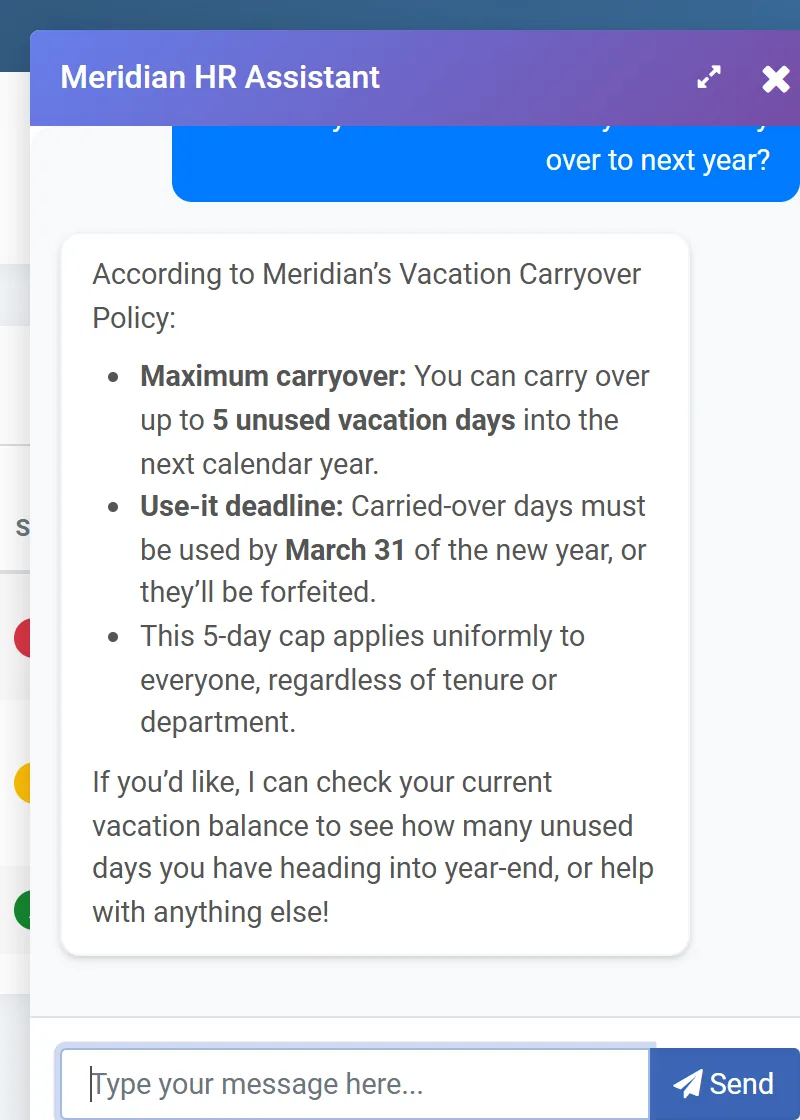
The important part in this step: Finding the current version of each document, and getting the department that owns it to agree to keep it up to date.
Step 5: Build small assistants and a supervisor
Up until now, we’ve been doing a lot of the prep work. Now, you build the agent that most people imagine when they hear “chatbot.”
When building an AI chatbot, don’t try to create one big assistant that does everything. Instead, create multiple assistants that each handle one job. Think of them as employees with very specific knowledge. For instance, one of our assistants only handles vacation requests. A different one only handles onboarding.
Then, you build a supervisor agent, which acts like a supervisor for each of your assistants. It reads the question from the user, and then figures out which assistant is best suited for that question.
Our agent has four assistants, one for each job, and a supervisor that reads each question and hands it to the right one. Each assistant gets a short prompt and a short list of tools (the applications from step 3).
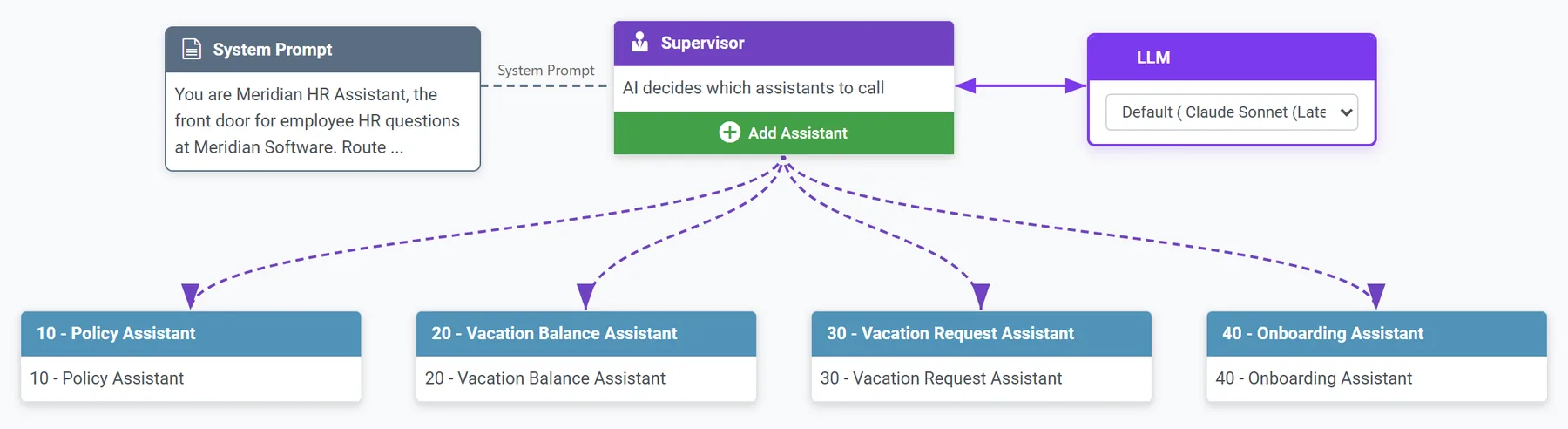
One thing to note: The system prompt tells the assistant what it is and what it should be doing. Be as specific as possible here, to keep make sure the assistant understands what it can and cannot do.
For instance, if you say something like, “You are an assistant that answers vacation balance questions”, the assistant will handle basic questions well but might stumble on the more complicated ones. For example, this prompt doesn’t say how a balance is calculated or whether pending requests count. It doesn’t say what to do when Priya asks about David’s balance. Because they aren’t defined in the prompt, the LLM must make those decisions on its own, and some of them probably won’t match what HR would say.
Here’s an example of a good system prompt that tells the assistant what it needs to know:
“You help employees with their own vacation information only. Remaining balance = vacation allowance minus vacation used, from the profile tool. You can list their request history and statuses. You have no access to other employees’ data; if asked about anyone else, explain that this information is restricted to each employee. Pending requests are not yet deducted from the balance; mention them separately when present.”
It covers who the assistant is, what it can do, what it can’t do, and how to go about the things it should do. You could even get more specific than that if you want. The point is this: Anything that isn’t defined for the assistant is something that it will have to figure out on its own. It might do a good job most of the time, but not always. Don’t leave anything to chance.
The important part in this step: Test the prompts and rewrite them after you watch the assistant answer real questions. One of our most important prompt changes came out of testing.
Step 6: Test it signed in as real employees
Sign in as each user and ask what they’d normally ask, plus a few things they shouldn’t.
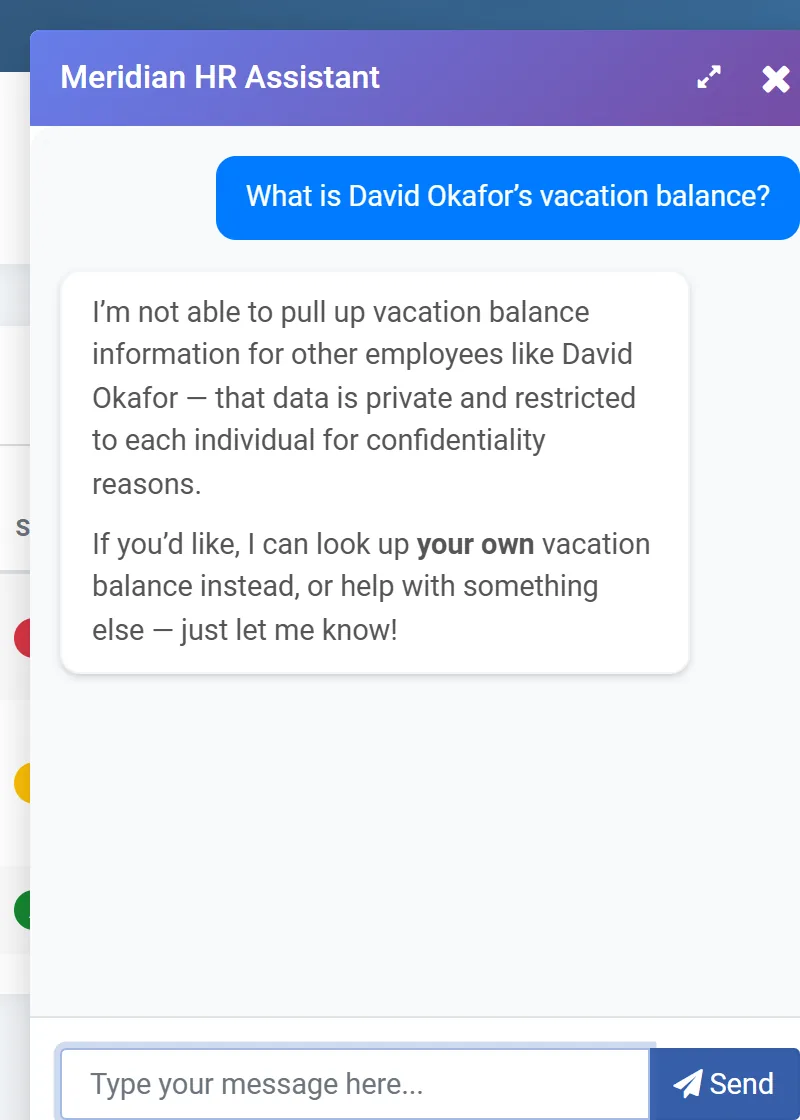
Still signed in as Priya, we asked for David Okafor’s vacation balance. The assistant answered, “I’m not able to pull up another employee’s vacation balance,” and nothing about David appeared in the conversation. The prompt supplies the polite wording, but even without it, the balance app would only return Priya’s row.
Testing also turned up two problems we hadn’t planned for. First, the request assistant let an employee ask for more days than she had left. We added a balance check to its instructions, and when the first version still let the model offer to submit the request anyway, we tightened the wording and tested again.
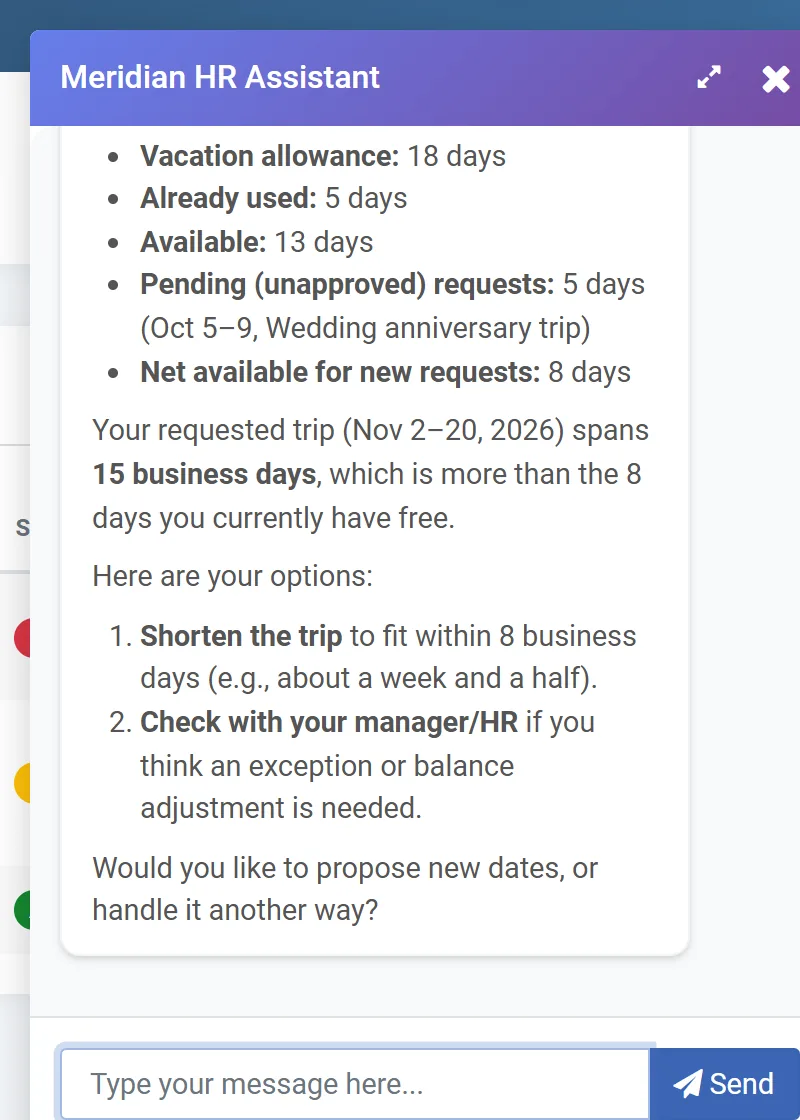
Second, the assistant counted business days while the portal’s request form counted calendar days, so the same dates produced two different totals. A model can’t decide which one your company uses.
The important part in this step: Have someone who knows the department try to break it, then decide the right answer for each problem they find.
How hard is it to build a chatbot over your own data?
Getting an LLM to chat takes very little time. Most of the effort goes into describing your data and deciding what each user can see and change. A read-only assistant over well-described tables comes together pretty fast. Anything that writes data takes longer, mostly because it needs more testing.
Building an AI assistant over your database with m-Power
We built this HR AI assistant with m-Power, which is our development platform. m-Power builds web applications and AI tools directly over the databases you already run, on-premise or in the cloud.
If your team doesn’t have time to build what you want, mrc’s services team builds custom web applications and AI tools (like this one) for customers, and you own the applications when the project is done. 96% of first-time services clients become repeat customers.
Try it, then see it over your own data
Connecting a model to a folder of documents is easy. Deciding what it can see, what it can change, where the data goes, and who keeps it current takes longer. Build the assistant over the database you already run, give it applications instead of tables, and a lot of those answers carry over from the systems you already secure.
Sign in to the HR portal demo if you’d like to play around with this demo.
If you’re trying to figure out what a chatbot over your own data looks like for a team like yours, we’d be glad to show you what other teams have built with m-Power. The demo is specific to your situation. We often build something directly over your data so you can see exactly how it works in your environment.